Alert email not including lead detail | Community
Skip to main content
February 22, 2016
Question

Alert email not including lead detail

  • February 22, 2016
  • 2 replies
  • 1622 views

We are having a problem with our alert emails to sales. They receive the email alert but the lead detail is blank and there is no link to it either.This is what they see:
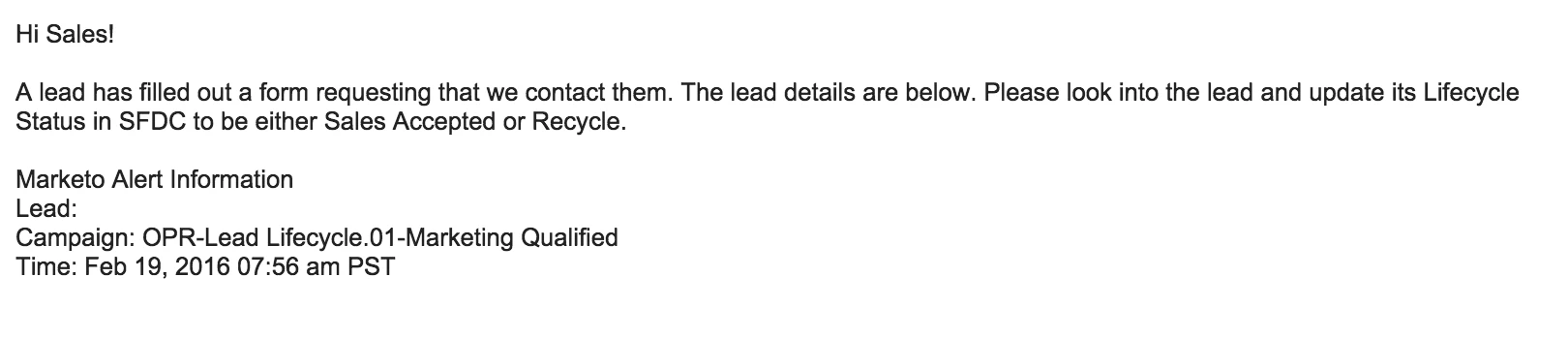
This is what we have for a token in the email set up - wondering if we should use a different token?

Hi {{lead.Lead Owner First Name:default=Sales}}!

A lead has filled out a form requesting that we contact them. The lead details are below. Please look into the lead and update its Lifecycle Status in SFDC to be either Sales Accepted or Recycle.

{{SP_Send_Alert_Info:default=no detail}}

This post is no longer active and is closed to new replies. Need help? Start a new post to ask your question.

2 replies

Grégoire_Miche2
Level 10
February 22, 2016

Hi Anne,

If the lead is not in the CRM, it may explain why this is coming empty (And I gather the lead is not is the CRM because the lead owner first name token resolve to its default value).

What is weird is that it should at least display the first and last name.

You would rather use the usual lead tokens such as first name, last name, company name, etc...

-Greg

Diederik_Marte4
Level 4
February 23, 2016

I agree Grégoire. I've encountered this before. The standard sync interval with Marketo and Salesforce is 5 minutes. So If you sync to SFDC and sent the alert straight after, it's likely to be empty, as it wasn't synced yet. Try putting an 11 minute delay in the notification. If it's still empty, something else might be the problem.

6x Marketo Champion | Marketo Certified Solutions Architect (MCSA) | Marketo User Group Leader | International Speaker on Marketing Technology