
Adding hidden fields (e.g. UTMs) to Marketo Dynamic Chat dialogues
They’ll tell you it can’t be done. But they didn’t count on the power of having no social life.[1]
Marketo’s Dynamic Chat is an able alternative to third-party apps (indeed, it’s technically a separate app that syncs bidirectionally with Marketo Engage). But one thing it lacks is hidden field support which is so key for attribution.
Many of our clients don’t notice this gap because they use API-based reporting to see chats in the context of full journeys.[2] But for those without such a solution, the fact you can’t even pop the current page’s UTM params (let alone data in cookies/local storage) into fields is frustrating.
Quick look before I slam the hood
Each Dynamic Chat dialogue is a sequence of mini HTML <form> elements whose data is routed over a persistent websocket, rather than a traditional HTTP POST. I really like this implementation because it keeps HTML semantics — you can see the <form>, <input>, and <button> — but gives way better performance than if it made a separate post for each step.[3]
Also, dialogues use a combination of Light DOM and Shadow DOM trees, so show/hide logic needs to be aware of where to inject styles.
So my main design goals were:
- detect whether each newly injected input (Info capture step in Dynamic Chat-ese) matches one of our hidden fields
- if so, (1) hide it using CSS, (2) fill its value from a source object, and (3) submit its accompanying form automatically
That’s pretty much it at a high level. But the code to do it right proved pretty tricky.
Step 1: Set up your Dialogue with hidden fields
Adding to-be-hidden fields in Dynamic Chat » Dialogues is simple. They’re like any other Info capture fields and you should use the same label for the Chatbot Message and the Placeholder. You can actually choose whatever label you want, just pass that label to addHiddenChatFields() as described later:
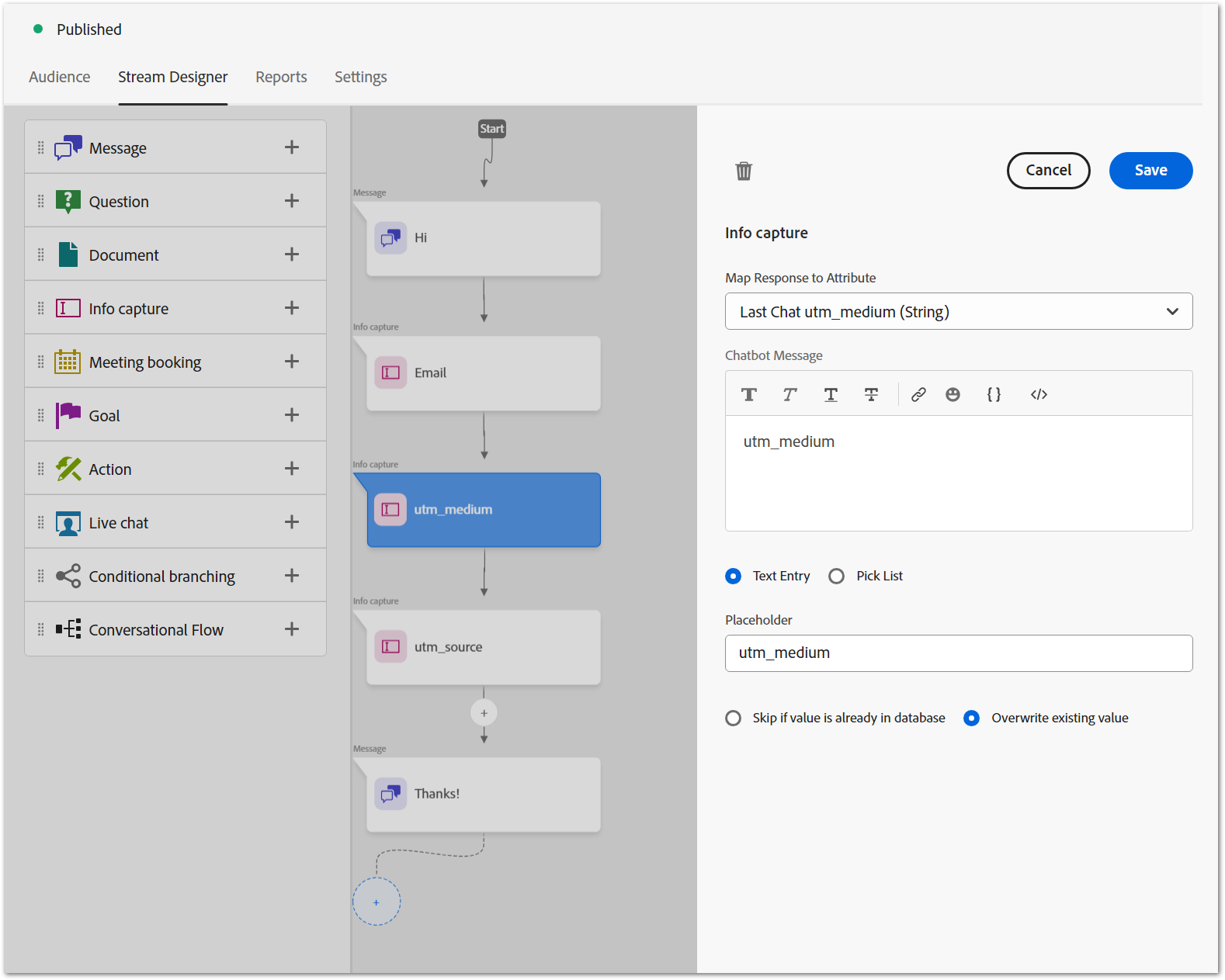
Notice in this example the hidden fields are after the last visible field, Email. So once the person submits their Email (but not before), the UTMs are picked up from the source. This is probably the order you want in your environment, but maybe not.
On field order and persistence
You might not realize Dynamic Chats remember Info capture answers within the same session, a form of progressive profiling. A DC session persists across pageviews, with partial data, until you deliberately clear the session or the lead finishes the playbook.
Depending on how you’re getting the values to pass to addHiddenChatFields() you want to either use the latest available values as of chat completion (i.e. conversion), or retain the original values as of the start of the chat.
- if you’re using a JS persistence library to store attribution history in cookies/local storage[4] and getting values from there, put all hidden fields at the end
- if you don’t have JS persistence but only want to copy UTMs from the conversion page itself, also put them all at the end
- if you don’t have JS persistence but want to leverage Dynamic Chat’s own session-level tracking[5], put “original” type fields at the start of the stream and “most recent” type fields at the end
Overall, where field values come from is your decision. The code is for dropping ’em in the chat, whatever their origin.
Step 2: Get the code
Here’s addHiddenChatFields(), a minor masterpiece of monkey patching if I do say so:
  /**
   * Enable hidden `Info Capture` fields in Marketo Dynamic Chat
   *
   * @author Sanford Whiteman, TEKNKL
   * @version v1.0.0 2026-05-12
   * @license Hippocratic 3.0: This license must appear with all reproductions of this software.
   * @param { Map<string,string>|Object.<string,string> } sourceObject - supports Map, Map-like interfaces (e.g. URLSearchParams), and Objects
   * @param { string[] } fieldList - list of keys to grab from sourceMap
   * @param { string } [defaultValue=NULL] - used when value is falsy
   * @param { boolean } [unhide=false] - temporarily reveal hidden fields for debugging
   * @returns {undefined}
   */
  function addHiddenChatFields(sourceObject, fieldList, defaultValue = "NULL", unhide = false){
    // ducktype Map-like `get` or make Map
    const sourceMap = typeof sourceObject.get == "function" ? sourceObject : new Map(Object.entries(sourceObject));

    const hiderSheet = new CSSStyleSheet();
    for( const field of fieldList ) {
      hiderSheet.insertRule(`div.hb_chat_server:has(input[placeholder="${ CSS.escape(field) }"]) { display: none; }`);
    }

    new MutationObserver((mutationRecords, lightObserver) => {
      iterateLightRecords:
      for( const record of mutationRecords ) {
        for( const node of record.addedNodes ){
          if( node.id === "hb_chatbot-root" ) {
            lightObserver.disconnect();

            node.shadowRoot.adoptedStyleSheets = [hiderSheet]
            new MutationObserver((mutationRecords, darkObserver) => {
              iterateDarkRecords:
              for( const record of mutationRecords) {
                for( const node of record.addedNodes ) {
                  if( node.nodeType == Node.ELEMENT_NODE ) {
                    for( const inspectable of [node, ...node.querySelectorAll("INPUT")] ) {
                      if( inspectable.nodeName === "INPUT" && fieldList.includes(inspectable.placeholder) ) {
                        const { groups: { uuid } } = inspectable.id.match(/hb_(?<uuid>.+)_/);

                        if( inspectable.isConnected ) {
                          inspectable.value = sourceObject.get(inspectable.placeholder) || defaultValue;
                          inspectable.form.querySelector("BUTTON").click();
                        }
                        hiderSheet.insertRule(`div:is(.hb_chat_client, .hb_chat_server)[id^="hb_${ CSS.escape(uuid) }"] { ${ unhide ? `outline: 2px solid gold;` : `display: none;` } }`);
                      }
                    }
                  }
                }
              }
            }).observe(node.shadowRoot, { childList: true,  subtree: true });

            break iterateLightRecords;
          }
        }
      }
    }).observe(document.body, { childList: true });
  }
This code can be before or after the Dynamic Chat loader.js, doesn’t matter.
Examples
addHiddenChatFields() is deliberately flexible: it doesn’t just support query params, it can use any string values from a Map-like object or simple Object! Of course a URLSearchParams instance is one such Map-like, so pass query params like so:
const fields = ["utm_medium", "utm_source"];
const source = new URLSearchParams(document.location.search);

addHiddenChatFields(source,fields);
To change the (global) default value when any field is missing or empty:
const fields = ["utm_medium", "utm_source"];
const source = new URLSearchParams(document.location.search);

addHiddenChatFields(source,fields,"N/A");
If you want different defaults per field, set them in the source before adding:
const fields = ["utm_medium", "utm_source"];
const source = new URLSearchParams(document.location.search);
const defaults = new URLSearchParams("utm_source=Direct&utm_medium=Not Provided");
for( const [name,value] of defaults ) {
    source.has(name) || source.set(name,value)
}

addHiddenChatFields(source,fields);
If you have consolidated data from cookies/local storage + current URL in an Object (this is what those persistence libraries are for!), use that:
const fields = ["recent_utm_medium", "recent_utm_source", "original_utm_medium", "original_utm_source"];
const source = YourPersistedObject;

addHiddenChatFields(source,fields);
By the way, with the new CookieStore API, you can fetch cookies natively in modern browsers and pass them in:
const fields = ["stored_utm_medium", "stored_utm_source"];

Promise.all( fields.map( (name) => cookieStore.get(name) ) )
.then( (cookies) => cookies.map( (cookie) => [cookie.name, cookie.value] ) )
.then( (entries) => new Map(entries) )
.then( (source) => addHiddenChatFields(source,fields) )
Finally, for debugging purposes only, set unhide:
const fields = ["utm_medium", "utm_source"];
const source = new URLSearchParams(document.location.search);

addHiddenChatFields(source,fields,"NULL",true);
unhide reveals how the sausage is made, outlining to-be-hidden fields instead of fully hiding them:
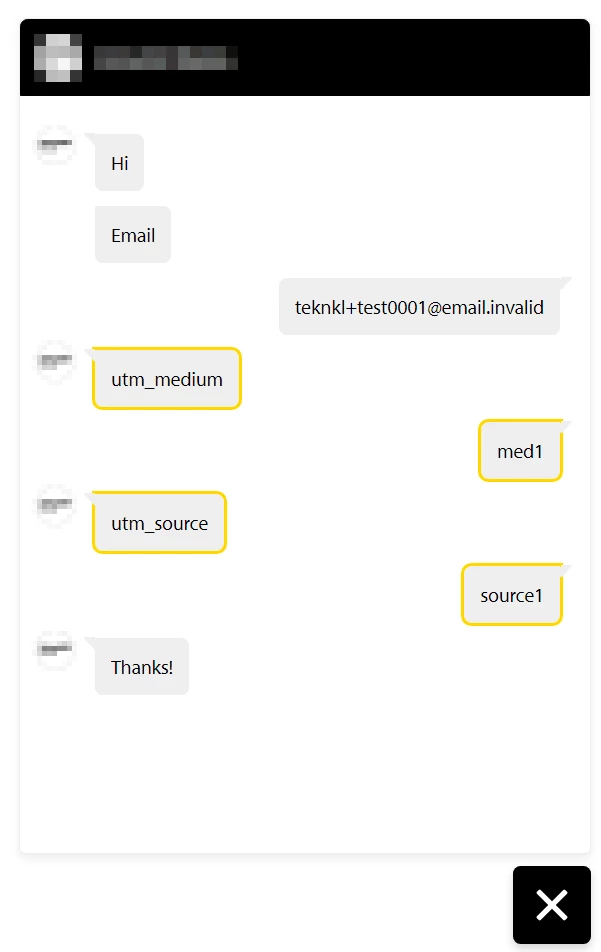
Notes
[1] To set the record straight, I do have a social life. It just comes in fits and starts. Even have tickets for an album release party, uh, 6 weeks from now.🥲
[2] Dynamic Chat creates a Marketo activity upon completion, and the details contain the full page URL. Apps consuming the raw Activity Log can parse that URL and slipstream it into the standard Munchkin pageview/click journey.
[3] OK, with HTTP/3 and QUIC you might get competitive, but sooner or later you’d want WebTransport anyway.
[4] Honestly can’t imagine how any Marketo shop does without such a library, or the API-driven equivalent noted above! (Even apps like Marketo Measure or Segment don’t cover every single case.)
[5] Dynamic Chat’s sessions really aren’t up to the multitouch task, though. For example, if you put the Info capture for original_utm_source at the top, the session stores the utm_source from the first time someone opened the dialogue; if it’s missing, the session stores your default value, like NULL or Direct. If it was originally missing and the person visits a UTM-tagged URL without chatting, then later hits another UTM-tagged URL where they complete the dialogue, you aren’t able to get anything from that intermediate page. You can only change the value from the default once the session is reset or completed.
(And yes, I realize these remarks are probably confusing — I’m steeped in this stuff every day so it’s second nature. tl;dr: a persistence library will always have more intelligence than Dynamic Chat sessions.)