September 14, 2016
Question

Adding a Column on Reports

  • September 14, 2016
  • 2 replies
  • 1341 views

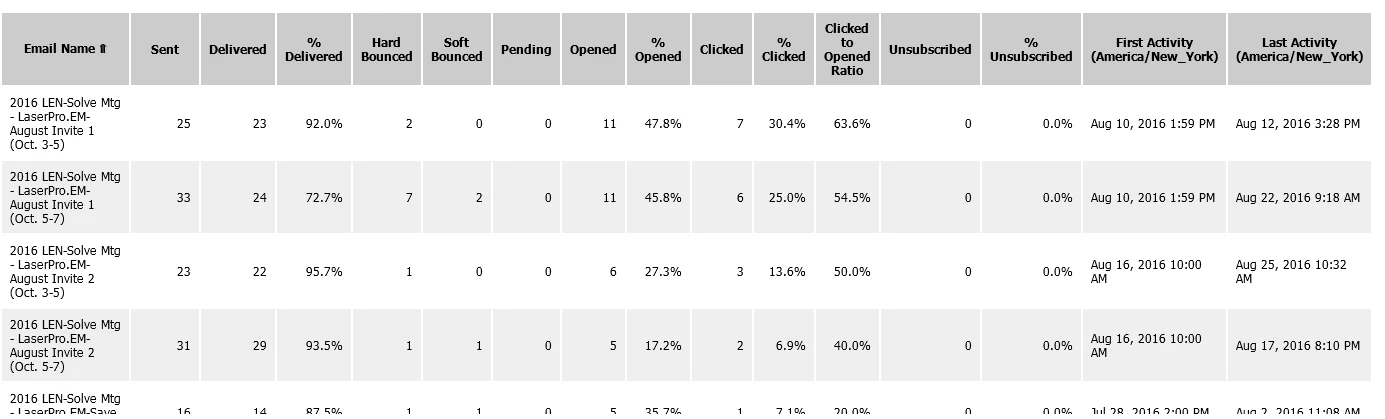
Our product managers are having a difficult time discerning the names of our emails and landing pages, which is completely understandable, given the way the reports look (pictured here). I am wondering if there is a way to add another column in the reports where we can assign a code/set of numbers to identify each asset/campaign. I look forward to hearing suggestions from my fellow Marketo users.
This post is no longer active and is closed to new replies. Need help? Start a new post to ask your question.

2 replies

Jim_Thao7
Level 8
September 14, 2016

The only other column available for display that isn't default is "Total".

You should just export the report and then build your own column before sending it out.  Unless of course your sales reps are subscribed to this report, then this wouldn't work.

September 14, 2016

Thank you Jim. This is one of the alternatives we are considering. We were just wondering if there was another way to accomplish this. Thank you very much.

Jessica_Kao3
Level 7
September 15, 2016

You can also look at your program and email naming convention.  For some emails like our product nurtures we will add the subject line and that is enough of an indication or what the offer is WP, INFG, Webinar, etc