Add values to a field instead of changing it | Community
Skip to main content
June 29, 2016
Solved

Add values to a field instead of changing it

  • June 29, 2016
  • 2 replies
  • 2950 views

Is there a way to simply add values in a semicolon delimited fashion to a field, rather than completely wiping and changing it? For instance, when a lead comes into our database we generally tag it with a Boolean True/False field indicating their Product Interest. We have this setup across 11 products. Rather than constantly pulling ugly reports with all 11 column headers and a 1 or a 0, I'd like to setup some kind of global listening campaign that triggers a data value change in Product Interest but simply adds the product value to it, not delete what's already there. For example:

Product 1: True

Product 2: False

Product 3: True

Product Interest = Product 1; Product 2

Is this a thing? I don't have my hopes up, but certainly would be cool. Thank you!
This post is no longer active and is closed to new replies. Need help? Start a new post to ask your question.
Best answer by gkrajeski

I have a few (10-ish) proxy fields.

Proxy fields are used for short term use, typically strings or information you will concatenate as you are asking in another field.

Here is an example of my campaign, where I set the values based on select/drop-down picklists (form only) and then concatenate them into the previous value with a datestamp.

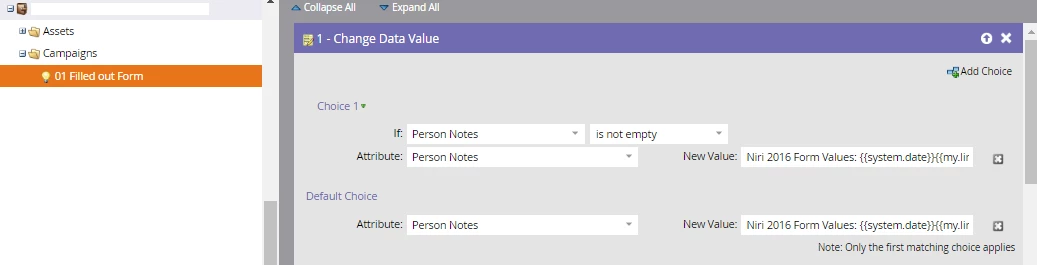
Person Notes is mapped to the Description field in SFDC, and I've concatenated the multiple string values from my form with the following Change Data Value flow (note, this also incorporates @Sanford Whiteman​'s linebreak token hack):

Here is the detail on the New Value: Niri 2016 Form Values: {{system.date}}{{my.linebreak}}IR website provider: {{lead.ProxyString_1}};{{my.linebreak}}Targeting Provider: {{lead.ProxyString_2}};{{my.linebreak}}Market Intelligence Portal: {{lead.ProxyString_3}};{{my.linebreak}}Shareholder ID and Surveillance Provider: {{lead.ProxyString_4}};{{my.linebreak}}Financial Printer / EDGAR Filer: {{lead.ProxyString_5}};{{my.linebreak}}Newswire Provider: {{lead.ProxyString_6}};{{my.linebreak}}{{my.linebreak}}Previous Notes:{{my.linebreak}}{{lead.Person Notes}};

2 replies

Dory_Viscoglio
Level 10
June 29, 2016

There are a ton of threads on this, I would look up "concatenations" and you will see plenty of results and ideas.

gkrajeski
gkrajeskiAccepted solution
Level 10
June 29, 2016

I have a few (10-ish) proxy fields.

Proxy fields are used for short term use, typically strings or information you will concatenate as you are asking in another field.

Here is an example of my campaign, where I set the values based on select/drop-down picklists (form only) and then concatenate them into the previous value with a datestamp.

Person Notes is mapped to the Description field in SFDC, and I've concatenated the multiple string values from my form with the following Change Data Value flow (note, this also incorporates @Sanford Whiteman​'s linebreak token hack):

Here is the detail on the New Value: Niri 2016 Form Values: {{system.date}}{{my.linebreak}}IR website provider: {{lead.ProxyString_1}};{{my.linebreak}}Targeting Provider: {{lead.ProxyString_2}};{{my.linebreak}}Market Intelligence Portal: {{lead.ProxyString_3}};{{my.linebreak}}Shareholder ID and Surveillance Provider: {{lead.ProxyString_4}};{{my.linebreak}}Financial Printer / EDGAR Filer: {{lead.ProxyString_5}};{{my.linebreak}}Newswire Provider: {{lead.ProxyString_6}};{{my.linebreak}}{{my.linebreak}}Previous Notes:{{my.linebreak}}{{lead.Person Notes}};

gkrajeski
Level 10
June 29, 2016

Also to note,

I clear out my Proxy values after sending an alert to the account owner in this campaign as such:

July 6, 2016

Awesome thanks a bunch, Geoff -- I see what you're doing here. Appreciate the help!