Add to SFDC campaign flow from "Clicked Link on Webpage" | Community
Skip to main content
November 13, 2015
Question

Add to SFDC campaign flow from "Clicked Link on Webpage"

  • November 13, 2015
  • 1 reply
  • 2255 views

Hi,

I am trying to track the number of downloads we have on our website and will be using the SFDC campaigns to track this. However, I am having troubles with the flow working correctly.

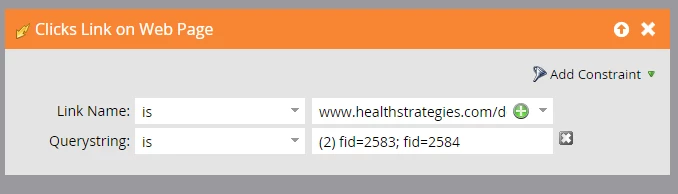
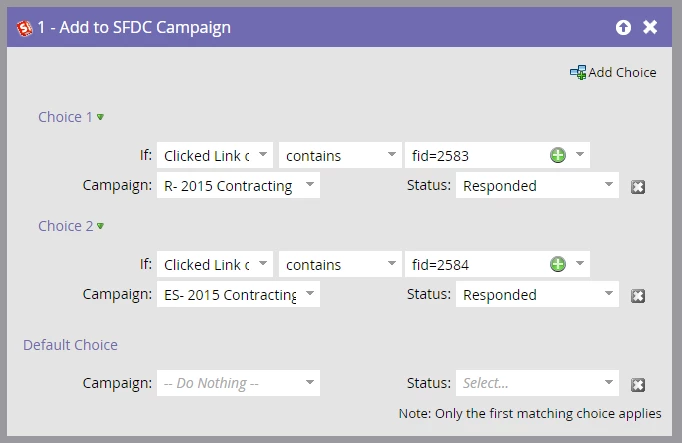
All of our download links have the same URL but the querystring contains the file ID number associated to the document downloaded. The smartlist works great and is able to track the action. However, the flow step is not working correctly. When I try to break it out by the file ID number, the action is skipped.

Smartlist:
Flow:
What I see in results:

Help? What I am doing wrong? If I do not group several documents in one, then I will have to create nearly 400 smart campaigns to track these downloads! eeek. I don't think my fingers or patience could handle that.

This post is no longer active and is closed to new replies. Need help? Start a new post to ask your question.

1 reply

Adobe Employee
November 13, 2015

Hi Brooke,

I've been doing some testing in my stage instance, but I'm not coming up with a way to make this work.  The trouble is that the choice in the flow step which looks at Clicked Link On Web Page is only looking at the url, and the query string doesn't count as part of that.

Any way I try to work with the problem, it looks like it would require one campaign per query string value.  Is there anywhere else that value gets listed?  Any other field you might be able to base the choices on?

John

November 13, 2015

Thanks for your response John! Unfortunately, there is not another field I could pull from. I’m going to talk to the website programmer to see if there is anything on his end that he could do with how the URLs are generated. Hopefully I can figure something out.

Adobe Employee
November 13, 2015

I'd be interested in hearing any solution you come up with.  I would also encourage you to post this as an idea.  If it was possible to base the choice off the query string that was appended to the url which triggered the campaign, then your original set up would work as expected.  This may be something that our product managers could implement if there was enough push for it.

John