
Add to calendar - time error | Community
Skip to main content
Ellie_Boardman-
Level 4
May 20, 2016
Question

Add to calendar - time error

  • May 20, 2016
  • 1 reply
  • 2749 views

Hi - I've created an 'add to calendar' link in an email which is linked directly to a token I've created.

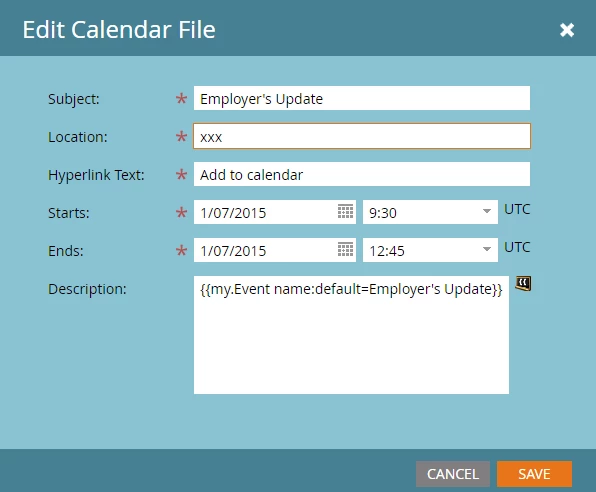
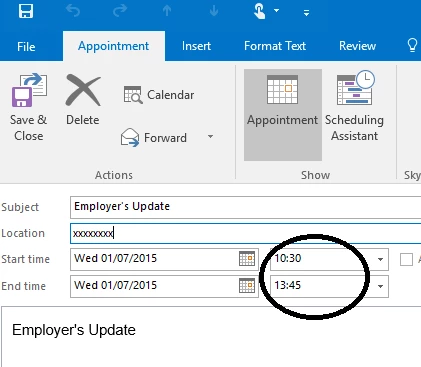
I have set the time for the event which should be 9:30am - 12:45 (GMT). When I test the link, the calendar appointment is defaulting so it's an hour later - any idea why this happening / anything I can change in my settings to fix this?
This post is no longer active and is closed to new replies. Need help? Start a new post to ask your question.

1 reply

Frank_Breen2
Level 8
May 20, 2016

Your system settings are in UTC, you'll need to change you personal settings to GMT, instructions here: Select Your Language, Locale and Time Zone - Marketo Docs - Product Docs

Ellie_Boardman-
Level 4
May 20, 2016

Thanks Frank - I've just double-checked and it is showing GMT, so not sure why it is still showing UTC in the calendar token?

Frank_Breen2
Level 8
May 20, 2016

Refresh Marketo and go back into the Calendar token and change the time again as it will still have the UTC time (make sure GMT is beside the dropdown time), then download the ics file again and it should be fixed.