Add Rich Text field in Marketo Form using API | Community
Skip to main content
Level 2
August 21, 2023
Solved

Add Rich Text field in Marketo Form using API

  • August 21, 2023
  • 1 reply
  • 2128 views

Hello, Community members!


I am trying to add a Rich Text field in a Marketo form using API but it's throwing "System error" code 611. The content type used is multipart/form-data. Below is the body content (syntax similar to that described on developers.marketo.com).


Also, can we add JavaScript code to the Rich Text field using API?

Any suggestions would be appreciated!


{ "text": "<div>Fancy Rich Text Component</div>" }
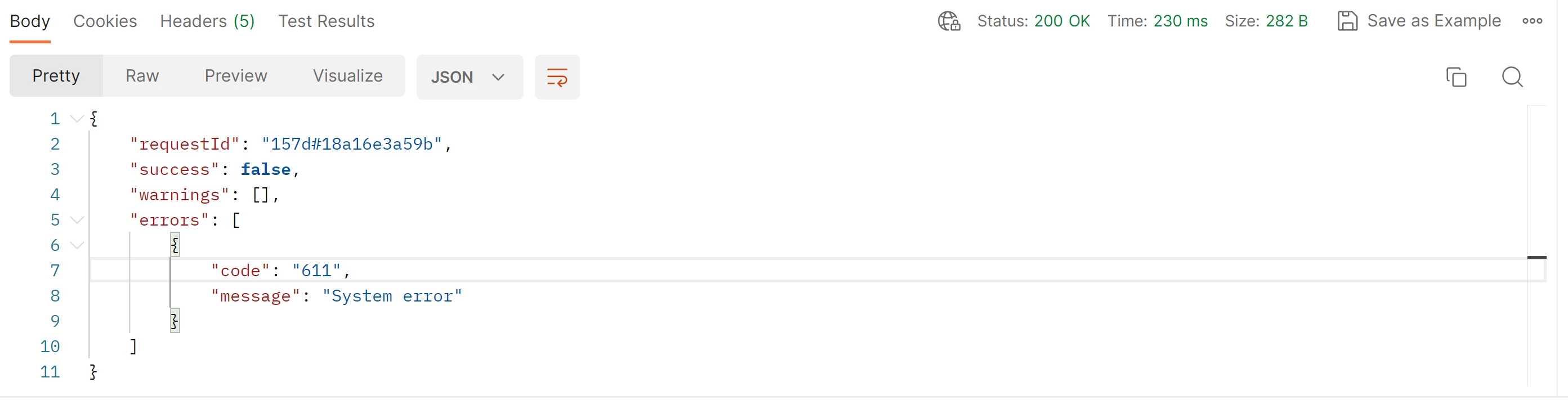
 

This post is no longer active and is closed to new replies. Need help? Start a new post to ask your question.
Best answer by Darshil_Shah1

You're not passing data as form/multipart (even though you say so in the headers)! You need to select the form-data in the Body (instead of raw > text). Check out this article on how to pass the multipart/form-data using Postman.

1 reply

Darshil_Shah1
Community Advisor and Adobe Champion
August 21, 2023

Marketo has a separate endpoint for adding Rich Text fields to the forms:


POST /rest/asset/v1/form/{id}/richText.json


You didn't mention the endpoint, complete payload with field content passed (as this endpoint requires data in the multipart form-data format), query parameters, headers, etc. you're using for the API call you're making to Marketo. W/o those information it'd be a little difficult to be able to provide the exact solution to your issue. Make sure you've set the Content-Type header to multipart/form-data.


Also, can we add JavaScript code to the Rich Text field using API?


The developer documentation clearly says that the field content should be structured as HTML content that does not contain any script, meta tags, or link tags. Overall, with or w/o API you may not want to house your JS in Rich text fields for the reasons very well explained by Sandy here. Please let us know if you have questions.

ssRDAuthor
Level 2
August 21, 2023

I am using the same endpoint with Content-Type as multipart/form-data.


POST > BaseURL/rest/asset/v1/form/{id}/richText.json?{access_token}


Darshil_Shah1
Community Advisor and Adobe Champion
Darshil_Shah1Community Advisor and Adobe ChampionAccepted solution
Community Advisor and Adobe Champion
August 21, 2023

You're not passing data as form/multipart (even though you say so in the headers)! You need to select the form-data in the Body (instead of raw > text). Check out this article on how to pass the multipart/form-data using Postman.
