Add "hint text" to "select" field type in form? | Community
Skip to main content
December 2, 2014
Solved

Add "hint text" to "select" field type in form?

  • December 2, 2014
  • 1 reply
  • 4089 views
Is this possible?  In a lot of form field types, rather than a field label, you can add hint text withing the field.  I'm hoping that this is also possible with a "select" field type.  Is it?  Is there a workaround?

Thanks,
Dave
This post is no longer active and is closed to new replies. Need help? Start a new post to ask your question.
Best answer by Valerie_Armstro

Hi David,

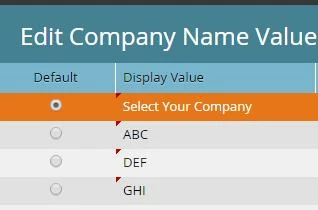
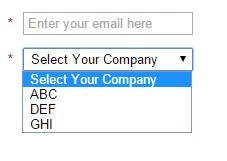
To customize the default display value of a select field, choose that field in the form editor, click Edit values, then change the default value "Select..." to whatever text you want to appear by default.  In my example, I have changed the Company Name default value to "Select Your Company"


Field Editor:


How it appears on the form:

1 reply

Valerie_Armstro
Valerie_ArmstroAccepted solution
Level 9
December 2, 2014

Hi David,

To customize the default display value of a select field, choose that field in the form editor, click Edit values, then change the default value "Select..." to whatever text you want to appear by default.  In my example, I have changed the Company Name default value to "Select Your Company"


Field Editor:


How it appears on the form:

June 11, 2015

Thank you! This helped me out as well.