AB Test Custom Conversion | Community
Skip to main content
Level 3
June 26, 2026
Solved

AB Test Custom Conversion

  • June 26, 2026
  • 5 replies
  • 129 views

Hi, I have an AB test for two whole emails, nearly everything is the same except for the header image. If I want to send the winner based on whichever header gets the most clicks, I would do custom conversions -> clicks link in email and specify the two links, right? In this case the two links are exactly the same however I've added an "A" and "B" in the utm_term to differentiate the two.
Best answer by Michael_Florin-2

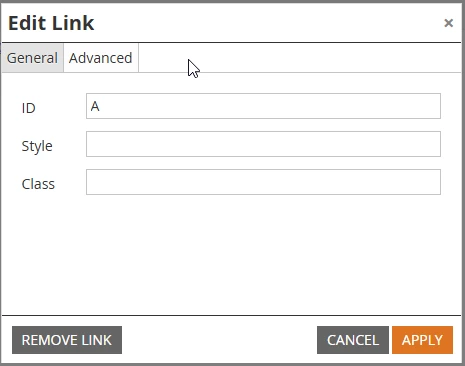
Another option to make two links that point to the same target distinguishable is to use different Link IDs:


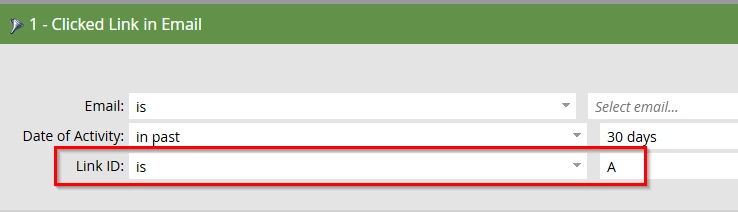
This makes it invisible for the email recipients - compared to using URL parameters - and you can easily see the results by using Link ID as a Smart List constraint:


5 replies

Ashish_Batra
Level 1
June 26, 2026

If you are testing for whole emails. I would suggest try out different layout of text format or maybe different CTA. 

In most of the cases CTA gets more click than the header so your test will be biased on that. 

You can rethink of the another strategy maybe.


Marketo often:

  • Normalizes URLs
  • Groups links if only tracking params differ

Always make links visually and structurally distinct, not just analytically different. You must use unique URLs (not just UTMs) for reliable A/B winner tracking

Level 3
June 26, 2026


Yes, you are 100% correct on the workflow. Because you want to pick the winner based only on the specific header image clicks (and ignore other links in the email), you must use the Custom Conversion route.

Adobe Marketo Engage’s standard "Clicks Link" winning criteria in A/B tests does not distinguish links that differ only by query string parameters like UTM tags. Marketo treats URLs with identical base paths as the same link, which prevents accurate winner tracking based on those parameters alone.

Per my understanding to work around this limitation and ensure Marketo tracks the links as distinct in A/B tests, you have two effective options:

Option 1: Use a URL Anchor / Hash Fragment 

Append a hash or anchor to the end of the URLs (after any UTM parameters). For example:

  • https://example.com/page?utm_term=A#A

  • https://example.com/page?utm_term=B#B

Option 2: Use Two Different Redirect or Landing Pages

Create or use two slightly different URLs (such as vanity URLs or distinct redirects) that both ultimately lead to the same final destination. For example:

  • https://example.com/pageA

  • https://example.com/pageB

Additional Note:

  • Test your links to ensure clicks are tracked correctly in Marketo.
  • Use the Marketo Engage reporting interface to verify that clicks on each link are recorded separately.

Hope that helps?

Found this helpful? Mark the thread as solved so other community members can quickly locate the answer.
Michael_Florin-2
Michael_Florin-2Accepted solution
Level 10
June 26, 2026

Another option to make two links that point to the same target distinguishable is to use different Link IDs:


This makes it invisible for the email recipients - compared to using URL parameters - and you can easily see the results by using Link ID as a Smart List constraint:


SanfordWhiteman
Level 10
June 26, 2026

Correct answer, literally exactly what this feature is for!

John1-2Author
Level 3
June 29, 2026

Thanks! It doesn’t seem like it’s an option for hyperlinked images, is there another way to do this?

Michael_Florin-2
Level 10
June 29, 2026

I don’t know which options you have available in your email or email template, but you can also add the Link ID via HTML:

<a href="https://example.com" id="A"></a>

John1-2Author
Level 3
June 29, 2026

Thank you!