Update Profile Action Missing Profile Fields | Community
Skip to main content
MktgCloudUser
Level 4
October 25, 2023
Solved

Update Profile Action Missing Profile Fields

  • October 25, 2023
  • 2 replies
  • 1100 views

Hello,


After a Purchase event, we'd like to update the visitor's "Loyalty Points" by taking the existing value in the Profile and adding the Purchase amount to it.  For example, if the existing Loyalty Points value in the Person dataset is "100" and they purchase something for "59.99", we want to write "160" (rounded up) back to the Profile Dataset.


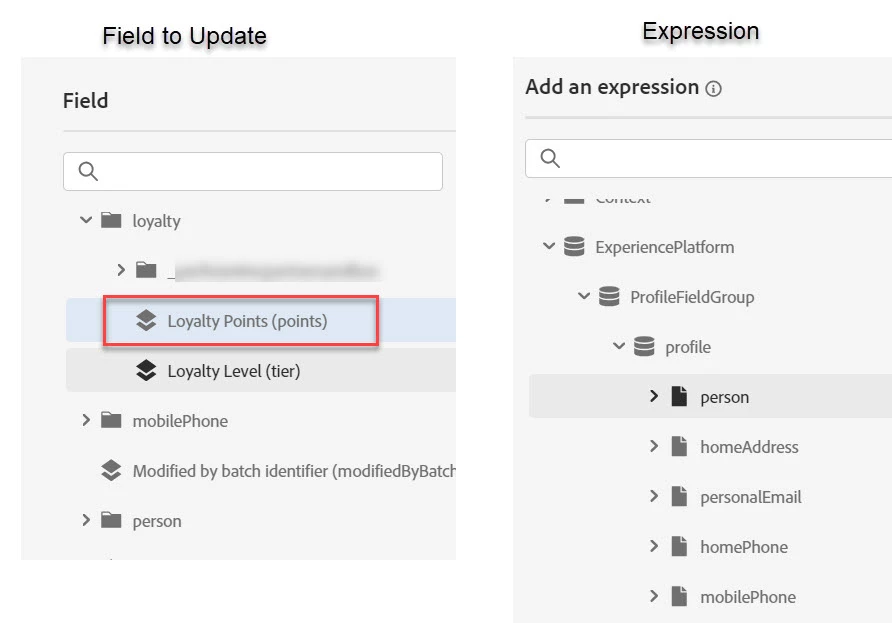
In the Update Profile action, we select Loyalty Points but that value missing in the Expression dialog prevents us from using the appropriate Math function.  Is this because the Update Profile action only updates values under the OOTB Persons Fieldgroup - meaning it can't update any custom values?  If not, what could be the issue here?


This post is no longer active and is closed to new replies. Need help? Start a new post to ask your question.
Best answer by IvanMi1

Would also suggest taking a look at computed attributes as an automated way to take purchase amounts and additive create a new profile field for something like loyalty points. 

2 replies

SatheeskannaK
Community Advisor
Community Advisor
October 25, 2023

@mktgclouduser, Ensure you have enabled the fields under Configurations -> Data sources -> Experience platform -> ProfileFieldGroup -> Select the loyalty points attribute. Once you enable refresh the journey and verify under update profile -> value (advanced mode).

Thanks, Sathees
IvanMi1Adobe EmployeeAccepted solution
Adobe Employee
October 25, 2023

Would also suggest taking a look at computed attributes as an automated way to take purchase amounts and additive create a new profile field for something like loyalty points.