
Unable to access array via contextual attribute | Community
Skip to main content
arpan-garg
Community Advisor
Community Advisor
December 5, 2023
Solved

Unable to access array via contextual attribute

  • December 5, 2023
  • 2 replies
  • 1145 views

Hi All,


I created a customer action for making an API call within my journey and then is trying to parse the custom action response as contextual attribute to create my email. This is how the response looks like from custom action
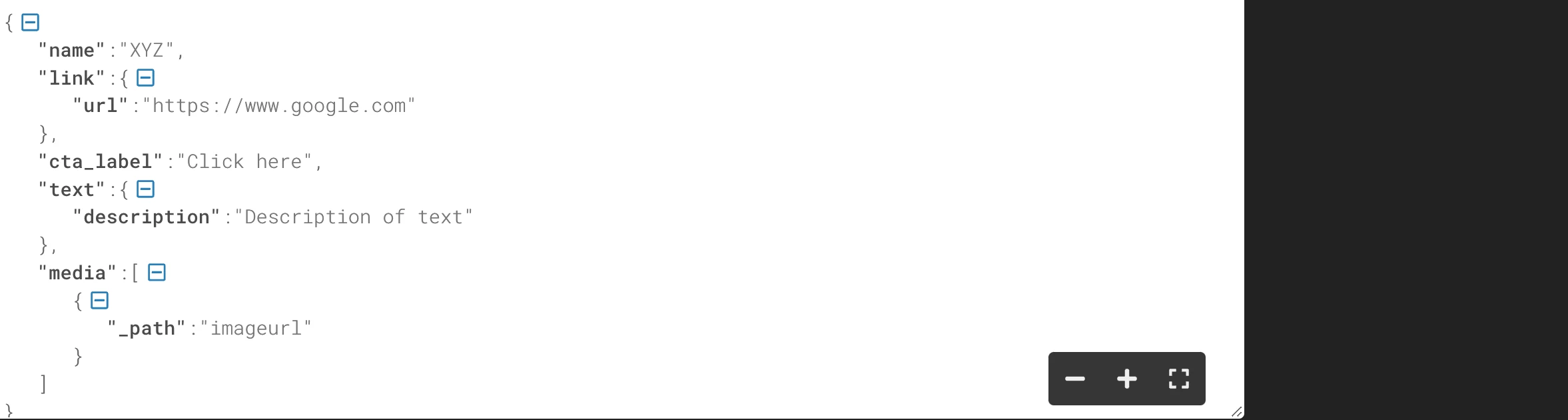
I can access most of the thing in this response like name,url,cta_label,description but is unable to access the _path which is present in the media object. I am wondering because its an array its not working.


Did any one tried accessing a array object via contextual attribute in AJO? I tried using helper function for it , but didn't succeed.


Thanks,

Arpan



Best answer by Manoj_Kumar

Hello @arpan-garg 

According to the documentation you will have to use quotes to access the fields with special characters:

Field references | Adobe Journey Optimizer

2 replies

Manoj_Kumar
Community Advisor
Manoj_KumarCommunity AdvisorAccepted solution
Community Advisor
December 5, 2023

Hello @arpan-garg 

According to the documentation you will have to use quotes to access the fields with special characters:

Field references | Adobe Journey Optimizer

Manoj     Find me on LinkedIn
Sukrity_Wadhwa
Community Manager
Community Manager
December 18, 2023

Hi @arpan-garg,

Was the given solution helpful to resolve your query or do you still need more help here? Do let us know.

Thanks!

Sukrity Wadhwa
Mohan_Dugganab
Adobe Employee
Adobe Employee
December 18, 2023

@arpan-garg This will be addressed in the subsequent release, kindly keep an eye on the release notes.

Pradeep-Jaiswal
Level 5
October 7, 2025

@arpan-garg Are you now able to access values from the array into email and web channel ?

arpan-garg
Community Advisor
Community Advisor
October 8, 2025

Hi @pradeep-jaiswal  - Yes its possible now, we can iterate over it.