Trigger Journey on webpage with websdk tags | Community
Skip to main content
Level 3
November 25, 2024
Solved

Trigger Journey on webpage with websdk tags

  • November 25, 2024
  • 1 reply
  • 711 views

Hi, 

I have created simple journey, when user visits "product view" page and goes back to home page, am displayed some heading.
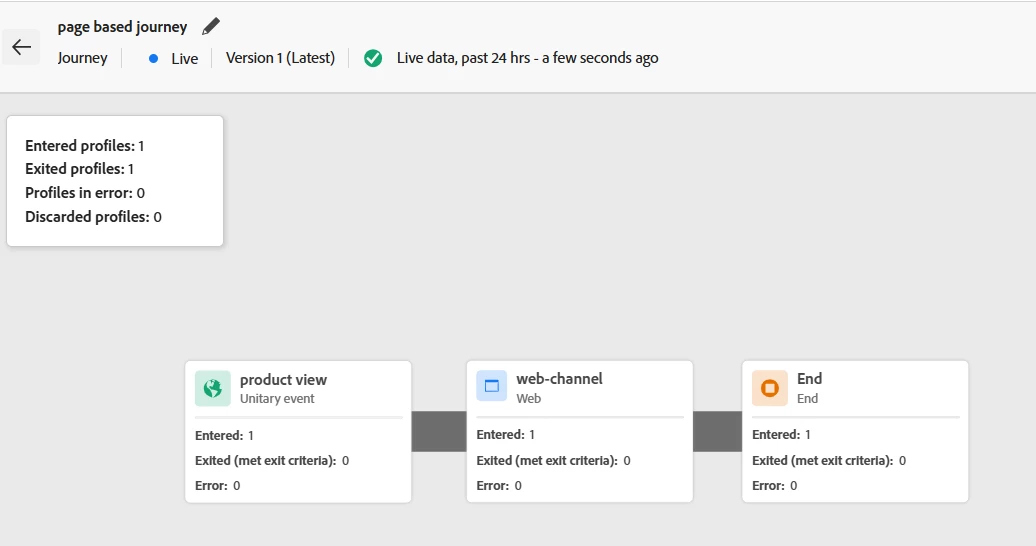


Am able to see entered profiles value increasing. but journey not triggered on web page.

I am not sure what else to configure.

Please guide me.


Thanks


This post is no longer active and is closed to new replies. Need help? Start a new post to ask your question.
Best answer by Hector_Manrique

Hi,


When you include an inbound channel like a web experience in a journey, it’s important to add a delay at the end node. This delay creates a time window for the user to interact with the web experience.


To set this up, simply add a "wait" step with the timeframe you expect the web experience to be available for the user.


Let me know if you have any questions!

Best regards,
Hector

1 reply

Hector_ManriqueAccepted solution
Level 2
November 26, 2024

Hi,


When you include an inbound channel like a web experience in a journey, it’s important to add a delay at the end node. This delay creates a time window for the user to interact with the web experience.


To set this up, simply add a "wait" step with the timeframe you expect the web experience to be available for the user.


Let me know if you have any questions!

Best regards,
Hector

ArunLaAuthor
Level 3
November 26, 2024

@hector_manrique  do i have to do any configuration in Tags >> Rules to make journey work ?

Level 2
November 27, 2024

in the journey add a wait node with the expected time you want the users to see the web experience after the product view