

Three Messages, Three Behaviors: A Better Way to Use Quiet Hours in AJO
Most marketers initially think of Quiet Hours as a simple Do Not Disturb feature, a single switch that silences or pauses all outgoing messages during a set period. Turn it on for a journey, define the time window, and you're done.
That mental model is close, but the real strength of Quiet Hours lies in how it handles messages, not just when they're queued or discarded, but what happens to them during and after the quiet period.
Quiet Hours in AJO is configured at the action level, this means a single journey can contain multiple messages, each with its own Quiet Hours behavior: one message might be discarded, another queued for later delivery, and a third allowed to send immediately. All of these can coexist within the same journey, with each action behaving according to its specific purpose.
Because the messages in a journey aren't all created equal. Some are time-sensitive, others can wait, and some may no longer be relevant after a delay. That's why a one-size-fits-all Quiet Hours policy often falls short.
A retail promotion illustrates the problem particularly well.
The Wednesday Flash Sale
A fashion retailer runs a weekly promotion called the Wednesday Flash, a one-day sale that opens at noon and ends sharply at 8 PM. Loyal customers receive early access, and the customer journey is simple: a promotional email when the sale begins, an SMS reminder a few hours later for customers who browsed but didn't purchase, and an order confirmation for anyone who completes a purchase.
Three messages. One journey.
At first glance, applying Quiet Hours seems straightforward. But the reality is more nuanced.
Journey execution doesn't always align perfectly with customer actions. Batch processing, audience qualification, and profile update latency can cause messages to be evaluated and sent hours later than expected. In this journey, the SMS reminder was occasionally being triggered in the middle of the night because the wait condition resolved at 2 AM. Even worse, some promotional emails were arriving on Thursday morning, long after the Wednesday Flash had ended.
The obvious fix was to enable Quiet Hours for the entire journey. But that introduced a different problem. While delaying a promotional message until morning might be desirable, delaying an order confirmation is not. A customer who completes a purchase at 11 PM expects immediate confirmation, regardless of the time of day.
This is where the action level design of Quiet Hours stops being an implementation detail and becomes the solution. Different messages have different expectations around timing, and Quiet Hours lets each one be treated accordingly.
Three Messages, Three Behaviors
The value of Quiet Hours becomes much clearer when you look at each message in the journey through the lens of its purpose. What appears to be a small configuration detail suddenly opens up a range of possibilities, allowing each action to follow the handling strategy that makes the most sense for its specific use case.
The Promotional Email: Discard After 8 PM Wednesday
The promotional email exists to create urgency around the sale. Its message is simple: the offer is available now, but not for long. Once the sale ends, that urgency loses all meaning.
If the email cannot be delivered before 8 PM on Wednesday in the recipient's local time zone, it should not be delivered at all. Delaying it until the following morning doesn't provide value, it creates confusion. A subject line such as "50% off ends tonight" arriving on Thursday feels inaccurate at best and misleading at worst.
Configuration
- Rule Set: Weekly_Flash_Sale_Email_Discard
- Schedule: Every Wednesday, 8:00 PM – 11:59 PM
- Time Zone: Recipient's local time zone
- Handling: Discard
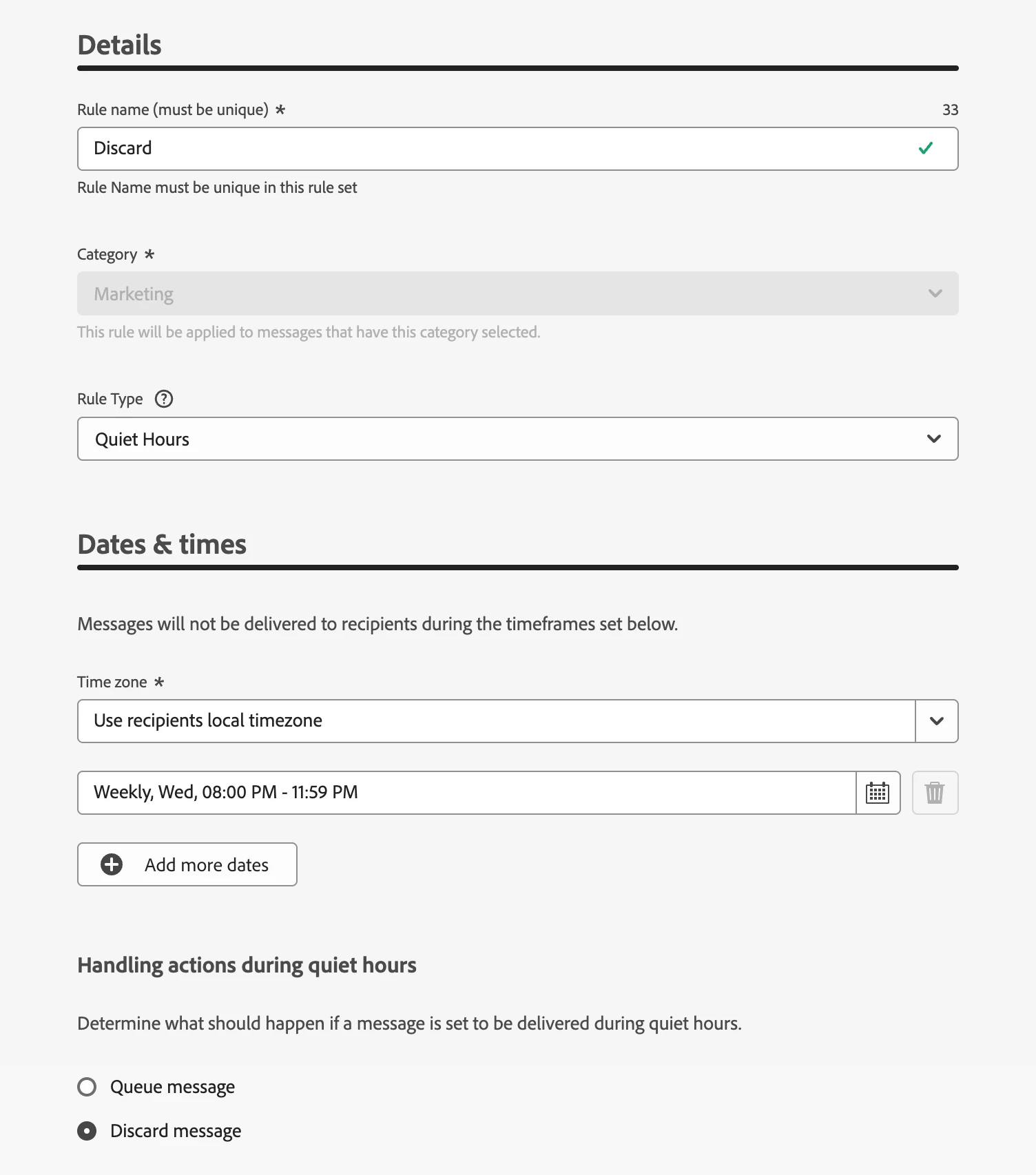
The custom schedule ensures the rule applies only after the Wednesday Flash has ended. Using the recipient's local time zone makes the cutoff relevant regardless of geography, whether the customer is in London, Chicago, or Sydney.
If the message attempts to send after the sale window closes, it is discarded rather than queued for later delivery. The customer never receives an outdated promotion, and the brand avoids sending a message that has already lost its relevance.
The SMS Nudge: Queue Overnight
The SMS reminder serves a very different purpose. It targets customers who demonstrated genuine interest, they opened the email, browsed the sale, and considered making a purchase, but ultimately left without converting.
Unlike the promotional email, the value of this message is not tied to a narrow window of time. Customer intent doesn't disappear the moment the sale ends. A thoughtful reminder the next morning "You left something behind. Here's what's still available." can still encourage a purchase or, at the very least, keep the brand top of mind.
What doesn't work is delivering that reminder at 2 AM.
The issue isn't the content; it's the timing. A late-night SMS feels intrusive rather than helpful. Instead of driving engagement, it risks annoying customers, training them to ignore notifications, or even opt out of future communications altogether.
Configuration
- Rule Set: SMS_Nudge_Queue
- Schedule: Every day, 10:00 PM – 8:00 AM
- Time Zone: Recipient's local time zone
- Handling: Queue
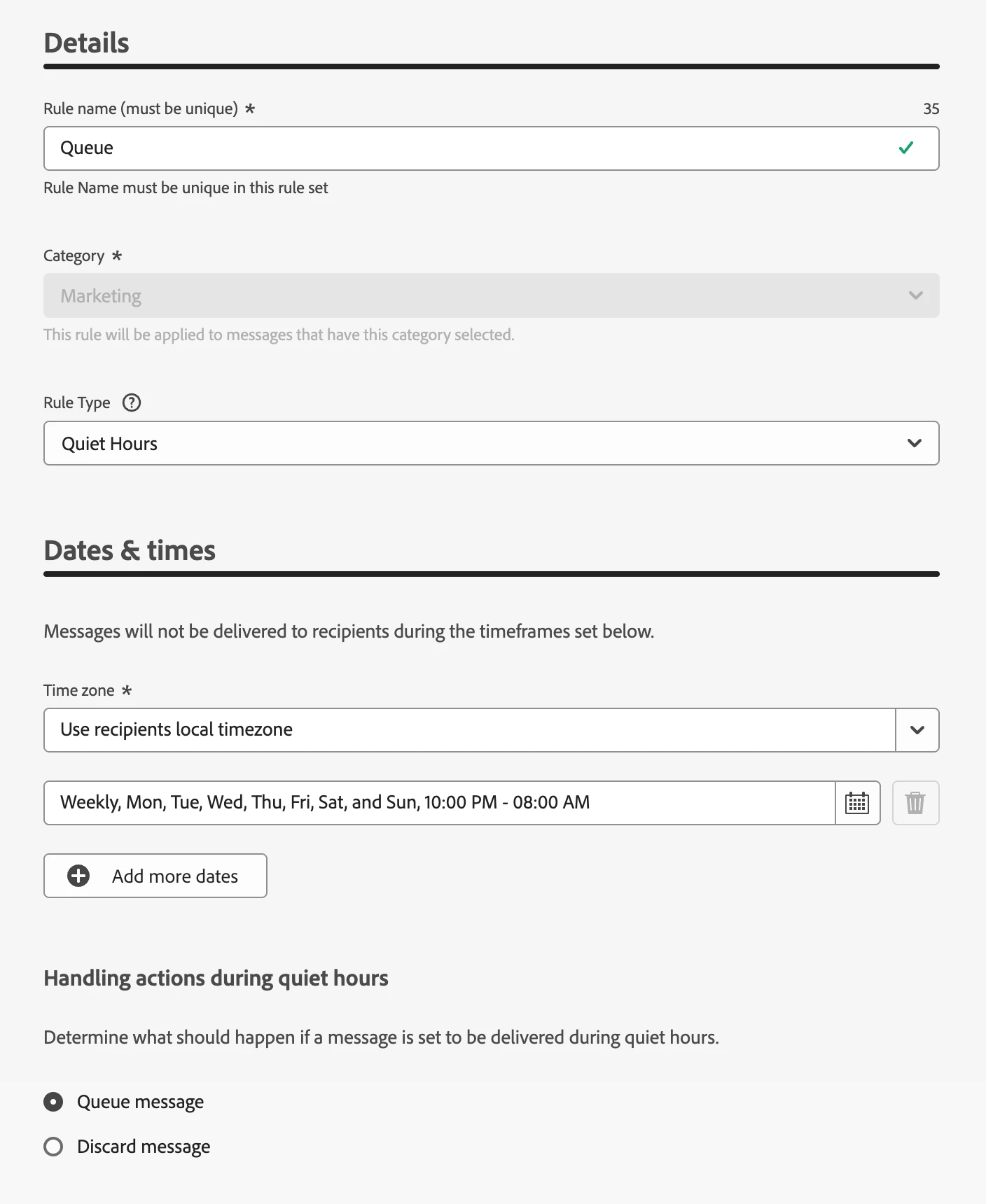
The quiet window applies every day, not just on Wednesdays. Because the reminder is triggered after a wait period, it can become eligible for delivery at any time depending on when the customer entered the journey.
When the SMS attempts to send during the overnight window, AJO queues it rather than discarding it. Delivery resumes at 8 AM local time, when customers are more likely to be awake, engaged, and receptive. The message still reaches them, but at a moment that feels helpful rather than disruptive.
The Order Confirmation: No Quiet Hours
This scenario is the simplest of the three, and that's precisely the point.
A customer who completes a purchase at 11:30 PM is actively engaged. They have made a decision, submitted payment, and expect immediate confirmation that everything went through successfully.
Delaying that confirmation until the next morning doesn't protect the customer from an inconvenient notification, it creates uncertainty. Customers start wondering whether their order was processed, whether their payment was accepted, or whether they need to try again. In some cases, that uncertainty can even lead to duplicate purchases or unnecessary support requests.
Configuration
- Rule Set: None
- Handling: Send immediately
For this message, Quiet Hours simply do not apply. The confirmation is delivered as soon as the purchase is completed, regardless of the time of day.
This isn't a missing configuration or an oversight. It's a deliberate decision based on the nature of the message. Transactional communications carry different expectations than promotional or engagement messages, and customers expect them to arrive immediately.
The ability to leave this action unrestricted while applying different Quiet Hours policies to other messages in the same journey is what makes the overall design effective. Each message is treated according to its purpose, rather than being forced into a single journey-wide rule.
What the Journey Canvas Looks Like
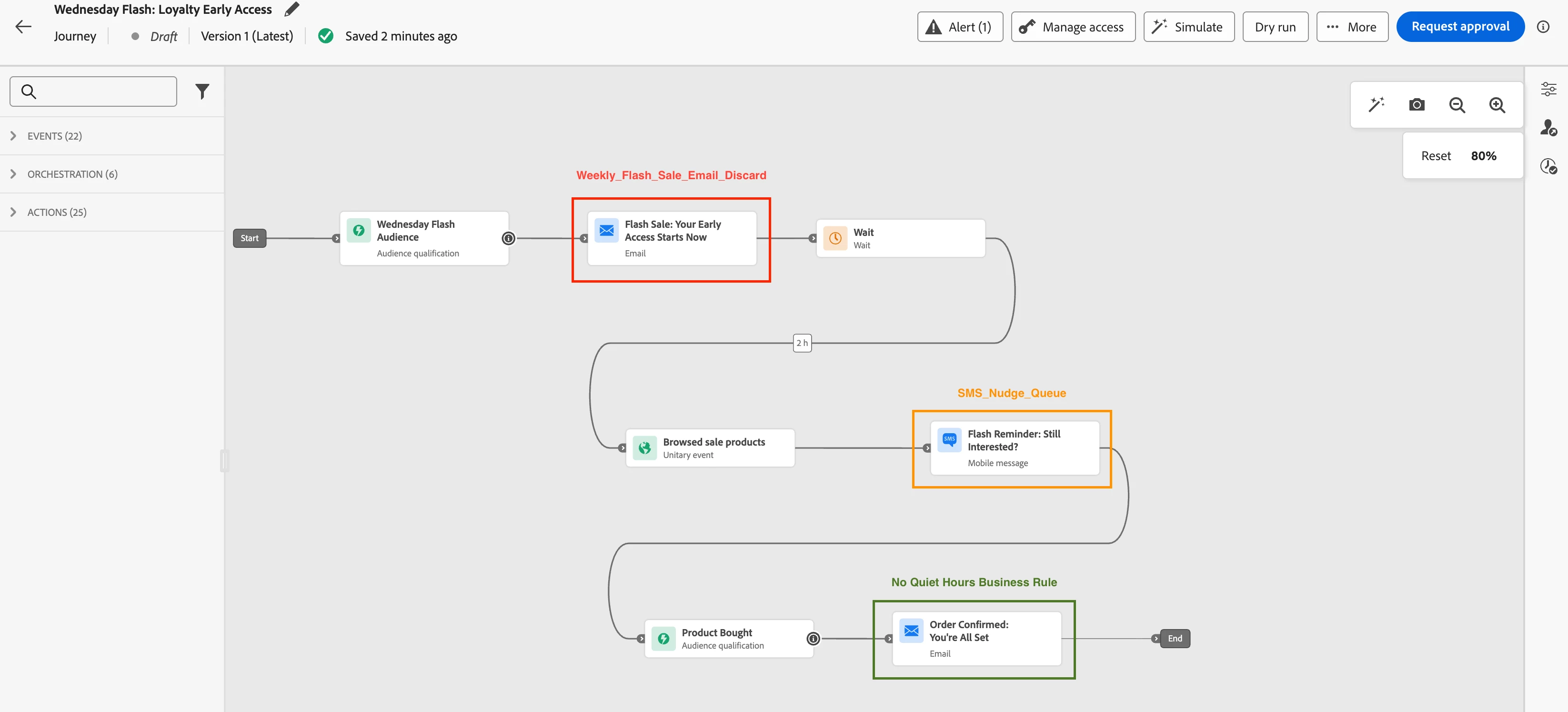
All three messages exist within the same journey, but their Quiet Hours configurations are completely independent.
| Action Node | Rule Set | Handling | Window |
|---|---|---|---|
| Promotional Email | Weekly_Flash_Sale_Email_Discard | Discard | Wednesday 8:00 PM to 11:59 PM (recipient time zone) |
| SMS Nudge | SMS_Nudge_Queue | Queue | Daily 10:00 PM to 8:00 AM (recipient time zone) |
| Order Confirmation Email | — | Send immediately | — |
On the AJO canvas, each action node exposes a Business Rules section in its properties panel. The promotional email node is configured with the Weekly_Flash_Sale_Email_Discard rule set, while the SMS node uses SMS_Nudge_Queue. The order confirmation node has no rule set attached, allowing it to bypass Quiet Hours entirely and send immediately.
These rule sets are created under Administration → Business Rules → Rule Sets as custom rule sets. Quiet Hours cannot be configured within the global rule set and must instead be defined as dedicated custom rule sets and attached to individual action nodes.
Once activated, a rule set can be reused across journeys, making it easy to apply consistent Quiet Hours policies throughout the sandbox.
For a step-by-step walkthrough of creating rule sets and attaching them to journey actions, refer to the accompanying video tutorial.
The Question Worth Asking for Every Action Node
The Wednesday Flash Sale is just one example. The broader lesson applies to almost every journey that contains more than one outbound message.
Before configuring Quiet Hours for any action, ask a simple question:
If this message were to trigger at 2 AM, what should happen?
The answer usually falls into one of three categories:
- If the message is tied to a time-sensitive event, promotion, or offer, and delivering it later would make it irrelevant or misleading, discard it.
- If the message remains valuable but the timing would be disruptive, queue it and deliver it when the customer is more likely to engage.
- If the customer is actively expecting the message and any delay would create uncertainty or friction, do not apply Quiet Hours at all.
Viewed through this lens, most journeys contain more than one valid answer. Promotional messages, engagement nudges, transactional confirmations, service notifications, and account updates often have very different expectations around timing.
Applying a single Quiet Hours policy to all actions of the entire journey or skipping Quiet Hours altogether, forces those messages into the same behavior, regardless of whether that behavior makes sense.
This is why Quiet Hours in AJO is configured at the action level. What might initially appear to be an implementation detail is actually a deliberate design choice. Messages within the same journey can have fundamentally different relationships with time, and AJO gives you the flexibility to handle each one appropriately.
The result is a journey that behaves less like a workflow and more like a thoughtful conversation, one where every message arrives at the right moment, or not at all.
Conclusion
The Wednesday Flash Sale journey didn't get smarter by adding more logic, it got smarter by treating each message on its own terms.
The promotional email expires when its relevance expires. The SMS reminder waits for an appropriate moment. The order confirmation is delivered immediately.
Three messages. Three behaviors. One journey.
That is what Quiet Hours, configured at the action level, actually gives you: the ability to respect the timing expectations of every message instead of forcing them all into the same rule.