Target users that haven't opened an email in last 12 months | Community
Skip to main content
Level 2
January 29, 2024
Solved

Target users that haven't opened an email in last 12 months

  • January 29, 2024
  • 1 reply
  • 1358 views

Hi all!


I need to create a recurring journey that must be excuted daily that must target contacts that haven't opened an email in the last 12 months.

The thing is when creating the audience I don't know how to establish the conditions so that the audience only includes contacts who have not opened an email for 12 months on that day, in order that the journey runs daily and only target that users.


Should I use "within", "rolling range",....?


Thanks


This post is no longer active and is closed to new replies. Need help? Start a new post to ask your question.
Best answer by SatheeskannaK

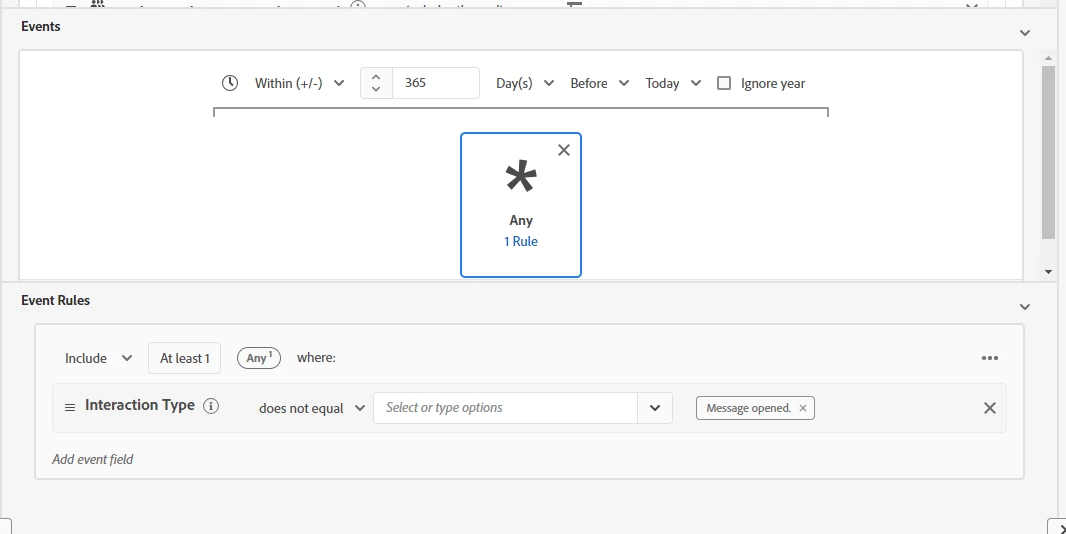
@joaquín, You can setup this audience either using a rolling range or within criteria. The conditions you choose should be effective for the targets you’re trying to reach. Here is the code view of the audience that you setup provides more clarity:


CHAIN(xEvent, timestamp, [C0: WHAT(_experience.customerJourneyManagement.messageInteraction.interactionType notIn ["open"]) WHEN(<= 365 days before today)])


1 reply

SatheeskannaK
Community Advisor
SatheeskannaKCommunity AdvisorAccepted solution
Community Advisor
January 29, 2024

@joaquín, You can setup this audience either using a rolling range or within criteria. The conditions you choose should be effective for the targets you’re trying to reach. Here is the code view of the audience that you setup provides more clarity:


CHAIN(xEvent, timestamp, [C0: WHAT(_experience.customerJourneyManagement.messageInteraction.interactionType notIn ["open"]) WHEN(<= 365 days before today)])


Thanks, Sathees
JoaquínAuthor
Level 2
January 30, 2024

Hi Sathees,


Thanks for your reply.

How could I set this in the segment builder view?


Thanks


Kind Regards

SatheeskannaK
Community Advisor
Community Advisor
January 30, 2024

@joaquín, You can see the code view on the right side audience setup.

Thanks, Sathees