Profile Cap Weekly Reset | Community
Skip to main content
August 6, 2024
Solved

Profile Cap Weekly Reset

  • August 6, 2024
  • 1 reply
  • 974 views

Hello, 


Use case:

send a push message to max 1000 profiles on a weekly basis


Setup:

- journey set up with Scheduler Type = Weekly

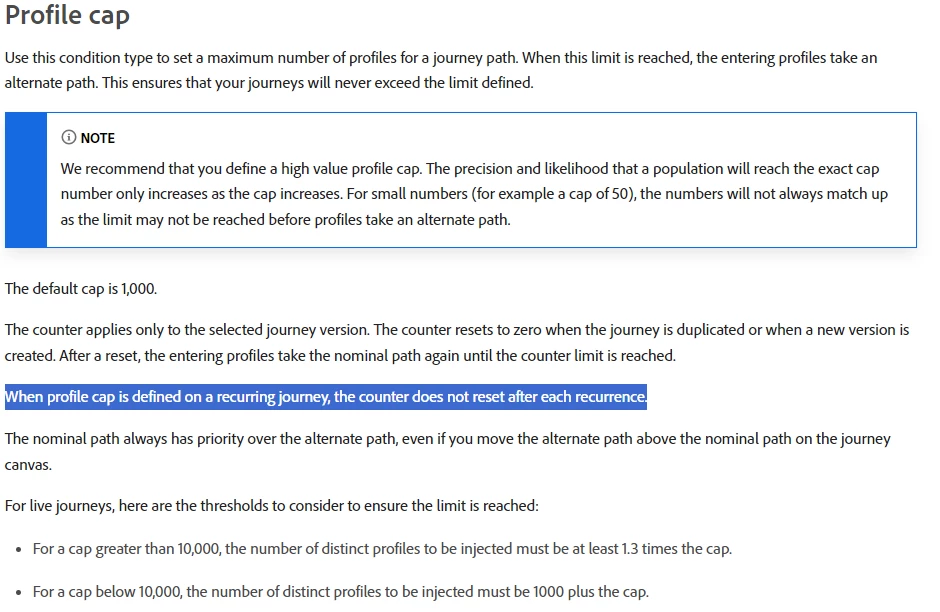
- use CONDITION node with Profile Cap at 1000 in the journey to orchestrate 


Challenge:

The CONDITION node picked up 1000 profiles when it's first deployed on July 29 but it didn't pick up any profiles on August 5. There were 5.2k profiles entered the node but all were dropped. 


2 questions: 

1. Does this mean the weekly 1000 profile cap is at journey level that when the first deployment has reached the limit, the subsequence runs will not pick up any eligible profiles?

2. How can we set up a journey to pick up max 1000 profiles on a weekly basis?


Thanks,

Cecilia


This post is no longer active and is closed to new replies. Need help? Start a new post to ask your question.
Best answer by Mohan_Dugganab

Hi,


Take a look at the below highlighted note - https://experienceleague.adobe.com/en/docs/journey-optimizer/using/orchestrate-journeys/about-journey-building/condition-activity#profile_cap 


Couple of options -

>> Create 1 journey for every day where you exclude the people you sent the day before
>> Create 1 journey that splits every day on a number of profiles, then wait for x day, then split again, then wait for x days with the total wait being less than the global time out period.


1 reply

Mohan_Dugganab
Adobe Employee
Mohan_DugganabAdobe EmployeeAccepted solution
Adobe Employee
August 7, 2024

Hi,


Take a look at the below highlighted note - https://experienceleague.adobe.com/en/docs/journey-optimizer/using/orchestrate-journeys/about-journey-building/condition-activity#profile_cap 


Couple of options -

>> Create 1 journey for every day where you exclude the people you sent the day before
>> Create 1 journey that splits every day on a number of profiles, then wait for x day, then split again, then wait for x days with the total wait being less than the global time out period.


saiciliaAuthor
August 7, 2024

Hello, 


Thanks for your reply. 


Question regarding this option that you shared: >> Create 1 journey that splits every day on a number of profiles, then wait for x day, then split again, then wait for x days with the total wait being less than the global time out period.


can you elaborate more on this option? I am not too clear on the part about "then split again, then wait for x days".

I would like to understand it more. 


Thanks,

Cecilia

Mohan_Dugganab
Adobe Employee
Adobe Employee
August 9, 2024

It will be a single shot journey with read audience > business criteria (if any) > profile cap > email > wait for x days > profile cap > email > wait for x days etc.,