List unsubscribe header not showing up | Community
Skip to main content
Level 4
April 6, 2024
Solved

List unsubscribe header not showing up

  • April 6, 2024
  • 2 replies
  • 1269 views

Hi, 


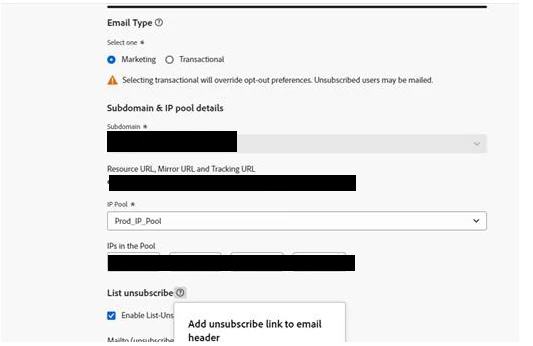
i wanted to ask if someone experienced the same issue, we followed adobe recommendations and enabled the toggle for list-unsubscribe on both our email channel surfaces. 

However in our emails (on gmail) no link unsubscribe is in the header. 


do we need to do other? it seems that enabling this toggle is sufficient. Thanks. 
 

This post is no longer active and is closed to new replies. Need help? Start a new post to ask your question.
Best answer by Anuhya-Y

@nick_2024 

Gmail currently shows the headers for the sender addresses with top IP reputation. In brief, Gmail only displays the One-Click unsubscription header for sender emails with a high IP reputation. This means that emails from senders with a strong track record of sending trustworthy to have the One-Click unsubscription option visible to recipients.


As the next step, contact the Adobe email delivery support team to understand and improve the sender's IP address reputation level.

2 replies

Anuhya-Y
Community Advisor
Anuhya-YCommunity AdvisorAccepted solution
Community Advisor
April 7, 2024

@nick_2024 

Gmail currently shows the headers for the sender addresses with top IP reputation. In brief, Gmail only displays the One-Click unsubscription header for sender emails with a high IP reputation. This means that emails from senders with a strong track record of sending trustworthy to have the One-Click unsubscription option visible to recipients.


As the next step, contact the Adobe email delivery support team to understand and improve the sender's IP address reputation level.

Mohan_Dugganab
Adobe Employee
Adobe Employee
April 8, 2024