Landing page Unsubscription | Adobe Higher Education
Skip to main content
Level 2
August 3, 2026
Pergunta

Landing page Unsubscription

  • August 3, 2026
  • 5 respostas
  • 43 Visualizações

Hi All 

I have a requirement for a landing page with five Opt-in/Opt-out services.

  • If a user selects one or more specific services for Opt-out and then clicks the Call-to-Action (CTA) button, only the selected services should be opted out.
  • If the user clicks the CTA button without selecting any specific service, the user should be opted out of all five services by default.

How can we implement this logic in AJO?


Thanks 

Gowtham Raj

    5 Respostas

    Adobe Employee
    August 3, 2026

    Hi GowthamRaj,

    You can create an AJO subscription landing page with five checkboxes, one for each service, and configure each checkbox for opt-out. When the user submits the form, only the selected services will be unsubscribed.

    For the rule "if no service is selected, unsubscribe from all five," handle this explicitly—for example, add an "Unsubscribe from all" option and use custom JavaScript or backend logic to select/submit all five opt-out choices. Do not rely on an empty submission or simply writing the form data to an AEP dataset, as that alone does not update subscription status.

    Sources:

    Level 2
    August 4, 2026

    Hi ​@ghoshdas 

    Thanks for the guidance. As suggested, we have created a separate landing page for the "Unsubscribe from All" option.

    Could you please advise how we can implement this using Custom JavaScript or backend logic? Our AJO instance does not have Custom JavaScript enabled.


    Thanks in advance.

    DavidKangni
    Community Advisor
    Community Advisor
    August 4, 2026

    You can extend your landing pages with custom JavaScript to validate input, run custom form submissions, fire analytics events, or build dynamic behaviors beyond the standard editor.

    https://experienceleague.adobe.com/en/docs/journey-optimizer/using/content-management/landing-pages/landing-pages-design/lp-custom-js#insert-javascript-code-into-a-landing-page


    But I don’t think you need a custom javascript for your use case. Follow Sathees recommendation

    • global unsubcription
    • channel opt-out

    Thanks,

    David

    David Kangni
    SatheeskannaK
    Community Advisor
    Community Advisor
    August 4, 2026

    @GowthamRAJ 

    You do not need to enable anything separately to use JavaScript in AJO. Based on your shared design, custom JS is unnecessary; you can implement the requirements using the following approach:

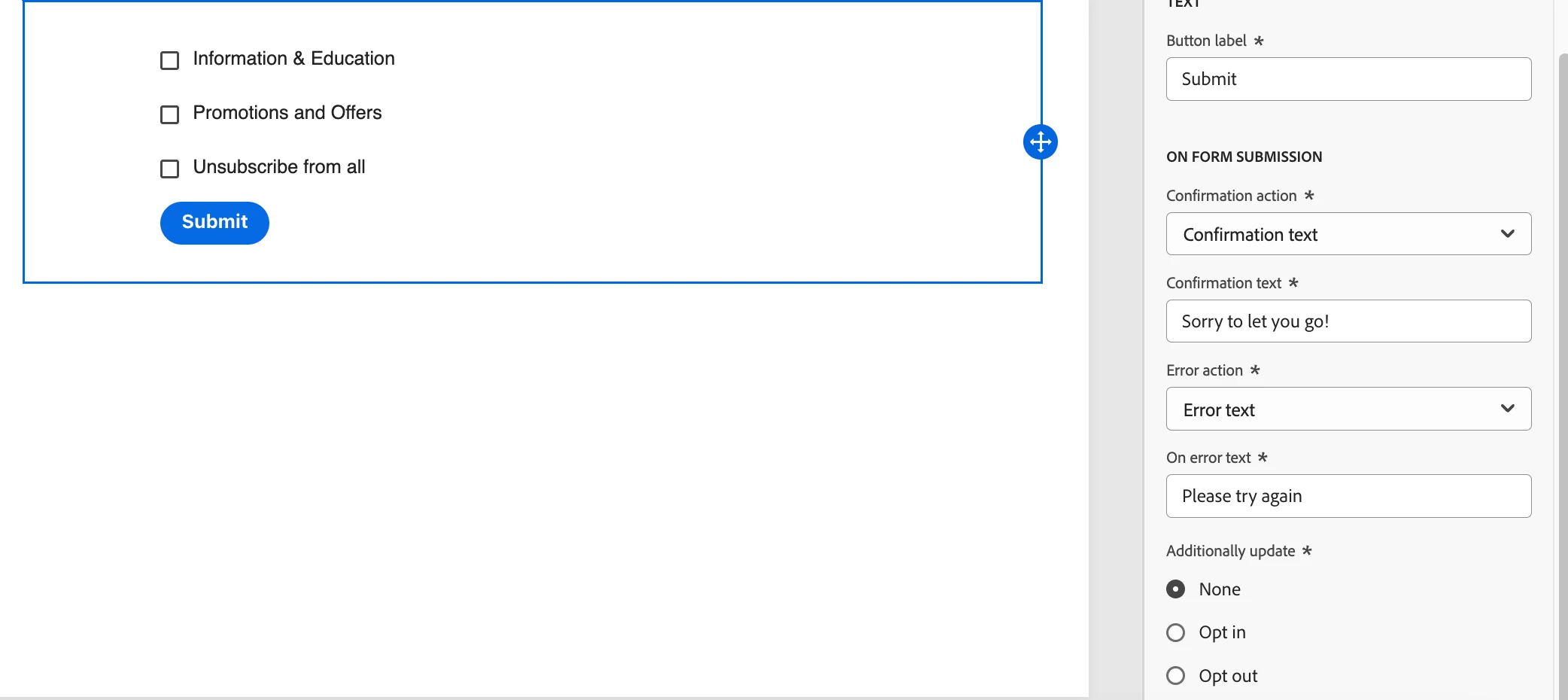
    • Assign Information and Education, Promotions and Offers, and Strategic programs to distinct subscription lists.
    • Configure the "Unsubscribe from all" functionality using one of two methods:
      • Link the "Unsubscribe from all" checkbox to a dedicated subscription list. For instance, when creating the business logic for a promotions & offers marketing campaign, exclude profiles that are either on the global unsubscribe list or specifically opted out of promotions & offers.
      • Alternatively, connect the "Unsubscribe from all" checkbox directly to an email channel opt-out. This applies a channel-level opt-out to the profile, which takes precedence over individual lists.
    • Note: The CTA label should likely be "Submit" rather than "Unsubscribe from all".
    • In this scenario, when someone clicks on “Submit,” you can set the additional update to “None” as shown below.


    Thanks, Sathees
    Level 2
    August 5, 2026

    Thanks ​@SatheeskannaK  for the detailed explanation