IP warming - Unable to activate Phase | Community
Skip to main content
Level 2
April 4, 2025
Solved

IP warming - Unable to activate Phase

  • April 4, 2025
  • 5 replies
  • 822 views

Hello to amazing community,


I and my team are working on shifting our marketing emails from other vendors to AJO and to begin with we have to start IP warming plans.

Here is step by step process that we followed over the period of time and now stuck right at the start phase, duh! I would like to ask community experts for help or advice for what could be we doing wrong here.

- Since we had subscribers list from other vendors, I downloaded those into CSV and created an Audience by uploading it. I see the audience that was created shows profile count after successful ingestion.

- I created multiple campaigns for IP warm up plans and uploaded IP warming plans for phases. Used the Audience that I created in step 1 for campaigns

- After that created multiple phases in IP warm up plans. I am trying to now activate phase 1 of the plan but encountering an issue while activating it, the error code is not giving enough information on why its failing. Adding screenshots for clarity. 


Note:

- Channel configuration with IP pools are tested fine.

- Campaigns were tested internally for delivery check.
Best answer by DavidKangni

Hi @sachinj 


For Custom upload audiences, targeting fields typically used in AJO (e.g., personalEmail.address, mobilePhone.number) are empty and therefore cannot be used for targeting.

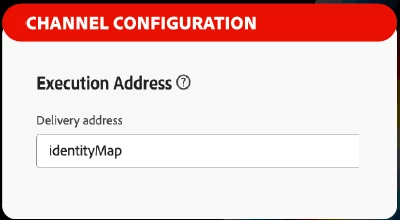
To solve this, you can specify the “execution field” (or “execution address” depending on the channel) in the channel configuration as ‘identityMap’. This will ensure that the attribute chosen as the identity at audience creation will be the one used for targeting in AJO.


For the error code not giving enough information on why it's failing, you can go to developer mode of your browser and get more details from the network tab logs or generate har file.


Thanks,

David

5 replies

SatheeskannaK
Community Advisor
Community Advisor
April 4, 2025

@sachinj As far as I know, this could be an issue with using a custom upload audience for the IPWarming campaigns. You may have created the audience with email as the identity namespace. If you look at the profiles created, they won't have the personalEmail.address field populated. But the IPWarming campaign will be looking for value from the personalEmail.address field.

Thanks, Sathees
DavidKangni
Community Advisor
DavidKangniCommunity AdvisorAccepted solution
Community Advisor
April 4, 2025

Hi @sachinj 


For Custom upload audiences, targeting fields typically used in AJO (e.g., personalEmail.address, mobilePhone.number) are empty and therefore cannot be used for targeting.

To solve this, you can specify the “execution field” (or “execution address” depending on the channel) in the channel configuration as ‘identityMap’. This will ensure that the attribute chosen as the identity at audience creation will be the one used for targeting in AJO.


For the error code not giving enough information on why it's failing, you can go to developer mode of your browser and get more details from the network tab logs or generate har file.


Thanks,

David

David Kangni
SachinJAuthor
Level 2
April 4, 2025

Its not letting me select and save identityMap under execution field. 

DavidKangni
Community Advisor
Community Advisor
April 4, 2025

@sachinj 
without the .id just identityMap as on my screenshot

Can you confirm you're using email as identity when importing your audiences?

Thanks,

David

David Kangni
SachinJAuthor
Level 2
April 4, 2025

I have create emailAddress as custom namespace Identity to map email addresses. Also, it won't let me just choose identityMap in the field.


SachinJAuthor
Level 2
April 7, 2025

@satheeskannak @davidkangni  Thank you to both of you for your valuable help. My issue is resolved.