How to send different personalized emails to the same email address | Community
Skip to main content
Level 1
March 25, 2026
Question

How to send different personalized emails to the same email address

  • March 25, 2026
  • 2 replies
  • 12 views

Hello,


we want to send gift vouchers to the winners of our prize competition with transactional emails.

There is a possibility that some Clients may have won multiple prizes, so we need to send them several emails with different gift vouchers at the same email address.

We have an Excel file with the target email addresses and the relative gift vouchers. In this file there are duplicated ids. We want to upload the file and make sure that Adobe Journey Optimizer sends multiple emails to the same duplicated ID/Addresses, each with its own gift voucher.

The Excel file looks like this:
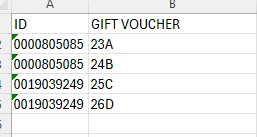
In this example, ID 0000805085 needs to receive 2 emails, one with gift voucher 23A and one with 24B, at the same email address. 

How can we do this with Adobe Journey Optimizer in one single Journey?

Thank you very much for your support


Joseph

    2 replies

    Manoj_Kumar
    Community Advisor
    Community Advisor
    March 26, 2026

    Hi ​@Joseph 

    You can import this file in dataset link to event based schema. documentation: https://experienceleague.adobe.com/en/docs/experience-platform/ingestion/tutorials/ingest-batch-data#create-a-dataset


    Create a journey with re-entrance allowed and upload the file. 

    The idea is that this file will create multiple events against a profile with voucher as event property. This can then be used in Email.
     

    Manoj  | https://themartech.pro
    AmitVishwakarma
    Community Advisor
    Community Advisor
    March 26, 2026

    Hi ​@Joseph 

    You can do this in one Journey, but you must treat each Excel row as an event, not as a deduped profile from a segment.


    1. Model your voucher file as an event dataset

    Create an Experience Event schema, e.g. PrizeVoucherEvent, with at least:

    • winnerId (your ID column)
    • personalEmail.address (email)
    • voucherCode (your GIFT VOUCHER column)

    Create a dataset on this schema and ingest the Excel/CSV so that each row becomes one event.

    2. Create a Unitary Event in AJO on that dataset 

    In Configurations > Events > Create event:

    • Type: Unitary
    • Schema: your PrizeVoucherEvent schema
    • Identity: map personalEmail.address to your Email identity namespace
    • Enable supplemental ID (or "multiple simultaneous entries") and map it to something unique per row, e.g. voucherCode or a row ID. This is what lets the same profile be in the journey multiple times at once.
    • Event ID condition can be something simple like eventType == "prize.voucher" if you use an eventType field.

    Ref: Using supplemental IDs to allow multiple journey entries for the same profile in https://experienceleague.adobe.com/en/docs/journey-optimizer-learn/tutorials/journeys/unlock-journey-reentry-with-supplemental-id

    3. Build a one‑step transactional Journey

    Create a new Journey:

    • Start node: your PrizeVoucherEvent. Action node: Email (transactional-style template). Personalize the email with event fields, e.g.: 
      • {{context.events.prizeVoucherEvent.voucherCode}}
      • Any other prize‑specific fields from the event.
    • Make sure re-entrance is allowed for the journey (and "simultaneous entrances using supplemental ID" is on).

    4. Run once > one email per row

    When you ingest the Excel/CSV:

    • Each row > one PrizeVoucherEvent.
    • The same email address appearing twice with different vouchers will trigger two separate journey entries, thanks to supplemental ID, so AJO sends two different emails to the same address, each with its own voucher.


    Amit Vishwakarma - Adobe Commerce Champion 2025 | 16x Adobe certified | 4x Adobe SME