How do I refer to the Mirror Page including an anchor in HTML? | Community
Skip to main content
May 3, 2024
Solved

How do I refer to the Mirror Page including an anchor in HTML?

  • May 3, 2024
  • 1 reply
  • 817 views

To refer to a specific location on the mirror page with an anchor in an email's HTML, I attempted to use the following codes:


<a href="<%@ include fragment='MirrorPageUrl' %>#vraag2a 

<a href="<%@ include view='MirrorPageUrl' %>#vraag2a 

<a href="<%@ include view='MirrorPage' %>#vraag2a 


However, this did not work due to the '<%@ include view='MirrorPage' %> portion. It does work with a normal URL. Does anyone have a solution to fix this issue in HTML?
This post is no longer active and is closed to new replies. Need help? Start a new post to ask your question.
Best answer by Mohan_Dugganab

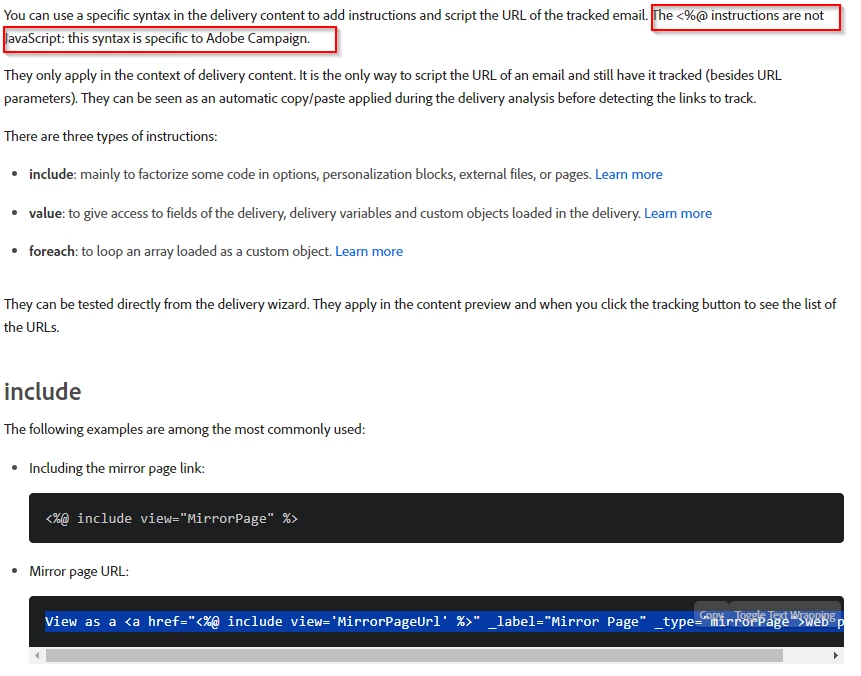
The <%@ instructions / syntax is specific to Adobe Campaign. Reference - https://experienceleague.adobe.com/en/docs/campaign-classic/using/sending-messages/tracking-messages/tracking-personalized-links/pre-processing-instructions 


You will have to replace with the equivalent tag that gets generated in AJO email designer.

<a class="arc-link" data-nl-type="mirrorPage" data-tracking-type="MIRROR_PAGE" href="" id="acr-link-18376110" style="text-decoration: underline;">Web view</a>


1 reply

Mohan_Dugganab
Adobe Employee
Mohan_DugganabAdobe EmployeeAccepted solution
Adobe Employee
May 3, 2024

The <%@ instructions / syntax is specific to Adobe Campaign. Reference - https://experienceleague.adobe.com/en/docs/campaign-classic/using/sending-messages/tracking-messages/tracking-personalized-links/pre-processing-instructions 


You will have to replace with the equivalent tag that gets generated in AJO email designer.

<a class="arc-link" data-nl-type="mirrorPage" data-tracking-type="MIRROR_PAGE" href="" id="acr-link-18376110" style="text-decoration: underline;">Web view</a>