Hi @Michael_Soprano
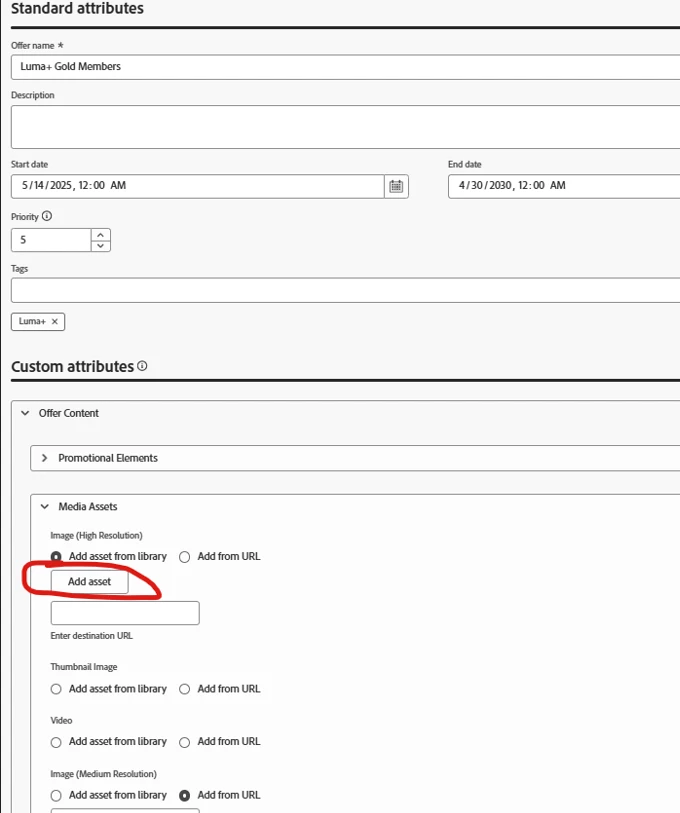
In DSN you're seeing a Decisioning field that's actually of type "Decisioning Asset", not a plain string, even though it ends up storing a URL behind the scenes.
To get the same "Add asset from library / Add from URL" behavior in your own sandbox:
1. Configure AEM Assets / Dynamic Media for AJO
Make sure your Journey Optimizer tenant is connected to AEM Assets / Dynamic Media so the asset selector is available in offer authoring.
2. Add a Decisioning Asset field in the Offers catalog schema
In AJO:
- Go to Decisioning > Catalogs > Offers > Edit schema.
- Under your org node (_<imsOrg>), click + and create a new field (for example imageHighRes).
- For data type, choose Decisioning Asset (not string).
- Save the schema.
3. Use the field in your decision items / offers
When you create/edit a decision item, that field will appear under Custom attributes / Offer content with the UI you saw in DSN:
- Add asset from library > opens the AEM asset picker and stores the public asset URL in the field.
- Add from URL > lets you paste a URL manually.
This is exactly how the DSN environment is configured:
- The field is modeled as Decisioning Asset in the catalog schema,
- AJO is pre-wired to a demo AEM Assets repo,
- At runtime it's just a string URL, but the UI knows to show the AEM asset picker.
Amit Vishwakarma - Adobe Commerce Champion 2025 | 17x Adobe certified | 6x Adobe SME