4 replies

Pulkit_Jain_
Adobe Employee
Adobe Employee
October 6, 2026

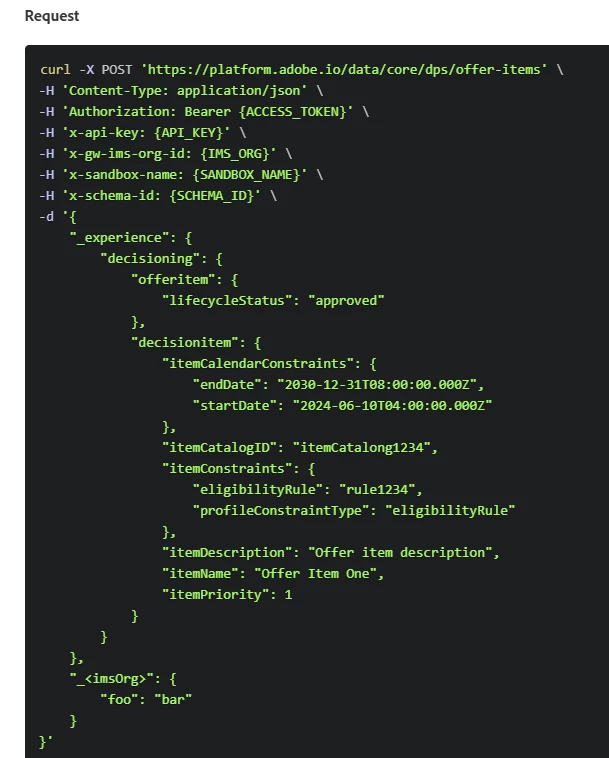
​@Dex 666 I think capping is not included because your payload only defines:

"_experience.decisioning.offeritem.lifecycleStatus"

Frequency capping must be explicitly added under:

"_experience.decisioning.offeritem.frequencyCappingConstraints"

Example:

"offeritem": {
"lifecycleStatus": "approved",
"frequencyCappingConstraints": [
{
"limit": 1,
"scope": "profile",
"events": ["decisioning"],
"repeat": {
"enabled": true,
"unit": "day",
"unitCount": 1
}
}
]
}
Dex 666Author
Level 2
October 6, 2026

Could you share the URL? How do I know what type of POST request should I send (its the question to Adobe :D) ? 

Pulkit_Jain_
Adobe Employee
Adobe Employee
October 6, 2026

frequencyCappingConstraints is not a system-generated field. DPS only stores what you explicitly send in the request payload.

Example, right now your payload contains:

"_experience": {
"decisioning": {
"offeritem": {
"lifecycleStatus": "approved"
}
}
}

So the created offer item only has lifecycle status and decision item metadata

Since no capping object was provided, DPS does not create:

"_experience.decisioning.offeritem.frequencyCappingConstraints"

If you want capping enabled, you must add the full capping configuration yourself during the POST call, for example:

"offeritem": {
"lifecycleStatus": "approved",
"frequencyCappingConstraints": [
{
"limit": 1,
"scope": "profile",
"events": ["decisioning"],
"repeat": {
"enabled": true,
"unit": "day",
"unitCount": 1
}
}
]
}

Then DPS persists that object and you will see it in subsequent GET/lookup responses.

AmitVishwakarma
Community Advisor
Community Advisor
October 6, 2026

Hi ​@Dex 666 
The API reference is https://experienceleague.adobe.com/en/docs/journey-optimizer/using/decisioning/experience-decisioning/experience-decisioning-api-reference/decision-items/create

The request is a POST to: https://platform.adobe.io/data/core/dps/offer-items

The documentation's request is a minimal example; it doesn't include every optional field. Frequency capping is optional, so it isn't generated automatically from lifecycleStatus. To create the item with a cap, add frequencyCappingConstraints inside _experience.decisioning.offeritem. https://experienceleague.adobe.com/en/docs/journey-optimizer/using/decisioning/experience-decisioning/manage-decision-items/items

For example, this sets a limit of one decision event per profile per day:

"offeritem": {
"lifecycleStatus": "approved",
"frequencyCappingConstraints": [
{
"entity": "offer",
"limit": 1,
"scope": "profile",
"events": ["decisioning"],
"repeat": {
"enabled": true,
"unit": "day",
"unitCount": 1
}
}
]
}

After the POST, use the returned item ID with the Lookup a decision item API to verify that the constraint was saved. The list API examples show that uncapped items can omit the field or return it as an empty array.

https://experienceleague.adobe.com/en/docs/journey-optimizer/using/decisioning/experience-decisioning/experience-decisioning-api-reference/decision-items/lookup

https://experienceleague.adobe.com/en/docs/journey-optimizer/using/decisioning/experience-decisioning/experience-decisioning-api-reference/decision-items/decision-items-list

Small caveat: the JSON fragment is a profile-level daily cap. Change scope, limit, events, or repeat to match the desired rule, and make sure the x-schema-id in the request is the correct decision-item schema for that sandbox.

Amit Vishwakarma - Adobe Commerce Champion 2025 | 17x Adobe certified | 6x Adobe SME