Create unsub and thank you page | Community
Skip to main content
Level 3
January 9, 2024
Solved

Create unsub and thank you page

  • January 9, 2024
  • 1 reply
  • 1365 views


Hi Team,
I have a requirement to create an unsubscribe and a thank you page in AJO and as soon as the customer clicks on unsubscribe in email the unsubscribe page will capture the preference and thank you page should appear.
I am trying with Link type as External Opt Out and One Click opt out, however I am not able to achieve results.

The document which I am referring is: https://experienceleague.adobe.com/docs/journey-optimizer/using/landing-pages/create-lp.html?lang=en#configure-primary-page

Any suggestions would be appreciated.


Thanks!
Best answer by AnanthanJa

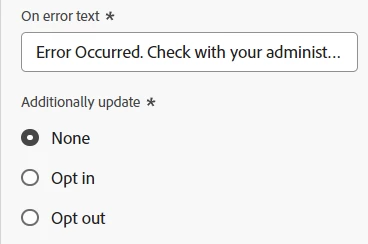
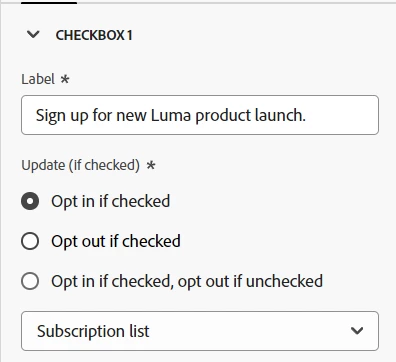
The consent can be added by using a checkbox in the form and configuring the email consent or subscription confirmation based on the out of box options available in AJO.


In addition, button also has option to opt-in or opt-out of email channel.


Hence it is not required to call the preferences api seperately.

1 reply

Adobe Employee
January 9, 2024

Hi @mustufam5967803,

Option 1:

You can use the one-click opt out and then configure the landing page for the confirmation alone. So once the unsubscription is done using the one-click opt out, the confirmation of the opt-out comes from the landing page.


Option2:

The other option is to use the External Opt-out/Unsubscription option and configure the publish url of the landing page as part of the email.


For option 2, the landing page will have a primary page which will contain the button for unsubscription and on click of the unsub button, you can unsubscribe and then move to the confirmation page


The confirmation page will be subpage of the unsubscription landing page.


Hope it helps.

Level 3
January 9, 2024

My requirement is to achieve option 2. Things are configured as you suggested, but for the unsubscribe CTA on the primary page, the AJO consent schema URL (https://platform.adobe.io/journey/imp/consent/preferences) should be added so that consent for individuals can be updated in the consent schema.

The challenge here is that if I add this URL in the CTA, the thank-you page does not appear. If I don't add it, consent is not getting updated.

AnanthanJaAdobe EmployeeAccepted solution
Adobe Employee
January 10, 2024

The consent can be added by using a checkbox in the form and configuring the email consent or subscription confirmation based on the out of box options available in AJO.


In addition, button also has option to opt-in or opt-out of email channel.


Hence it is not required to call the preferences api seperately.