Convert timestamp to readable format | Community
Skip to main content
January 6, 2023
Solved

Convert timestamp to readable format

  • January 6, 2023
  • 1 reply
  • 1001 views

Hello all,

How I can display 2022-12-11T07:13:04Z timestamp to 11/12/2022 07:13:04 EST format. Could not find any useful helper function.

Tried following codes-

{%= stringToDate(context.journey.events.`eventId`.timestamp).getMonth() %} + "/" +
{%= stringToDate(context.journey.events.`eventId`.timestamp).getDayOfYear() %} + "EST" 

Output -

12 + "/" + 2022 + "EST" 


Tried following codes-

{% let var1 = split(context.journey.events.`eventId`.timestamp,"T") %}

{{var1}}


Output -

List(2022-12-11, 07:13:04Z)


Thank you for any help or guide.

This post is no longer active and is closed to new replies. Need help? Start a new post to ask your question.
Best answer by Manoj_Kumar

Hello @rupaul_20 


You can use this code

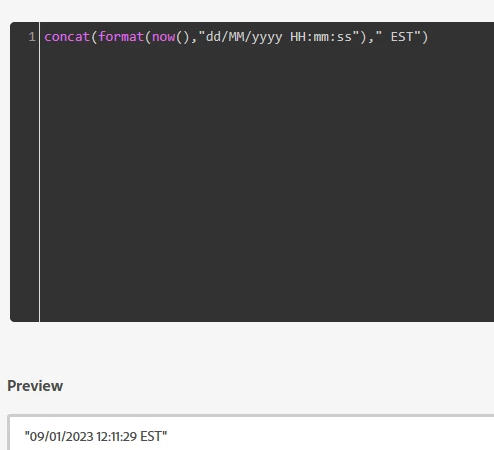
concat(format(context.journey.events.`eventId`.timestamp,"dd/MM/yyyy HH:mm:ss")," EST")


Working example:


1 reply

Manoj_Kumar
Community Advisor
Manoj_KumarCommunity AdvisorAccepted solution
Community Advisor
January 9, 2023

Hello @rupaul_20 


You can use this code

concat(format(context.journey.events.`eventId`.timestamp,"dd/MM/yyyy HH:mm:ss")," EST")


Working example:


Manoj  | https://themartech.pro
SatheeskannaK
Community Advisor
Community Advisor
January 9, 2023

@rupaul_20,


One thing to either consider or make sure that the event id timestamp that you capture in AJO is in EST. Usually, the default timestamp will be on UTC.


Thanks!

Thanks, Sathees