Level 4
Jan 29, 2024 1:08 PM UTC
Question

Content Template Creation Via API

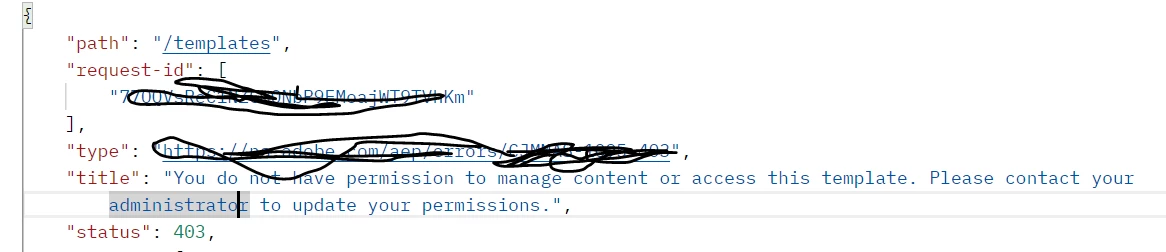
While creating Email template API, I am facing a challenge where I am getting a 403 error saying "You do not have permission" attaching screenshot for reference.

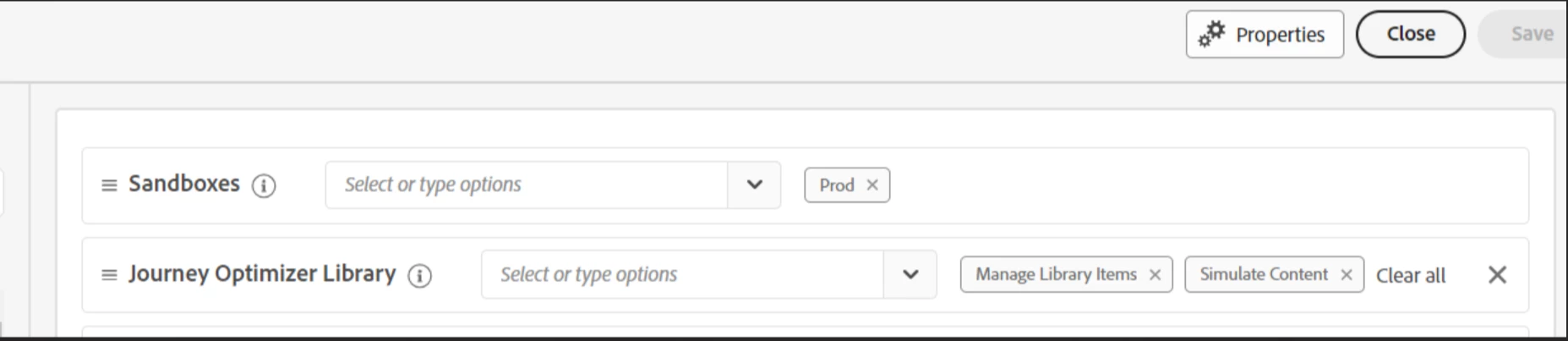
I can see that I have Manage library items permission included in the Content Library Manager product profile (Screenshot attached).

I also have API enabled for my profile.

What could be the other reason, I am getting errr saying "You do not have permission to manage content or access this template. Please contact your administrator to update your permissions"


This post is no longer active and is closed to new replies. Need help? Start a new post to ask your question.

4 replies

Mohan_Dugganab
Adobe Employee
Adobe Employee
Jan 29, 2024 1:13 PM UTC

Kindly check if "Assign API to a role" step is performed as well


Reference - 

https://experienceleague.adobe.com/docs/experience-platform/landing/platform-apis/api-authentication.html


Translate
Level 4
Jan 29, 2024 1:33 PM UTC

Thanks for the reply @mohan_dugganab 


Yes the API is enabled for the profile. I had added screenshot as well. I made sure correct Technical Account Id is configured with the profile.


Translate
Community Advisor
Jan 29, 2024 1:38 PM UTC

@mustufam5967803 Are you referring any asset/image in html? do you have access to Assets essentials?

Translate
Level 4
Jan 29, 2024 1:47 PM UTC

@anuhya-y 

For now I am only passing Plain-text in HTML. But yes I have access to DAM Asset essentials.

Translate
