
Cobe base experience - how to add asset from AEM Assets | Community
Skip to main content
Michael_Soprano
Level 10
July 2, 2026
Question

Cobe base experience - how to add asset from AEM Assets

  • July 2, 2026
  • 1 reply
  • 27 views

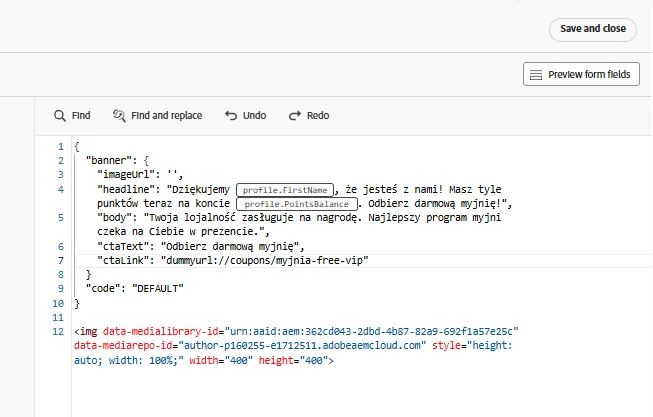
I do not see any option to change between HTML & JSON

When I add image from AEM Assets in HTML

How to add that html to JSON?
 

1 reply

Pulkit_Jain_
Adobe Employee
Adobe Employee
July 2, 2026

@Michael_Soprano 

CBE code editor has an explicit HTML / JSON mode and you should switch it to JSON (the {} icon) before pasting/authoring raw JSON. 

If you add AEM Assets while the editor is in HTML mode, the payload is treated as HTML. Recommended approach for JSON:

{
"image": "https://your-aem-asset-url.jpg"
}

If you must include HTML inside JSON:

{
"html": "<img src=\"https://your-aem-url.jpg\" />"
}