

Build Once, Reuse Everywhere: Why Journey Fragments Will Change How Your Team Works
The Monday morning that never ends
Picture this: it's Monday, and Priya, a journey orchestration lead at a retail brand, has three journeys on her plate. A loyalty re-engagement flow. A trial-to-paid conversion path. A seasonal promotion for a new product line.
Each journey needs the same opening move: read the audience, run an eligibility filter, and drop anyone who doesn't qualify. Priya has built that logic at least a dozen times. She knows it by heart. She also knows that if she copies it from an old journey, she'll spend the next hour untangling node references, fixing namespace mismatches, and wondering whether this version matches the one her colleague Marcus built last month.
By Tuesday, she's still wiring up the same three nodes. Again.
This is the quiet tax of journey building — not the creative work of designing a great customer experience, but the repetitive work of rebuilding logic your team already trusts. Journey Fragments exist to eliminate that tax.
What if your best journey logic lived in one place?
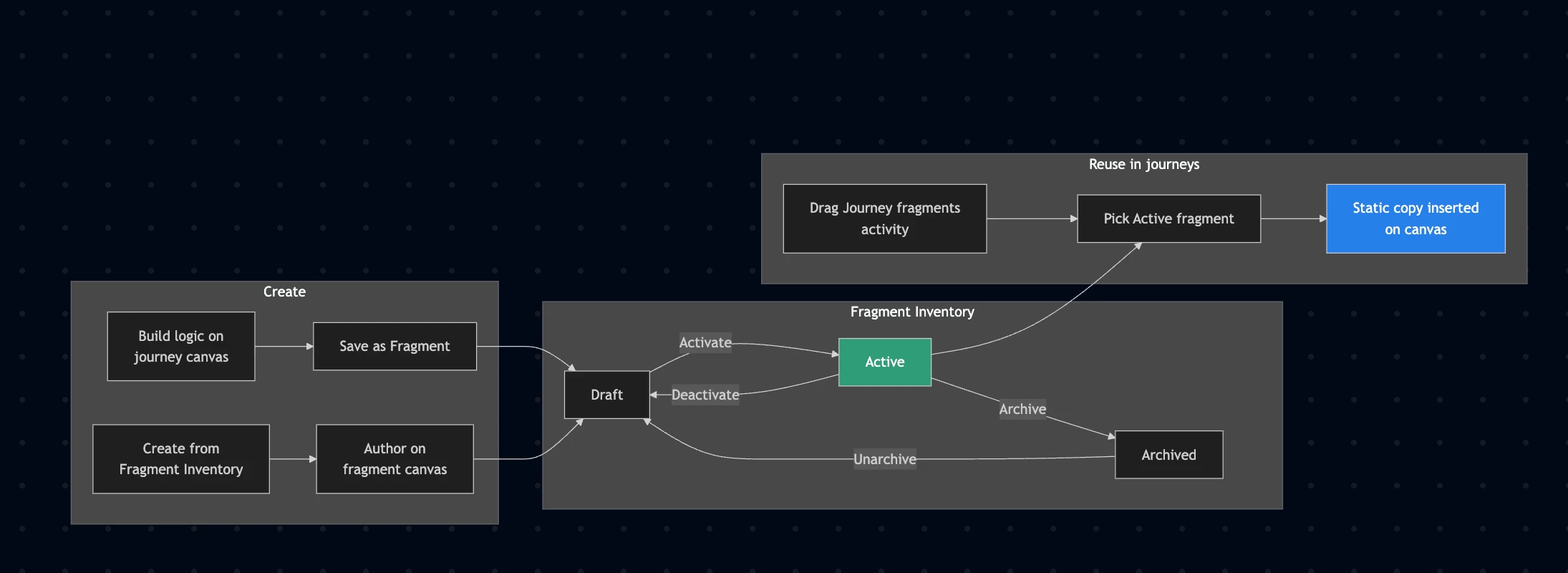
Journey Fragments are reusable blocks of journey logic — a connected set of nodes you build once and drop into any journey across your sandbox. Think of them less like a template document and more like a proven recipe your whole team can cook from.
An eligibility check. A preferred-channel router. A three-step welcome sequence. A "did they open the email?" reaction loop with a reminder. These aren't one-off canvas experiments anymore. They're assets — authored, versioned, and stored in a dedicated Fragment Inventory under Journeys → Fragments.
When Priya finishes her eligibility logic in a test journey, she selects the nodes on the canvas, clicks Save as Fragment, gives it a name, and moves on. Next time Marcus needs the same pattern, he drags the Journey fragments activity from the left rail, picks Standard Eligibility Check from the picker, and drops it in. Done.
No copy-paste archaeology. No "which journey had the good version?" Slack threads.
Two paths in, one library out
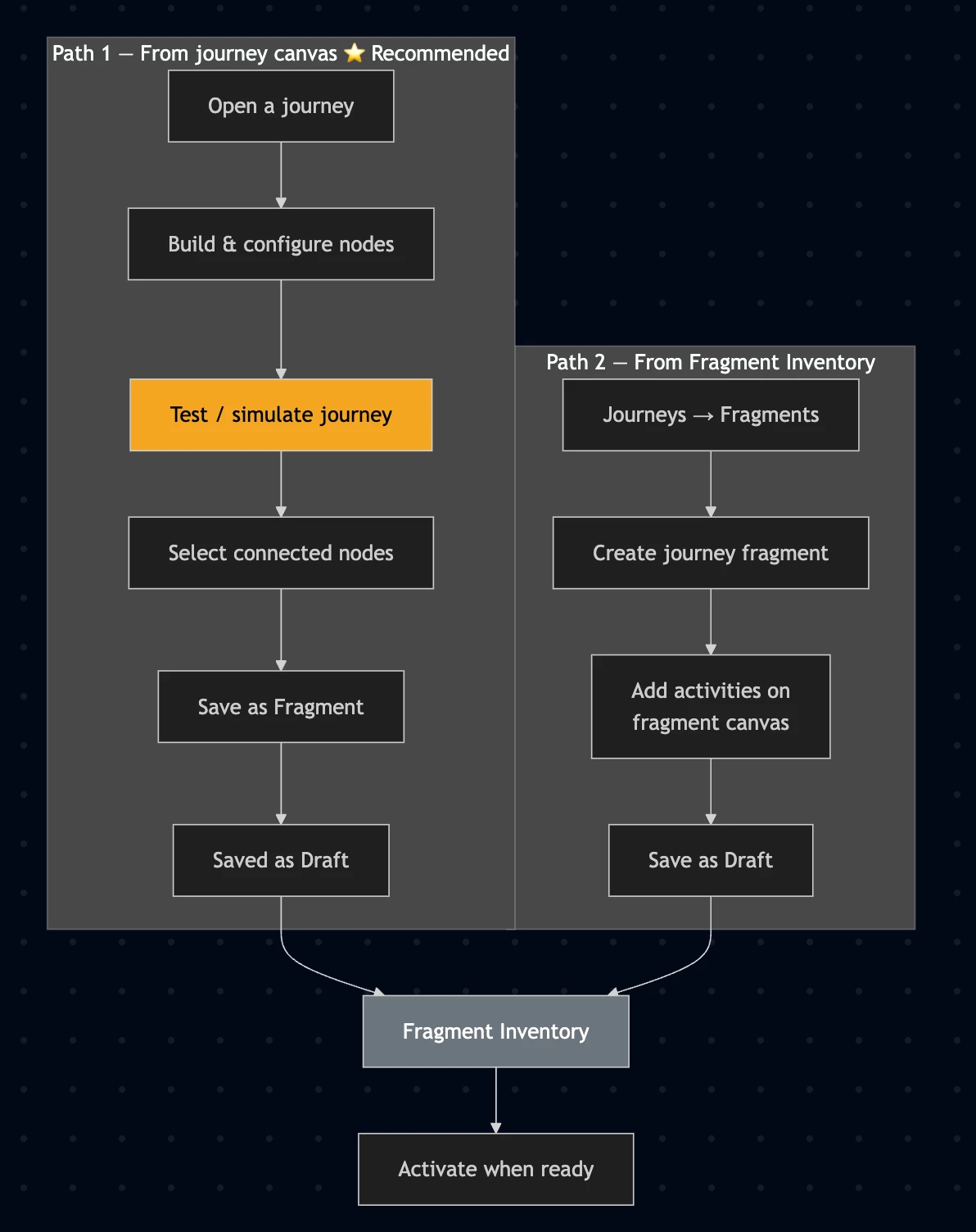
There's no single "right" way to create a fragment — and that's intentional.
From the canvas (the path most teams love): Build and test your logic inside a real journey first. Run simulation. Make sure the nodes behave the way you expect. Then select them and save. This is the recommended path when accuracy matters — because the fragment editor itself doesn't offer test mode or simulation. You're authoring logic, not guessing at it.
From the Fragment Inventory: Start fresh when you already know exactly what you're building — a simple channel router, a timed wait sequence, something you've validated mentally and want to formalize. Click Create journey fragment, build on the fragment canvas, save as draft, activate when ready.
Either way, the output is the same: a named, reusable piece of journey logic sitting in your team's shared library.
From draft to deployed — the lifecycle that keeps things sane
Fragments aren't wild-west copy-paste. They follow a clear lifecycle:
- Draft — work in progress, editable, not yet available in the picker
- Active — validated and ready to insert into journeys
- Archived — retired from use, but preserved for reference
Only draft fragments can be edited or deleted. To change an active one, deactivate it first. When you're ready to share it with the team, activate it — most of the same validation checks that run during journey publication apply here too.
One thing worth knowing upfront: contextual attributes and governance policies aren't fully evaluated at activation time. Those checks happen when the fragment is actually inserted into a journey and runs in context. That's by design — a fragment is portable logic; the journey is where it meets your specific audience and rules.
Drop it in. Move on.
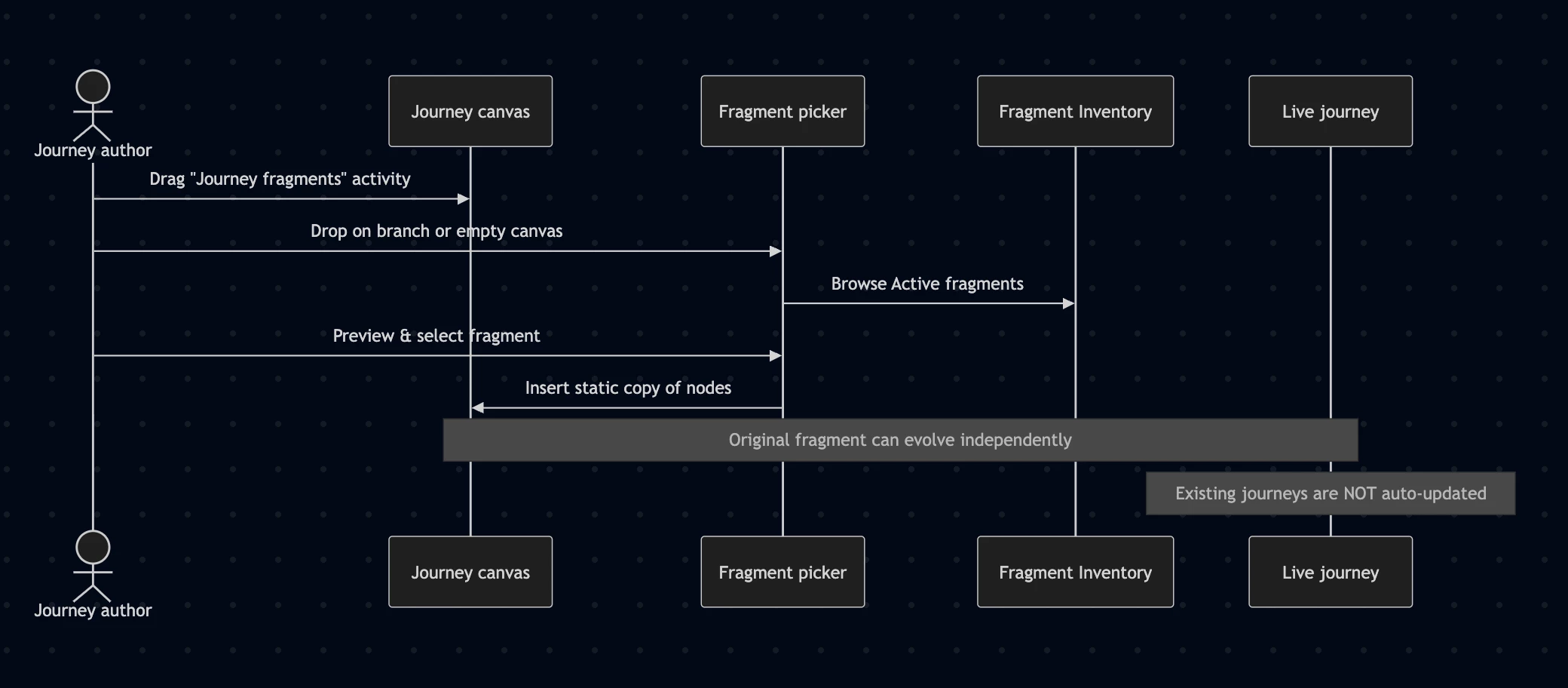
Using a fragment is deliberately simple:
- Open your journey
- Drag Journey fragments from the activity rail
- Drop it onto a branch — or onto an empty canvas if the fragment starts with a Read Audience, Audience Qualification, or Event node
- Browse or search the picker, preview if you want, select, and insert
The nodes appear on your canvas at the drop point, fully configured, ready to connect to the rest of your journey.
Here's the part that surprises some teams the first time: inserting a fragment creates a static copy. If Priya updates the original "Standard Eligibility Check" fragment next quarter, journeys that already used it won't automatically change. That's a feature, not a bug — it means existing live journeys stay stable while your library evolves. When you want the new version, you insert it fresh.
Four patterns teams are already reusing
The best fragments aren't exotic. They're the logic your team builds over and over:
Eligibility checks — Read Audience plus your standard filters. Same entry criteria, every journey, every time.
Preferred channel routing — Email, push, or SMS based on profile preference. One fragment, every outbound journey.
Onboarding welcome sequences — Three timed messages introducing a product. Swap the audience, keep the sequence.
Reaction-based reminders — Send an email, wait for an open, nudge if nothing happens. The nurturing pattern that used to take an afternoon now takes a drag-and-drop.
These aren't abstract examples. They're the patterns that turn a two-day journey build into a two-hour one.
A few guardrails worth knowing (without the manual feel)
Every good reusable system has boundaries. Journey Fragments keep things manageable:
- One entry path per fragment — no multi-fork selections
- Up to 20 nodes per fragment
- No Jump activities inside fragments
- Only connected nodes can be saved together
- Up to 200 active fragments per sandbox
- Journeys on the old stack (inline campaigns) need to be duplicated to the current stack first
These limits aren't there to frustrate you. They keep fragments focused — small enough to understand, large enough to be genuinely useful.
And if you're wondering: Journey Fragments are not content fragments. Content fragments are reusable email components — headers, footers, blocks. Journey Fragments are reusable logic. Different problem, different tool. AEM Content Fragments are a third thing entirely — content authored in Experience Manager, not journey orchestration.
What this means for your team
Back to Priya. By Wednesday — not Tuesday — she's shipped all three journeys. The eligibility check came from the fragment library. Marcus's preferred-channel router dropped in without a meeting. The welcome sequence was the same one the onboarding team activated last month.
What changed wasn't her skill. It was the infrastructure around her work.
Journey Fragments don't replace the craft of journey design. They protect it — by removing the repetitive rebuilds that eat your week and introduce inconsistency across your sandbox. Build once. Reuse everywhere. Spend your time on the journey, not on the plumbing.
Real-world example: Post-purchase loyalty journey
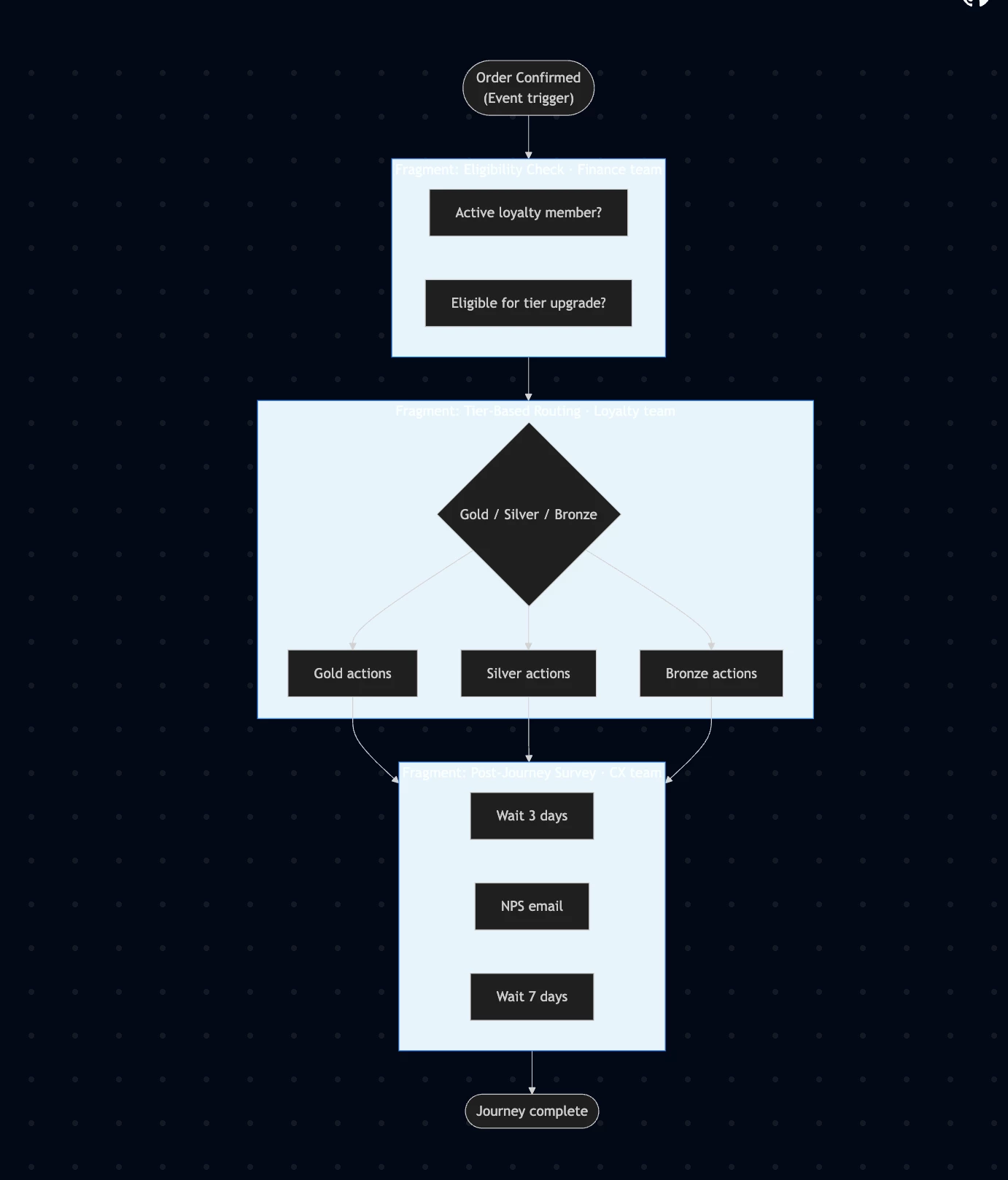
Here’s how a retail brand might use Journey Fragments to build a post-purchase loyalty journey:
| Step | What happens | Fragment | Owner |
|---|---|---|---|
| Trigger | Order Confirmed (Event) | — | — |
| 1 | Active loyalty member? Eligible for upgrade? | Eligibility Check | Finance team |
| 2 | Branch by tier: Gold / Silver / Bronze actions | Tier-Based Routing | Loyalty team |
| 3 | Wait 3 days → NPS email → Wait 7 days | Post-Journey Survey | CX team |
Each fragment was created and owned by a different team. The journey author assembled them in under 30 minutes — with confidence that the logic was production-tested and team-approved.