Amounts of email drop into "Bounces for outbound channels(AJO)" category on my email journey | Community
Skip to main content
New Member
March 31, 2025
Solved

Amounts of email drop into "Bounces for outbound channels(AJO)" category on my email journey

  • March 31, 2025
  • 1 reply
  • 739 views

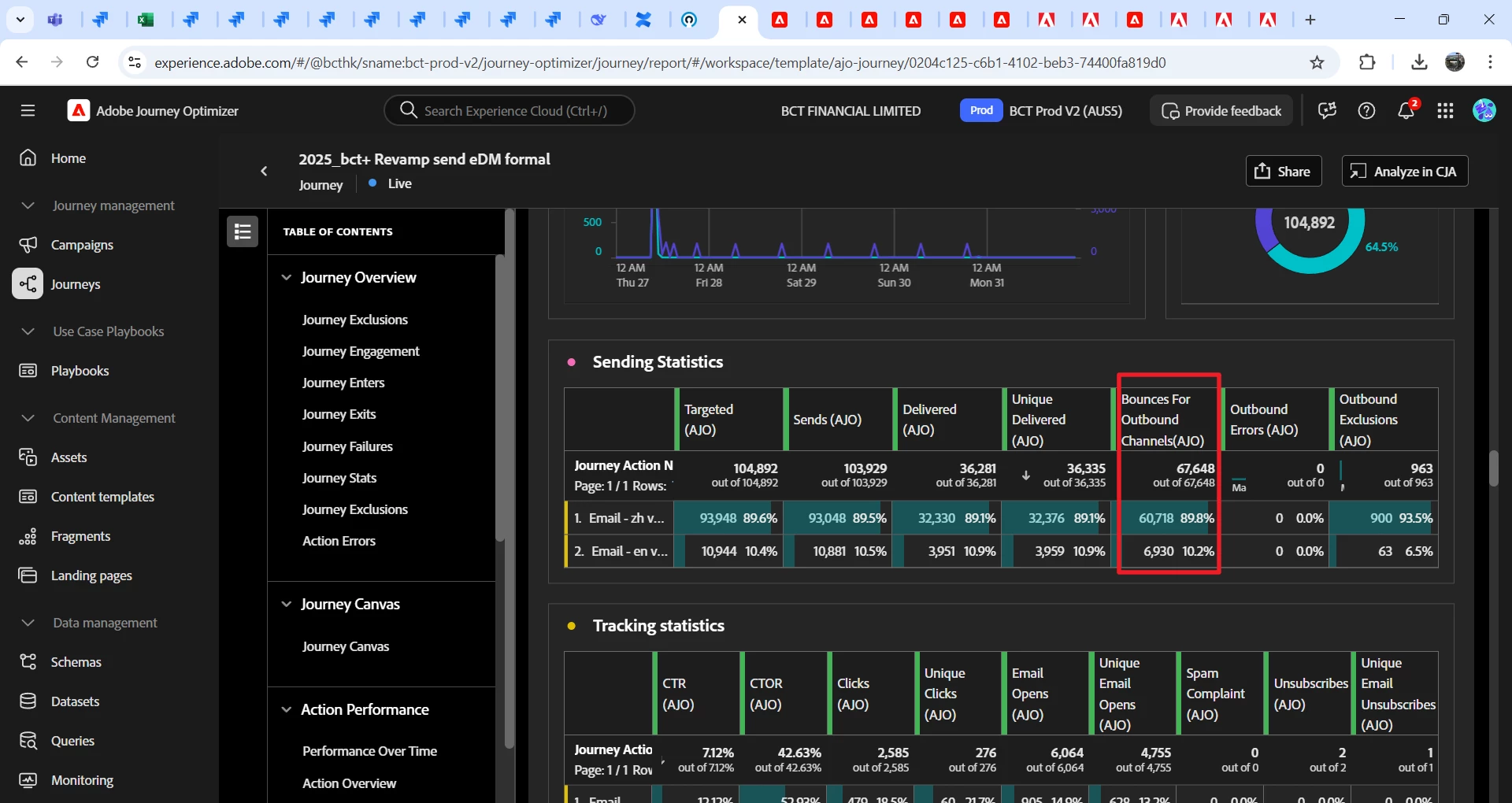
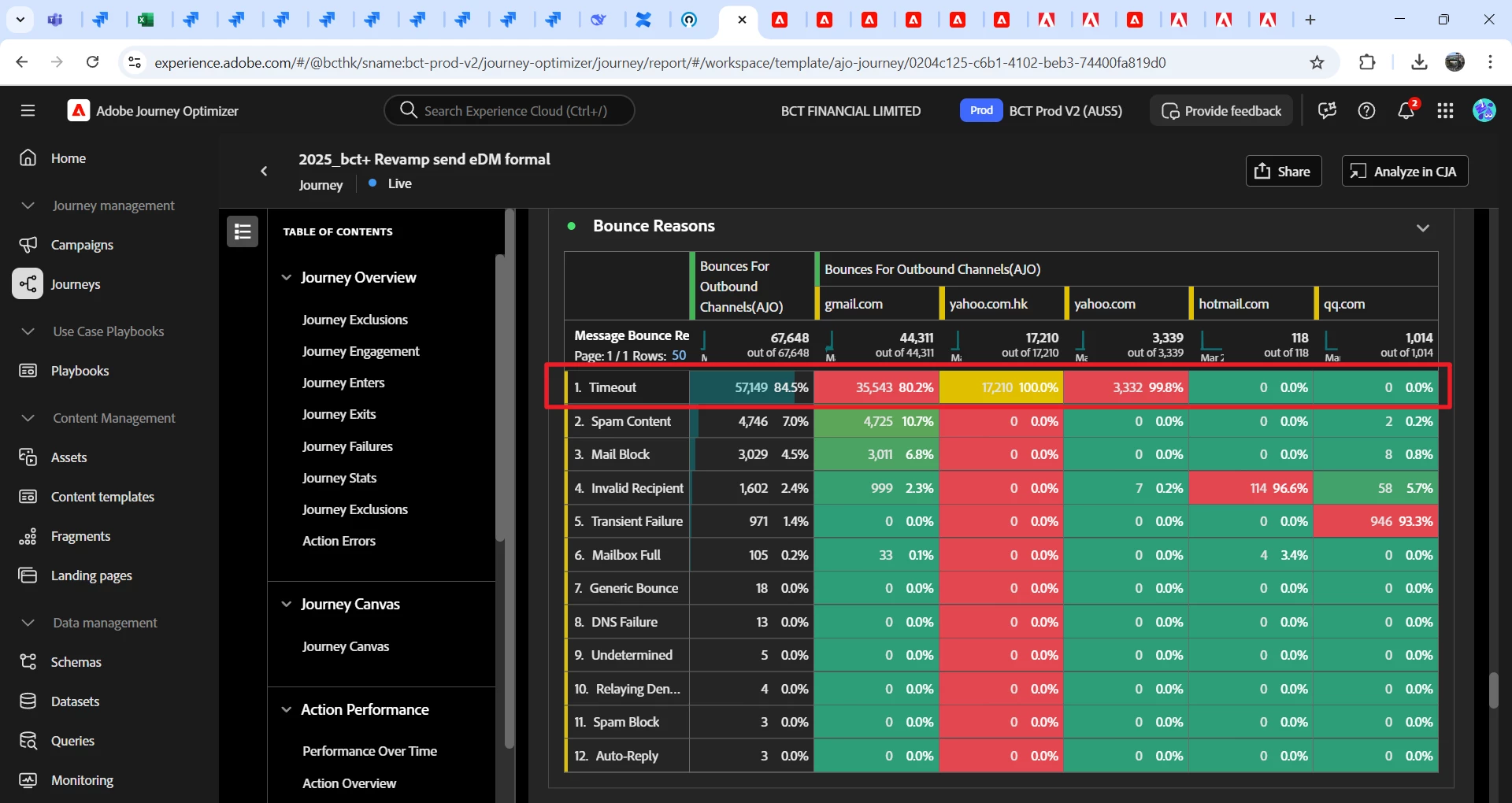
Amounts of email drop into "Bounces for outbound channels(AJO)", and I checked most of the reason is "Timeout". I am wondering about the root cause and how to fix it?


This post is no longer active and is closed to new replies. Need help? Start a new post to ask your question.
Best answer by SatheeskannaK

@jacobsing Have you ever created a deliverability strategy before blasting out 100,000 emails in a single day? If you haven't, it's a good idea to team up with an Adobe deliverability consultant to tackle any potential issues. They can offer you a solid strategy and helpful tips for managing such a large volume of emails, taking various factors into account. I recommend getting in touch with them right away to review the journey report and develop effective plans to address any challenges.

Sharing the deliverability guide: https://experienceleague.adobe.com/en/docs/journey-optimizer/using/reporting/deliverability/deliverability

https://experienceleague.adobe.com/en/docs/journey-optimizer/using/configuration/implement-ip-warmup-plan/ip-warmup-gs

1 reply

DavidKangni
Community Advisor
Community Advisor
March 31, 2025

@jacobsing 


First of all, I will suggest to check if you're not sending too much emails using few IPs addresses. 

If it's not the case, you can open a ticket with Adobe Support or reach out to your deliverability consultant (if you have the Deliverability package).

I have been seeing quite a bit of these at Gmail across the report lately, it is due to people’s accounts going over the storage limits and or being abandoned. It’s most likely time catching up with these accounts. 


Here are some of the reason I got from Deliverability team on my timeout issue


>>>552-5.2.2 The recipient's inbox is out of storage space and inactive. Please 552-5.2.2 direct the recipient to 552 5.2.2 https://support.google.com/mail/?p={hash} {hash}-{base64} – gsmtp

>>>554 5.7.1 [CS01] Message rejected due to local policy. Please visit https://support.apple.com/en-us/HT204137
 >>>552 5.2.2 ...@... user is over quota


Thanks,

 David


David Kangni
JacobsingAuthor
New Member
April 1, 2025

Hi David,


May I know how to check IP address via AJO. In this round of email journey, we blasted out 100K emails in total and we were using AJO's mail server. I would like to know if we exceed maximum emails trigger amounts on AJO? How many emails can be sent at once in a single email journey with AJO?

SatheeskannaK
Community Advisor
SatheeskannaKCommunity AdvisorAccepted solution
Community Advisor
April 1, 2025

@jacobsing Have you ever created a deliverability strategy before blasting out 100,000 emails in a single day? If you haven't, it's a good idea to team up with an Adobe deliverability consultant to tackle any potential issues. They can offer you a solid strategy and helpful tips for managing such a large volume of emails, taking various factors into account. I recommend getting in touch with them right away to review the journey report and develop effective plans to address any challenges.

Sharing the deliverability guide: https://experienceleague.adobe.com/en/docs/journey-optimizer/using/reporting/deliverability/deliverability

https://experienceleague.adobe.com/en/docs/journey-optimizer/using/configuration/implement-ip-warmup-plan/ip-warmup-gs

Thanks, Sathees