Level 2
April 9, 2026
Question

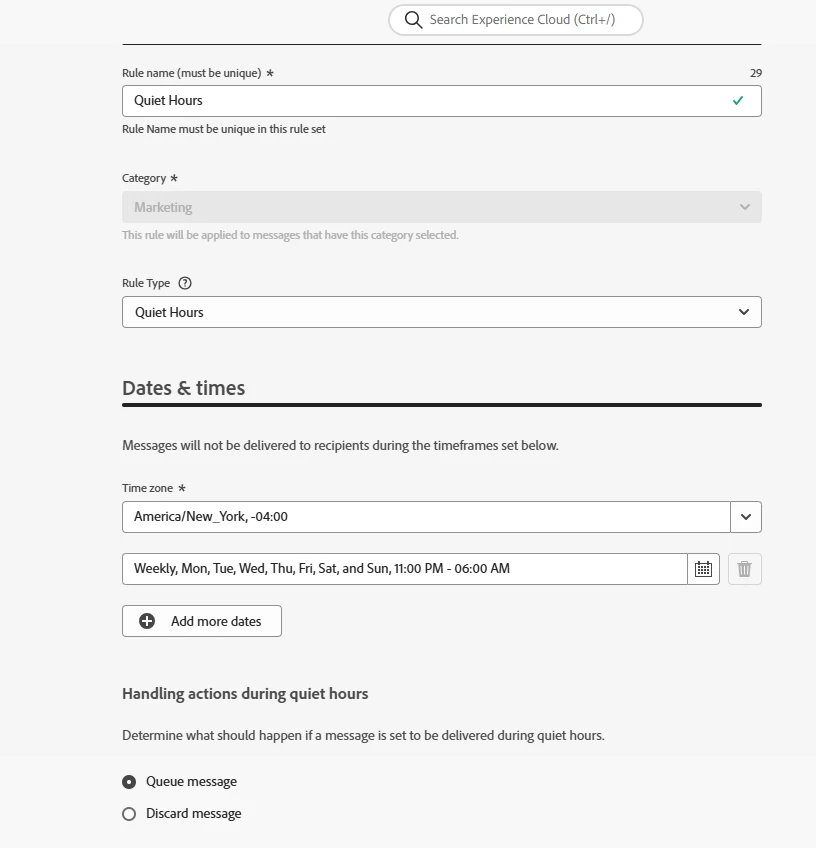
AJO Quiet Hours: Does queued message use real-time or event-time attribute values?

  • April 9, 2026
  • 2 replies
  • 64 views

In AJO, if a message is queued during quiet hours and contains a dynamic attribute (e.g, price) that changes during that time: 
Will the message use the value from when the event was triggered or the latest value at the time of delivery after quiet hours? 
Our requirement is in the night time, price of products change ($10 to $9) so we have to ensure that the profiles paused in quiet hours are getting sent the email with correct price ($10) -- approach for this. 
Will using “Discard” option in Business Rules in this requirement work?. 


2 replies

SatheeskannaK
Community Advisor
Community Advisor
April 9, 2026

@shivangisingh 

When a message is delayed in the queue due to Quiet Hours, the value utilized during message delivery is determined by whether Event Contextual Attributes or Profile Attributes.

  • Contextual Attributes (Trigger Event Data): These values are captured at the precise moment the triggering event occurs.
    • For instance, if the price ($10) is within the event payload, that specific value is stored with the journey instance. Consequently, even if the message is held in the queue for several hours, it will still display $10 upon final transmission.
  • Profile/Look-up Attributes: If the email retrieves the price from a Profile Attribute or a Dataset lookup, it typically fetches the most current available value at the time of message execution.. In this scenario, should the price in the database update to $9 while the message is queued, the profile will receive the email reflecting the $9 price.
  • If choose discard, the email delivery for that profile discarded.


Thanks, Sathees
Pulkit_Jain_
Adobe Employee
Adobe Employee
April 13, 2026

@shivangisingh 

Queued Quiet Hours messages use the attribute values at the time of actual send, not at the time the event was triggered. So if the price changes from $10 → $9 overnight, the queued message will send with $9.

To lock in the original value ($10), you must store the price at event time and use that in the message.

Using Quiet Hours → Discard will prevent sending entirely, so it does not meet your requirement unless you design a separate resend flow.

Level 2
April 13, 2026

A little correction to what I mentioned earlier. I have the requirement that the during the quiet hours, the price would change from 10$ to 9$, I want to show my customers the updated price. Currently, my price attribute is an event attribute. 
So, once the quiet hours is over, the customers should get the email with updated price, with what it is showing in the website currently. 
Will queue message works for this requirement? 

Level 2
April 13, 2026

I am using the price attribute in the email. So what price will it show to the customers.