AJO Dataset lookup in Advanced Expression Editor is not working | Community
Skip to main content
Level 2
March 11, 2026
Solved

AJO Dataset lookup in Advanced Expression Editor is not working

  • March 11, 2026
  • 3 replies
  • 79 views

Hello Everyone,


  1. Added datasetLookup Activity in the journey with name “MyDatasetLookUpActivity” and other configurations are set up properly as per here . https://experienceleague.adobe.com/en/docs/journey-optimizer/using/orchestrate-journeys/about-journey-building/dataset-lookup#:~:text=Use%20enriched%20data%20in%20the,Push%2C%20SMS%2C%20etc.)
  2. However, when you use the below syntax to fetch the attribute through the look up syntax defined in the above document (sample syntax added below) in the Advanced Expression editor. It is Throwing Dataset look up not found error in the screen.

@datasetLookup{MyDatasetLookUpActivity.entity._partner.loyaltyTier} == 'Platinum'


Anyone faced this issue? 


Note the schema and dataset has been configured properly and works fine when you Email Personalization editor syntax.

 

Best answer by SatheeskannaK

@shashi_c23 I actually ran into the exact same problem and figured it out.

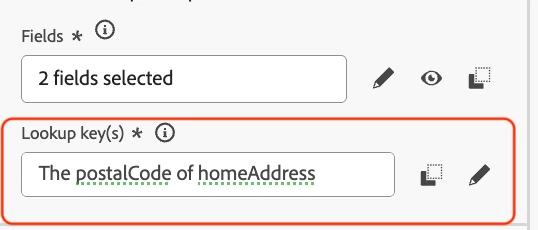
Here's the trick: When you're setting up the lookup key(s) in your dataset lookup activity, make sure you switch to the advanced mode instead of using the simple one. The screenshot below shows how I picked postalCode using that advanced mode. Hope this helps!

Condition activity screenshot:


3 replies

Level 2
March 16, 2026

@shashi_c23 Is the error within the ‘dataset lookup’ activity? If so, in the lookup key you can only define an attribute which is a string or list of strings.

Refer - https://experienceleague.adobe.com/en/docs/journey-optimizer/using/orchestrate-journeys/about-journey-building/dataset-lookup#configure

  • Keys can be expressions derived from the journey context, such as SKUs, email IDs, or other identifiers. Example: @profile.email or list(@event{purchase_event.products.sku}).

This syntax - @datasetLookup{MyDatasetLookUpActivity.entity._partner.loyaltyTier} == 'Platinum' is specific to the condition activity’s advanced expression editor but not for the ‘lookup key’ advanced expression editor. Hope this helps!

Level 2
March 16, 2026

Error is not in the look up activity but in the next condition activity.

Level 2
March 16, 2026

Thanks for confirming! Technically the dataset lookup activity is supposed to show up in the ‘context attributes’ in the condition. I saw the same error when I tried to use advanced expression editor when dataset lookup wasn’t available in the context attributes. The error resolves when it shows up and the syntax mentioned worked as it should.


Level 2
March 16, 2026

@Ivan_Mi - Do you know what’s going on here as I have seen your replies for other similar post.

SatheeskannaK
Community Advisor
SatheeskannaKCommunity AdvisorAccepted solution
Community Advisor
March 17, 2026

@shashi_c23 I actually ran into the exact same problem and figured it out.

Here's the trick: When you're setting up the lookup key(s) in your dataset lookup activity, make sure you switch to the advanced mode instead of using the simple one. The screenshot below shows how I picked postalCode using that advanced mode. Hope this helps!

Condition activity screenshot:


Thanks, Sathees
Level 2
March 17, 2026

@SatheeskannaK  - Wow. This worked. Thank you for the workaround.