AJO Access Email Body in the Journey | Community
Skip to main content
New Member
June 5, 2024
Solved

AJO Access Email Body in the Journey

  • June 5, 2024
  • 2 replies
  • 1275 views

Hi,


Is there a way to access Email body in the AJO Journey? A variable/property of the email action which I can access in the custom action? I want to post the body to an API through custom action so that I could save it and make it available to the customer support staff. 
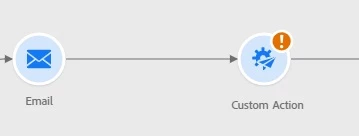
 

I have looked at BCC but it is not a cost affective way to achieve this. BCC feature usage gets counted against entitled message quota.


Is there any other way to pull out this information from AJO? Any API/webhook


thanks.

This post is no longer active and is closed to new replies. Need help? Start a new post to ask your question.
Best answer by DavidKangni

@adeelkh1 

for all channels, you can use the ‘Template’ field in the Entity Dataset, which contains the details of the non-personalized message templates. Export the dataset with this field to save metadata such as: who sent the message, to whom and when. Note that personalized data is not exported - only the template (format and structure of the message) is taken into account.


Use custom action  to transfer the data payload  and then an internal system has to know how to assemble the mirror page links using the data and the templates.


Thanks,

David


2 replies

SatheeskannaK
Community Advisor
Community Advisor
June 6, 2024

@adeelkh1 Usually custom action allows us to transfer the data payload rather than the email content. You can take a look at the content APIs if that's helpful.

Thanks, Sathees
DavidKangni
Community Advisor
DavidKangniCommunity AdvisorAccepted solution
Community Advisor
June 7, 2024

@adeelkh1 

for all channels, you can use the ‘Template’ field in the Entity Dataset, which contains the details of the non-personalized message templates. Export the dataset with this field to save metadata such as: who sent the message, to whom and when. Note that personalized data is not exported - only the template (format and structure of the message) is taken into account.


Use custom action  to transfer the data payload  and then an internal system has to know how to assemble the mirror page links using the data and the templates.


Thanks,

David


David Kangni
AdeelKh1Author
New Member
June 13, 2024

thanks @davidkangni 


do you have an example that shows how to assemble the mirror page? Once the mirror page is assembled, would it trigger "Open" tracking on the page?


thanks