Why doesn't custom field group show in schema editor with field under it?. | Community
Skip to main content
Level 4
January 28, 2025
Solved

Why doesn't custom field group show in schema editor with field under it?.

  • January 28, 2025
  • 2 replies
  • 1016 views

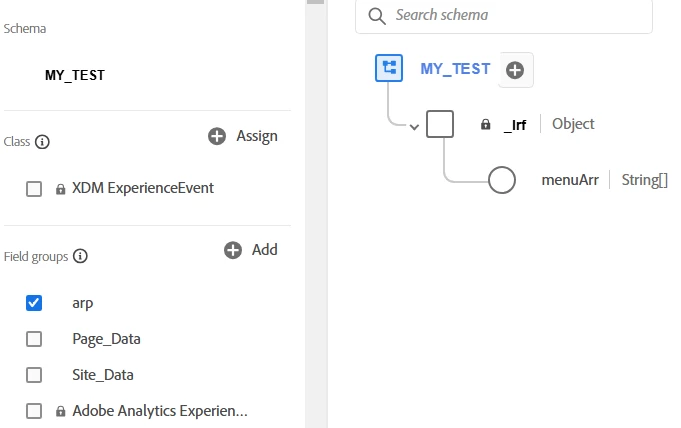
I created a custom field group (arp) and added a field, "menuArr". What I don't understand is why doesn't the schema editor show the new field group as a node under "_Irf" Also the path for menuArr shows as "_irf.menuArr" I would have expected the path to be "_irf.arp.menuArr" The right rail does say it's assigned to the "arp" Field Group.


Thanks

This post is no longer active and is closed to new replies. Need help? Start a new post to ask your question.
Best answer by Harveer_SinghGi1

Hi @michaeljo13 ,

This is working as designed as the name of the field group is not added to the paths of the fields grouped under it. If there is a hierarchy that you'd want to see in the field paths in a field group you'd have the create that hierarchy using Object data type while creating the fields for your field group.

So, for creating field path as "_irf.arp.menuArr" within a field group name "arp" you'd need to follow below steps,

  • Create a custom field group named "arp"
  • Add a field to this field group with below settings,
    • Name: arp
    • Type: Object
  • After this step you should see field "_irf.arp" appearing in your schema. Click on + sign next to this field to add another custom field with below settings,
    • NamemenuArr
    • Type: String //or any other type of your choice

Once you complete these steps you should see the path hierarchy "_irf.arp.menuArr" that you are expecting. You can follow Add fields to a field group documentation for better understanding this process.

Cheers!
2 replies

brekrut
Adobe Employee
Adobe Employee
January 28, 2025

How did you create the new field group?  Was this via the API or UI?


Can you show the new field group you created?

Level 4
January 29, 2025

It was by the UI.

Harveer_SinghGi1
Community Advisor and Adobe Champion
Harveer_SinghGi1Community Advisor and Adobe ChampionAccepted solution
Community Advisor and Adobe Champion
January 29, 2025

Hi @michaeljo13 ,

This is working as designed as the name of the field group is not added to the paths of the fields grouped under it. If there is a hierarchy that you'd want to see in the field paths in a field group you'd have the create that hierarchy using Object data type while creating the fields for your field group.

So, for creating field path as "_irf.arp.menuArr" within a field group name "arp" you'd need to follow below steps,

  • Create a custom field group named "arp"
  • Add a field to this field group with below settings,
    • Name: arp
    • Type: Object
  • After this step you should see field "_irf.arp" appearing in your schema. Click on + sign next to this field to add another custom field with below settings,
    • NamemenuArr
    • Type: String //or any other type of your choice

Once you complete these steps you should see the path hierarchy "_irf.arp.menuArr" that you are expecting. You can follow Add fields to a field group documentation for better understanding this process.

Cheers!

Level 4
January 29, 2025

Thank you again! That is very helpful! Much appreciated.