Unable to create a new property | Adobe Higher Education
Skip to main content
Level 2
October 10, 2017
해결됨

Unable to create a new property

  • October 10, 2017
  • 7 답변들
  • 5297 조회

Hi Team,

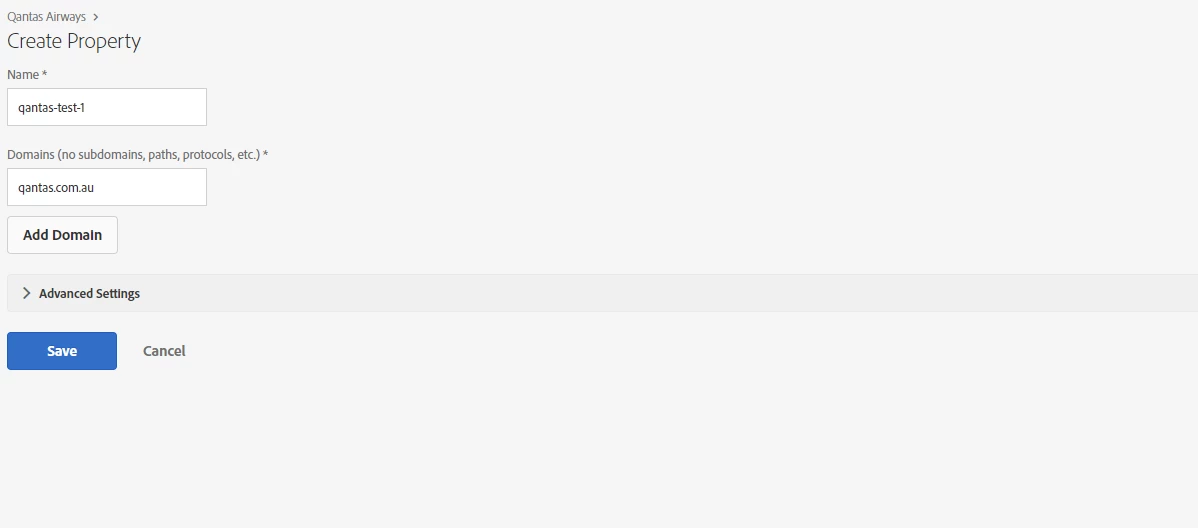
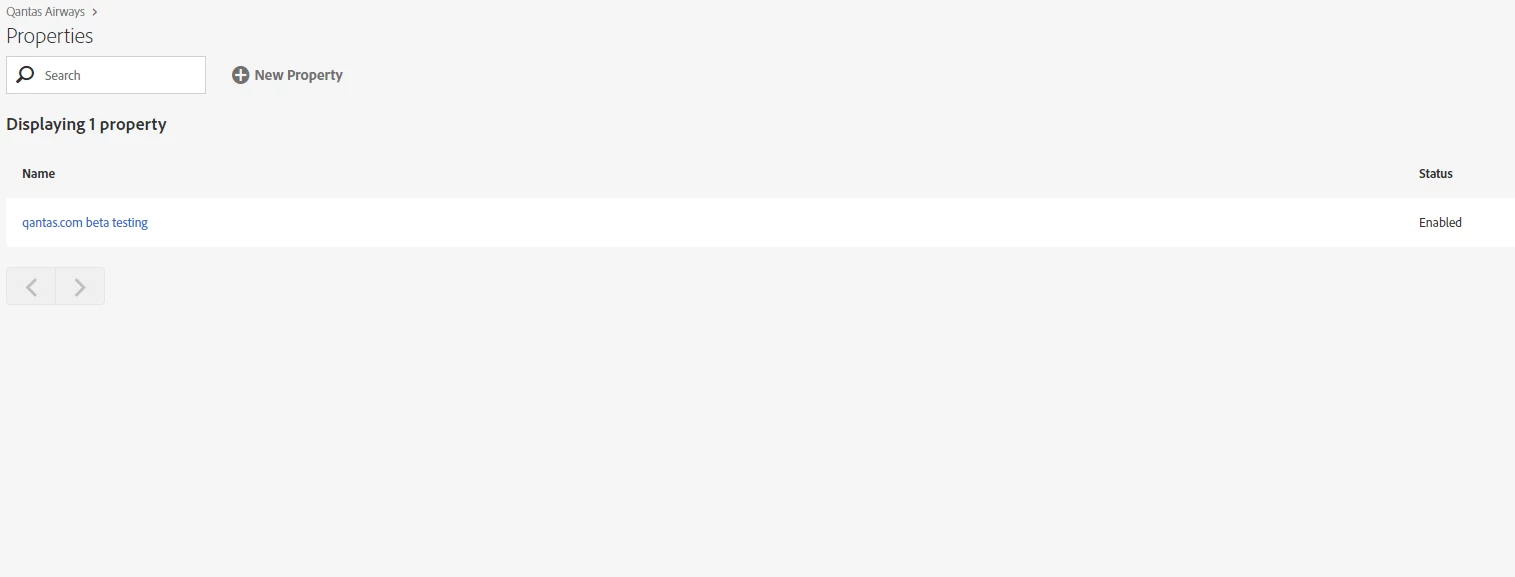
We are unable to create a new property in launch. It is allowing us to add the property but nothing is displayed for working in the listing.
이 주제는 답변이 닫혔습니다.
최고의 답변: JArchibald-1

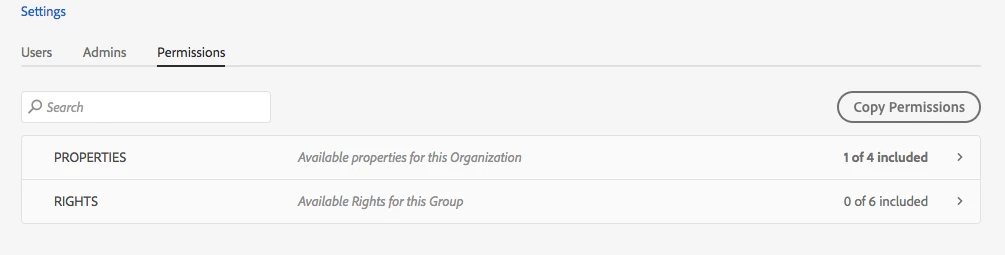
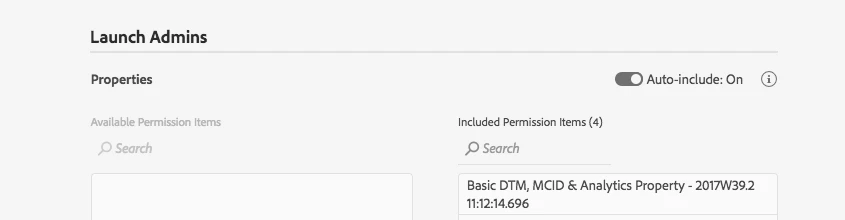
This is a permissions issue and can be solved by selecting "Auto-Include On"  in the property permissions for the Product config,

Or selecting whichever Properties you want the group to have access to.

The Permissions Tab for the product configuration looks like this:  notice how the Properties are only including 1 of X:

if you edit the properties you have it auto include as they are added:

This way all properties are visible as they are added

NOTE: the screen shots are from my property not "Qantas Airways"

7 답변

brandon_pack
Adobe Employee
Adobe Employee
October 13, 2017

Hey Tej - we are looking into it.  We still cannot replicate it on our end but we may add our own user to your property to see if we can replicate the issue.

If you can send us the browser console output and the network tab info, that may help us troubleshoot.

Thanks!

Adobe Employee
October 13, 2017

When we login as System Admins, we see all the properties you have been trying to create,  so they are getting created, just they are not visible to you for whatever reason.

have you tried logging in via an Incognito browser window?   just to ensure there is not erroneous caching that may be going on.

here is the data i would like to see to debug further"

In Dev tools, if you open the network tab, and then refresh the property list page (click on Qantas Airaways > above the Properties label

in the network tab, filter for properties, you should see something like "properties?page[size]=10" as the name,

Select it and then past in what is retuned in the response.

Copy and paste the response into the ticket.

this will tell us if the data is getting returned and we have a display problem, or if the API is not returning all of the data.

Awesome Bug,  thanks for reporting it. 

Level 2
October 17, 2017

Hi

The following is the response in network tab

{"data":[{"id":"PR22c96953928f481e81e5881fe0a2a070","type":"properties","attributes":{"created_at":"2017-08-09T00:35:24.972Z","domains":["qantas.com"],"enabled":true,"link_delay":100,"name":"qantas.com beta testing","tracking_cookie_name":"sat_track","undefined_vars_return_empty":false,"updated_at":"2017-10-10T01:11:50.504Z"},"links":{"company":"https://mc-api-activation-reactor.adobe.io/companies/COe652ada1e9364325845d5faabeb13979","data_elements":"https://mc-api-activation-reactor.adobe.io/properties/PR22c96953928f481e81e5881fe0a2a070/data_elements","environments":"https://mc-api-activation-reactor.adobe.io/properties/PR22c96953928f481e81e5881fe0a2a070/environments","extensions":"https://mc-api-activation-reactor.adobe.io/properties/PR22c96953928f481e81e5881fe0a2a070/extensions","rules":"https://mc-api-activation-reactor.adobe.io/properties/PR22c96953928f481e81e5881fe0a2a070/rules","self":"https://mc-api-activation-reactor.adobe.io/properties/PR22c96953928f481e81e5881fe0a2a070"},"meta":{"extensions_count":10,"rights":["develop","approve","publish","manage_extensions","manage_environments"]}}],"meta":{"pagination":{"current_page":1,"next_page":null,"prev_page":null,"total_pages":1,"total_count":1}}}

Even if I open it in incognito window we are facing the same issue.

Level 2
October 17, 2017

The error in console is as per the screenshot

thebenrobb
Adobe Employee
Adobe Employee
October 18, 2017

Logged as DTM-10635

Adobe Employee
October 18, 2017

This is a permissions issue and can be solved by selecting "Auto-Include On"  in the property permissions for the Product config,

Or selecting whichever Properties you want the group to have access to.

The Permissions Tab for the product configuration looks like this:  notice how the Properties are only including 1 of X:

if you edit the properties you have it auto include as they are added:

This way all properties are visible as they are added

NOTE: the screen shots are from my property not "Qantas Airways"

Level 2
October 19, 2017

Thanks for the help. This resolved the issue and the above is the correct answer.