
Unable to Connect Snowflake with AEP | Community
Skip to main content
Isha Gupta
Community Advisor and Adobe Champion
May 15, 2026
Question

Unable to Connect Snowflake with AEP

  • May 15, 2026
  • 2 replies
  • 57 views

We are trying to migrate our Snowflake authentication method to key/pair as recommended. We are following all necessary steps but still running into authentication error. Curious if anyone has done this lately and can share gotchas?
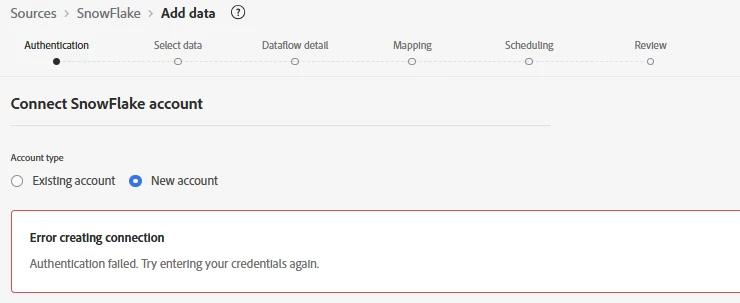
 

2 replies

Level 3
May 15, 2026

Hi ​@Isha Gupta,
It could be due to the Basic Authentication deprecation, which might be causing the error.


Regards,
Sandip

Isha Gupta
Community Advisor and Adobe Champion
May 16, 2026

Thanks ​@sandip_surse. However that’s not the issue as what I am trying here is to add a new account with key/pair authentication as our existing account is on Account Key which is now deprecated. We have raised a ticket with Adobe support and it looks like the issue is within AEP instance and client care will investigate further.

I wanted to ask here if anyone has been successful in setting up this connection recently?

Level 4
May 17, 2026

Hi ​@Isha Gupta ,


We set this up recently and ran into a few gotchas with key/pair authentication that might help while you wait on support.


The most common failure point is the private key format. AEP's Snowflake connector expects the private key in PKCS8 unencrypted format without the header and footer lines and without any line breaks just the raw base64 string. If you generated the key with a passphrase or if it still has the BEGIN PRIVATE KEY header, the authentication will fail with a generic error that doesn't tell you the real reason.


Second thing to check is the Snowflake account identifier format. AEP expects it in the format orgname-accountname, not the legacy account locator format like xy12345.us-east-1. This changed and is a frequent source of authentication failures even when the credentials themselves are correct.


Third, make sure the public key is assigned to the correct Snowflake user and that the user has not been locked out. You can verify in Snowflake by running DESC USER your_username and checking the RSA_PUBLIC_KEY field is populated correctly.


If all three of those check out and it's still failing, it may genuinely be an AEP instance-level issue as you suspected there have been intermittent connector issues with key/pair rollout. In that case the support ticket is the right path. Hope one of these helps narrow it down!
 

Isha Gupta
Community Advisor and Adobe Champion
May 18, 2026

Hey Akhil,

Thanks for your response! This is definitely helpful.

  1. We are using Base64 encoded private key without header & footer lines. Tried both with/without passphrase.
  2. For the account name, can you also specify if it needs to be in lowercase or appended with .snowflakecomputing.com? I actually tried both cases and noticed fields show green checkmark only field input is all lowercase.
  3. User validation is correct.

Support has confirmed as of now that their Flow Service API is throwing 404 error rather than Snowflake endpoints so I am holding off trying anymore (and spending so much time on this) unless they come back with a solution.
Thanks again for your time!
Best,

Isha

Level 4
May 18, 2026

Thanks for the update ​@Isha Gupta!


To answer your questions, yes the account identifier should be all lowercase, and you should not append .snowflakecomputing.com. AEP handles that internally. The format should just be orgname-accountname in lowercase, so the green checkmark behavior you noticed with lowercase input is actually correct and expected, that's AEP validating the format on the frontend.


Good to know it's confirmed on Adobe's end though, a Flow Service API 404 is infrastructure-level and only support can resolve that. Glad the checklist helped rule out the configuration side at least. Hope support gets back to you quickly!