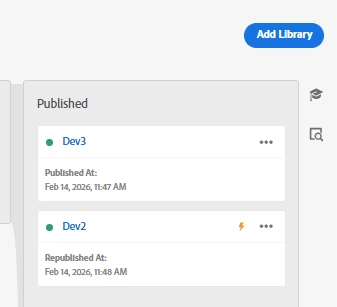
This is expected behavior in Adobe Experience Platform Data Collection. What you’re seeing is not two libraries simultaneously published to production in the conflicting sense it’s a reflection of how the publishing queue and library promotion work. Dev3 shows as Published because it completed a full publish cycle at 11:47. Dev2 shows as Republished at 11:48 because it was already in a published state and got republished, likely because a rule or data element it contained was modified and the library was republished to reflect that change without going through the full Dev → Staging → Production promotion flow again. The lightning bolt icon on Dev2 is the key detail here. That typically indicates the library has pending changes or was republished outside the normal promotion flow. Only one library is actually active on production at any given time the most recently published one takes precedence. So in your screenshot Dev2 is the active library on production since it was republished at 11:48, one minute after Dev3. The Published label on Dev3 doesn’t mean it’s currently serving on production it means it completed a publish at some point. Think of it like a deployment history rather than a simultaneous active state. To confirm which library is actually active on your production environment, check the embed code on your site and look at the library URL it will contain the library ID that maps to whichever build is actually being served.
Only Dev2 is currently live on your production environment.
In Adobe Experience Platform Data Collection the Published! column acts as a chronological ledger or history of all libraries that have ever successfully reached production.
Here is exactly how to interpret what you are seeing in your interface:
1. Chronological Version History
The "Published" column does not represent what is simultaneously active. It is an archive
Dev3was published first on Feb 14, 2026, at 11:47 AM
Dev2! was published (or republished) one minute later on Feb 14, 2026, at 11:48 AM
2. The Active Build (The Orange Lightning Bolt)!--
Look at the orange lightning bolt icon ⚡
This specific icon designates the Upstream / Active Production Library
Whichever library card holds this lightning bolt is the exact build currently served by your production embed codes.
3. Why Dev3 is Still Visible
When you push a new library to production, the previous libraries are not deleted from this screen. They remain visible so that you can
Compare versions to see what changed between Dev3and Dev2
select a previous library and Republish it, acting as an instant rollback mechanism if a newer build breaks your live site.