Rolling range Date in AXP | Community
Skip to main content
New Member
February 18, 2025
Solved

Rolling range Date in AXP

  • February 18, 2025
  • 3 replies
  • 721 views

Hello Everyone,


I want help to understand how rolling range filter work on dates in AXP.


Use case 1:

I have to run campaign on 17 Feb . For this I have to target audience with enrollment date from 30 Jan to 12 Feb(including 30Jan and 12 feb).


Use case 2:

I have to run campaign on 12 Mar . For this I have to target audience with enrollment date from 27feb to 5 Mar (including 27 feb and 5 Mar).


Is rolling date works fine , in case date lie between 2 months (example feb and march)


Thank you

This post is no longer active and is closed to new replies. Need help? Start a new post to ask your question.
Best answer by Harveer_SinghGi1

Hi @saurabhgu9 ,

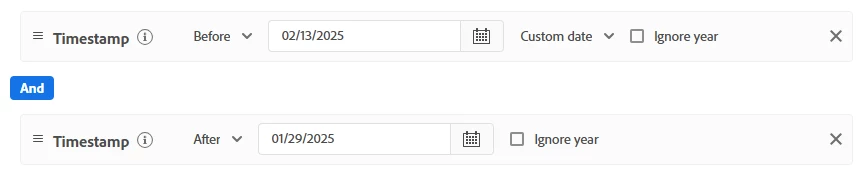
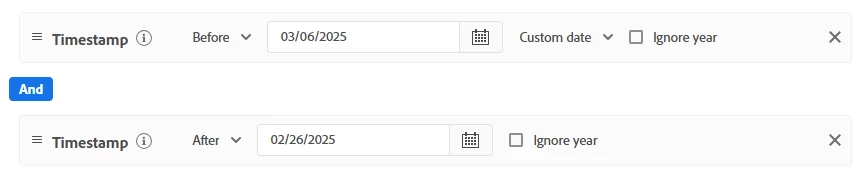
The audiences that you need don't need to use the rolling range constraint in my opinion. As you are looking for one time audiences with specific start and end days for enrollment date for both the audiences, you can create them as below,

Use case 1:

Use case 2:


Rolling range is used when you want to create an audience where you want to update the audience period based on change in DateTime field used. So taking use case 1 from your question as example, you'll create this audience with rolling range if you wanted it to update daily like below,

  • On 17-Feb target audience with enrollment date from 30-Jan to 12-Feb
  • On 18-Feb target audience with enrollment date from 31-Jan to 13-Feb
  • On 19-Feb target audience with enrollment date from 01-Feb to 14-Feb
  • and so on..

If this is what you need then rolling range can help you and you can create your audiences as below,

Use Case 1:

Use Case 2:


So depending upon your requirement you can use the needed time constraint in the audiences.

Cheers!


3 replies

jayakrishnaaparthasarathy
Community Advisor
Community Advisor
February 18, 2025

Hi @saurabhgu9  - Seems like you have a static dates instead of dynamic. Rolling range is more like dynamically look for the specific period of time. i.e. purchase order exists for last 1 to 7 days. So, it keep rolling the date dynamically as per the period mentioned. However, since you have the date fixed you can try to select "From(to)" date range which would customize both the date.

I don't have anything handy for the rolling date range concept, so you can check the adobe analytics rolling range segment which is pretty much same concept.
https://experienceleague.adobe.com/en/docs/analytics-learn/tutorials/components/segmentation/rolling-date-ranges-in-segments 

Thank you,
Jayakrishnaa P.

New Member
February 19, 2025

Hi @jayakrishnaaparthasarathy  the vedio in document do not says any thing on logic how to set rolling range interval.

Can you please provide any more information

kautuk_sahni
Community Manager
Community Manager
March 4, 2025

@saurabhgu9 Did you find the suggestions helpful? Please let us know if you need more information. If a response worked, kindly mark it as correct for posterity; alternatively, if you found a solution yourself, we’d appreciate it if you could share it with the community. Thank you!

Kautuk Sahni
kautuk_sahni
Community Manager
Community Manager
February 26, 2025

@bjoern__koth @parvesh_parmar @davidross91 @brekrut @anil_umachigi @riteshy18 @harveer_singhgi1 @arpan-garg @pradeep_kumar_srivastav @dwright-adobe Hey, could you take a look at this question and share your thoughts? Your input would be really helpful!

Kautuk Sahni
Harveer_SinghGi1
Community Advisor and Adobe Champion
Harveer_SinghGi1Community Advisor and Adobe ChampionAccepted solution
Community Advisor and Adobe Champion
February 26, 2025

Hi @saurabhgu9 ,

The audiences that you need don't need to use the rolling range constraint in my opinion. As you are looking for one time audiences with specific start and end days for enrollment date for both the audiences, you can create them as below,

Use case 1:

Use case 2:


Rolling range is used when you want to create an audience where you want to update the audience period based on change in DateTime field used. So taking use case 1 from your question as example, you'll create this audience with rolling range if you wanted it to update daily like below,

  • On 17-Feb target audience with enrollment date from 30-Jan to 12-Feb
  • On 18-Feb target audience with enrollment date from 31-Jan to 13-Feb
  • On 19-Feb target audience with enrollment date from 01-Feb to 14-Feb
  • and so on..

If this is what you need then rolling range can help you and you can create your audiences as below,

Use Case 1:

Use Case 2:


So depending upon your requirement you can use the needed time constraint in the audiences.

Cheers!