
Profile attributes propagated to EDGE | Community
Skip to main content
Michael_Soprano
Level 10
June 9, 2026
Question

Profile attributes propagated to EDGE

  • June 9, 2026
  • 5 replies
  • 63 views

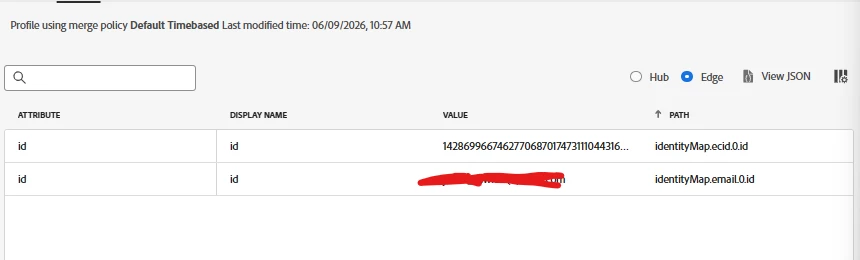
I have got the profile which has 30x profile attributes. It recently authenticated. 

Why the profile attributes are not propagated to EDGE? How to do that? 

I need to use them in AJO or AT and then these would be available on EDGE?
 

5 replies

bjoern__koth
Community Advisor and Adobe Champion
June 9, 2026

Edge propagation can unfortunately take quite a while and is nothing that happens immediately. Does this happen for individual profiles only or across the board?

Cheers from Switzerland!
awalker827
Level 2
June 9, 2026

To make these 30 attributes available for your personalization use cases, I believe you also need to setup a dedicated destination

Devyendar
Level 6
June 11, 2026

@Michael_Soprano in my understanding AEP Edge only stores a lightweight edge projection i.e., identities, audience memberships, and selected attributes (not all attributes) needed for personalization, not the full Hub profile.

Adobe says that to make profile attributes available at Edge for personalization, you must activate audiences to an Edge personalization destination, such as Custom Personalization With Attributes or Adobe Target, and explicitly map/select the profile attributes you want available. For same-page/next-page Target personalization, the implementation must use Web SDK or Edge Network API with a datastream configured for Adobe Target and Experience Platform. The audiences must use an Active-on-Edge merge policy for real-time edge evaluation.

Adobe Employee
June 25, 2026

Hi Michael, 


Try asking this question to Rovr: my ExL chatbot indexed on 6100 ExL Docs across multiple solutions. 

https://thelearningproject.in/tools/rovr/


Chat with Rovr: My ExL Based Chatbot: https://thelearningproject.in/tools/rovr/
Level 3
July 9, 2026

Hi ​@Michael_Soprano ,

Why attributes are not on Edge:

Edge only stores a lightweight version of the profile — not all attributes automatically. You need Active-On-Edge enabled on your merge policy.

How to fix:

Go to Profiles → Merge Policies → Edit your default merge policy → Enable Active-On-Edge toggle

Once enabled, allow 15-30 minutes for attributes to propagate to Edge. After that they will be available in AJO and Adobe Target for real-time personalization.

If already enabled and still not showing — check that the dataset is enabled for Profile and the attribute exists in the Union Schema.

Santosh Kumar | AEP & CJA Developer