OAuth 2 Client Credentials failing while configuring Streaming Destination in AEP (Authentication failed) | Community
Skip to main content
Level 2
March 17, 2026
Question

OAuth 2 Client Credentials failing while configuring Streaming Destination in AEP (Authentication failed)

  • March 17, 2026
  • 3 replies
  • 15 views

Hi everyone,

I’m trying to configure a Streaming Destination in Adobe Experience Platform (AEP) using OAuth 2 Client Credentials, but I’m consistently getting the following error:

“Error creating connection – Authentication failed. Check your credentials and try again.”


Configuration Details used:

  • Access Token URL:
    https://ims-na1.adobelogin.com/ims/token

  • Client ID / Client Secret:
    Generated from Adobe Developer Console (OAuth Server-to-Server project with AEP API added)

  • Client Credentials Type tried:

    • Basic Authorization

    • Client Credentials in Body

How do I use these details in the access token? The documentation says that the URL can have only one query parameter. 

  • Grant Type:
    client_credentials

  • Scopes used:
    openid,AdobeID,read_organizations,additional_info.projectedProductContext


Documentation details:

HTTP API connection | Adobe Experience Platform

Error seen:
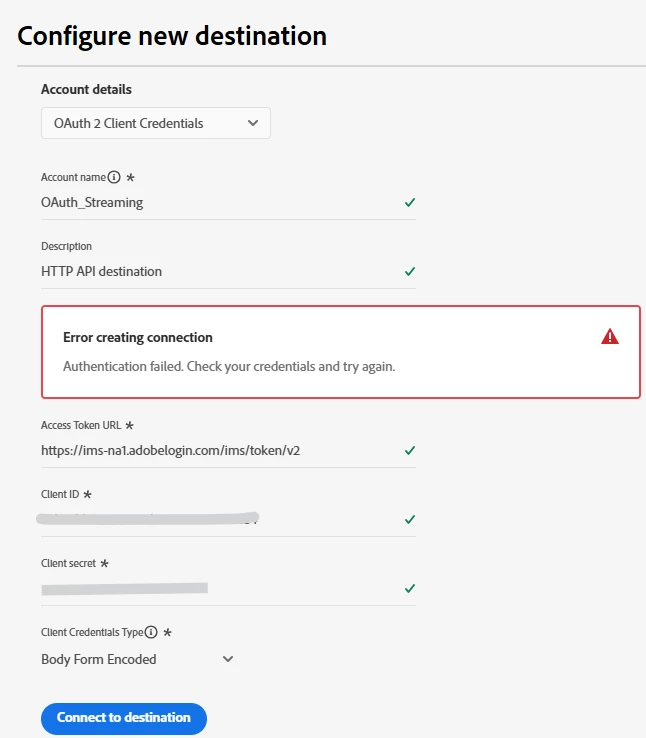
 

Tried below Access token URLs:

Any guidance or working examples would really help.

Thanks in advance!

3 replies

sreeCharan73
Level 3
March 18, 2026

Hello ​@user48 

It seems like you are trying to connect AEP as a destination to AEP, while I can understand that some usecases would need such creative workarounds, but it would end up being an abuse of the system, if not done with diligent care. Hence it may also be possible that Adobe restricts this by design. Just an asuumption.

Nevertheless, regarding the question here, the grant type is included by default and you might like to choose Basic authentication, the header already includes the grant Type. Refer https://experienceleague.adobe.com/en/docs/experience-platform/destinations/catalog/streaming/http-destination#supported-authentication-types:~:text=OAuth%202.0%20client%20credentials%20with%20basic%20authorization%2C%20with%20an%20authorization%20header%20which%20contains%20URL%2Dencoded%20client%20ID%20and%20client%20secret.

Hence the option 3, that you’ve tried should have worked. Since it didn’t, I was making the earlier assumption. 

Have you tried the basic webhook testing in lower environments for the configuration or even on Postman, if the credentials work.
I have no working example of this specific AEP - AEP setup, hence cannot share more here.

bjoern__koth
Community Advisor and Adobe Champion
March 18, 2026

Hi ​@user48,

not sure your URL is correct, my postman repo uses /v2 in the URL, and I have “session” in my scopes as well.

https://ims-na1.adobelogin.com/ims/token/v2?grant_type=client_credentials&client_id={{API_KEY}}&client_secret={{CLIENT_SECRET}}&scope={{SCOPES}}


SCOPES: openid,session,AdobeID,read_organizations,additional_info.projectedProductContext


Have you tried doing a separate auth request within Postman and your credentials?


Cheers from Switzerland!
cfong2
Level 1
March 18, 2026

Hi ​@user48!

The issue that you seem to be running into is because you are trying to send an auth request to Adobe’s own API Token URL. Generally, HTTPs API Destinations are used for third party HTTP endpoints hosted on Azure, GCP, or AWS. So in the “Access Token URL” would be where you put a third party/custom endpoint. Here’s a screenshot of the prerequisites for this type of destination:

What were your goals for setting up this endpoint? Maybe I can point you to a different resource that can help you do what you want to do.