More visible error message (Library Contents) | Adobe Higher Education
Skip to main content
Level 3
August 10, 2017
New

More visible error message (Library Contents)

  • August 10, 2017
  • 1 Antwort
  • 2585 Ansichten

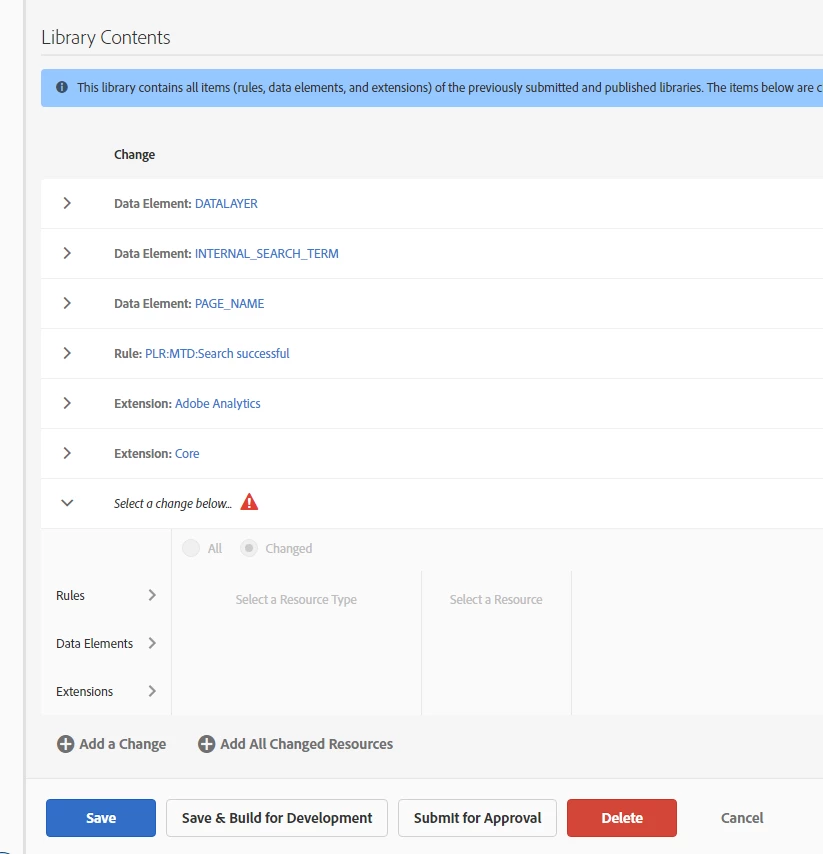
UX improvement (for fast clicking users):

If you add a change in the Library Contents, then forget to delete or fill it and try to save the library, the upcoming error sign is kind of small. The error sign is just near the unfilled change ("Select a Change below"), but the blue bar below the head "Library Contents" ("This library contains...") ist much more visible. Thus you won't directly understand wich error appeared or why you can't save.
1 Antwort

thebenrobb
Adobe Employee
Adobe Employee
August 10, 2017

It's a good idea.  The reason the error is there at all is that if you've selected a change, but forgot to hit the Blue save button at the end, we want to make sure you don't lose your work (or that you build a library that doesn't have something you thought you added.

The reason the error is on the change is to draw your eye to the specific spot that needs fixing.

The issue (as you noted) is that the big blue notice is a lot more visible.  During beta, we will add the ability to look at the things that you've already published - instead of this generic notice - and then the blue bar doesn't show up anymore.  We think when the blue notice is gone, you'll appreciate the placement of the red triangle a bit more.

So we plan to leave it as is for now.  If you still think it's an issue once the blue notice is gone, you should definitely bring it back up.