Landing Page Condition not Working | Community
Skip to main content
June 17, 2022
Solved

Landing Page Condition not Working

  • June 17, 2022
  • 1 reply
  • 1544 views

Hi All,


I am new to Adobe Launch and was trying to set up Google Ads conversion tag fires at specific page - www.example.com?results=abc122345678.


Events: Library Loaded (Page Top)

Conditions:

  • Landing Page > Return true if the landing page equals results= (enabled Regex)

Actions:

  • Custom Code > HTML > pasted the Google Ads conversion html code

Anyone can advise how to fix? Thanks a lot!

This post is no longer active and is closed to new replies. Need help? Start a new post to ask your question.
Best answer by Manoj_Kumar

Hi @_manoj_kumar_ 


Thanks for your reply.

I am afraid that adding datalayer may not be a feasible option for me as I am not able to edit backend code for the website.


Do you have any suggestion on the regex setting if I want the tag to fire in any pages that contains the string: "results="?


Thanks!


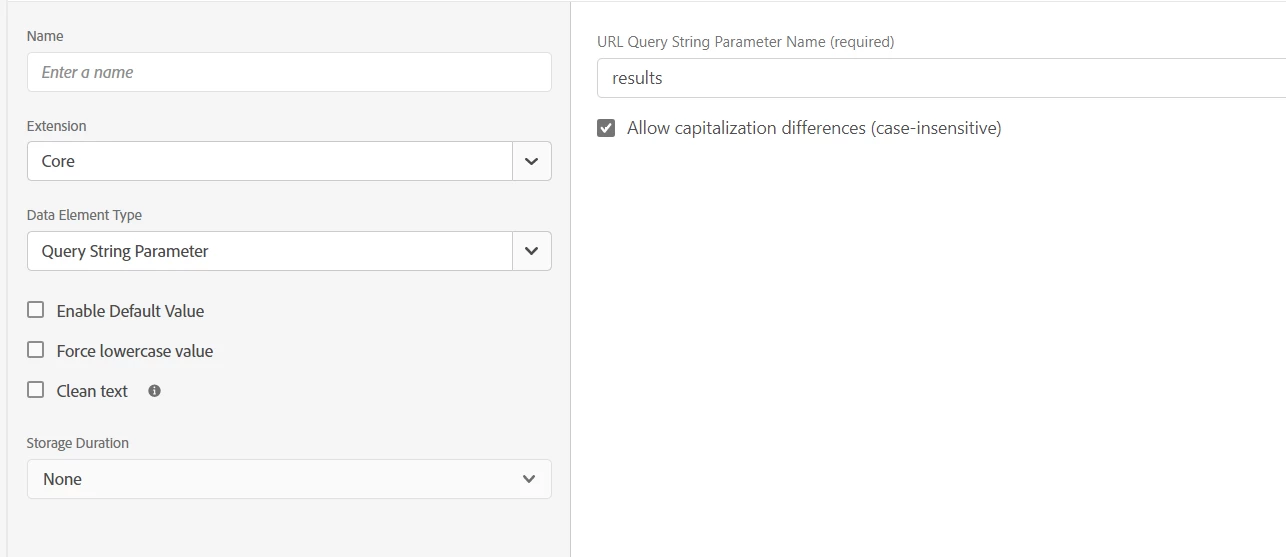
Hello @fppj_kelly 


You can do something like this.


1 reply

June 21, 2022

Anyone have ideas on this?☹

Manoj_Kumar
Community Advisor
Community Advisor
June 21, 2022

Hello @fppj_kelly 


I am assuming your regex is not working. The easiest way would be to add one variable in your datalayer like purchasePage:true


The in launch condition remove your regex condition and use the datalayer variable to check if the value true or false.

Manoj  | https://themartech.pro
June 22, 2022

Hi @_manoj_kumar_ 


Thanks for your reply.

I am afraid that adding datalayer may not be a feasible option for me as I am not able to edit backend code for the website.


Do you have any suggestion on the regex setting if I want the tag to fire in any pages that contains the string: "results="?


Thanks!