Invalid! These events are missing post-processed data: | Community
Skip to main content
Level 4
January 18, 2023
Solved

Invalid! These events are missing post-processed data:

  • January 18, 2023
  • 2 replies
  • 2494 views

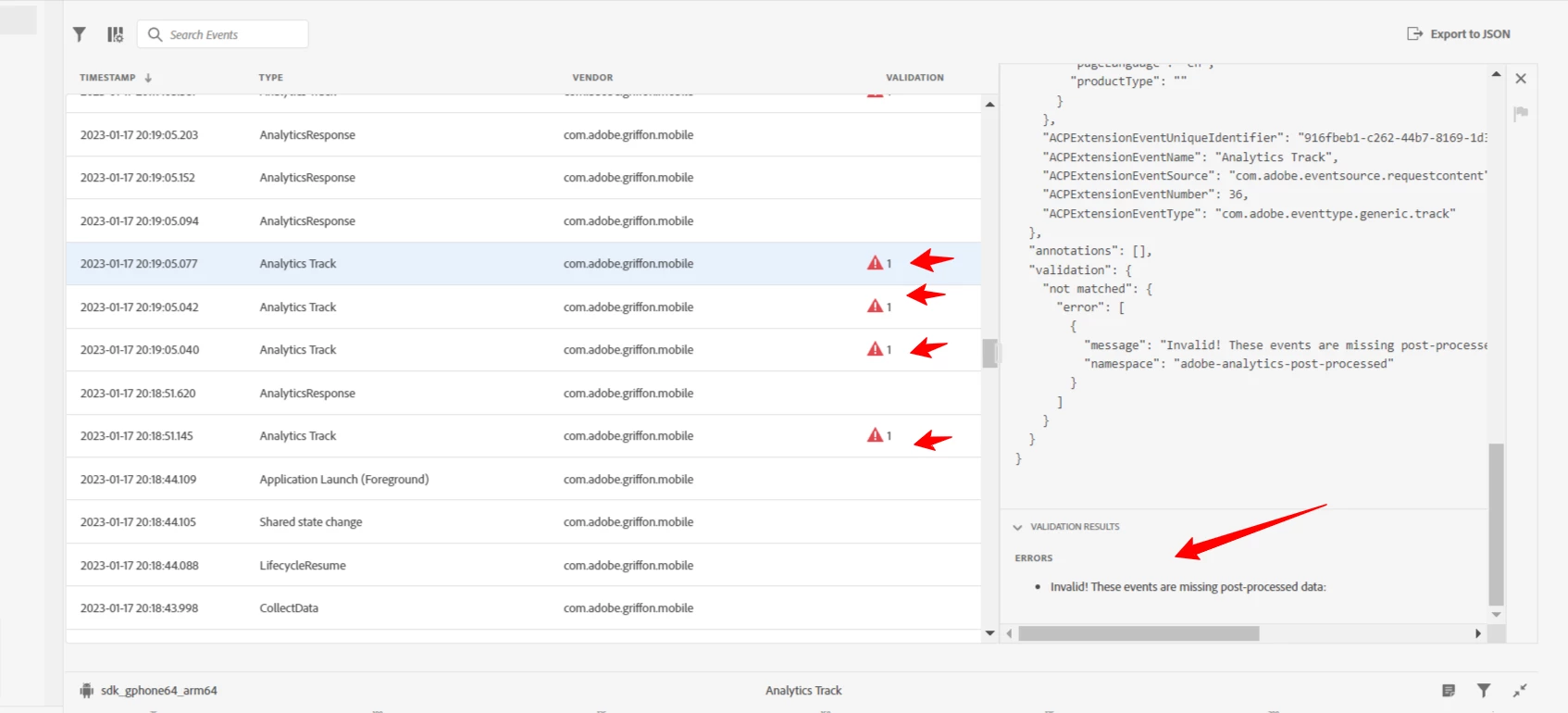
In the Assurance screen for validating Tracking for Mobile SDK, I am seeing events are missing post-processing data.  Does that mean that processing rules have to be configured?


This post is no longer active and is closed to new replies. Need help? Start a new post to ask your question.
Best answer by Jennifer_Dungan

I am working with the Adobe Griffon team on this.. there was a recent release that added this new Validation.


In my case, I still have post-processed data showing in the Analytics Events area... please check there and see if if your expected results are there.


If they are, ignore the validation column while the team investigates.


If you don't have your expected post-processing data, then please check your processing rules to ensure you have everything mapped correctly.

2 replies

Jennifer_Dungan
Community Advisor and Adobe Champion
January 19, 2023

This is weird... I just noticed the same message on all our sessions... stuff going back to Dec.. but the QA team didn't flag this... and I know we have processing rules in place.... and I can clearly see in our QA suite (where these sessions were recorded), that there IS processed data!


I wonder if there was a release that caused an issue... I will try and check our app tomorrow and see what I can find out....

Jennifer_Dungan
Community Advisor and Adobe Champion
Jennifer_DunganCommunity Advisor and Adobe ChampionAccepted solution
Community Advisor and Adobe Champion
January 19, 2023

I am working with the Adobe Griffon team on this.. there was a recent release that added this new Validation.


In my case, I still have post-processed data showing in the Analytics Events area... please check there and see if if your expected results are there.


If they are, ignore the validation column while the team investigates.


If you don't have your expected post-processing data, then please check your processing rules to ensure you have everything mapped correctly.

xcode2295Author
Level 4
January 19, 2023

I am seeing the data coming into the report suite. So, I am good. I thought it was not sending data to the report suite.

grossen
Adobe Employee
Adobe Employee
January 20, 2023

We have fixed the issue and have updated the message to contain additional information that we hope is more helpful.


Analytics post processed debug information is unavailable for this hit.

Please note that this does not indicate a problem with the processing of your data. This specific data is an additional debug source to help you understand how Analytics interpreted the data in near real time.

The post processing rules debug information provided by Analytics has to be retrieved within 24 hours from when the hit was sent to the Adobe Analytics collection service. To capture this data, you need to open the Assurance Analytics plugin. This plugin is responsible for gathering the debug data. If the plugin hasn't been accessed OR more than 24 hours passed since the hit was sent, this error will be present.

Jennifer_Dungan
Community Advisor and Adobe Champion
January 20, 2023

Thank you so much @grossen for getting this fixed so quickly. We really appreciate it!

kyle_rosenlof
Level 2
September 20, 2023


I'm also encountering the error "Analytics post processed debug information is unavailable for this hit." in an app that has been collecting data for over a year. I'm glad the logs are updated to provide a more detailed message, but it's unclear what issue is causing the errors and how to resolve it. Can you please explain? 


The fact that data is still coming through makes me wonder if this is just an Assurance issue? Digging into the Assurance release notes, it looks like there have been several updates this year. Do any of those updates require changes to the app code to continue working?


Any help you can provide is much appreciated
