Inject data form Json file | Community
Skip to main content
Saurabh_G
Level 2
November 21, 2022
Solved

Inject data form Json file

  • November 21, 2022
  • 3 replies
  • 5233 views

Hello Experts,

Can one help me on how to inject data form json format file to AEP.

Kindly provide process steps or supporting documents.

Thanks

This post is no longer active and is closed to new replies. Need help? Start a new post to ask your question.
Best answer by AmitRaghuwanshi

Hi @saurabh_g ,

Here are a few links that might help use AEP APIs.

  1. AEP Authentication Help Documentation
  2. AEP Postman Collections
  3. Adobe Developer Console

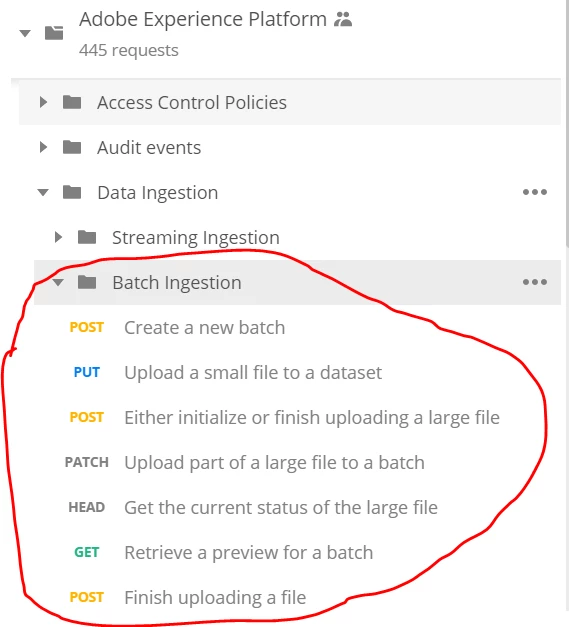
Before you test the data ingestion, you should use the postman collection as mentioned in point 2 (there will be a explicit node for Data Ingestion with all required API endpoints. I have also added a screenshot for your reference) and also create the developer console API project as per point 3 and extract the credentials (API key, client secret, and JWT token which are required to call API).


Once you have configured the collection and JWT token, you can follow the following steps,

Hope this helps.


With Regards,

Amit

3 replies

Avinash_Gupta_
Community Advisor and Adobe Champion
November 21, 2022

@saurabh_g Adobe Experience Platform Data Ingestion represents the multiple methods by which Platform ingests data from these sources, as well as how that data is persisted within the Data Lake for use by downstream Platform services. There are various ways :-


Streaming ingestion : Streaming ingestion for Adobe Experience Platform provides users a method to send data from client and server-side devices to Experience Platform in real time.


Batch ingestion: Batch ingestion allows you to ingest data into Experience Platform as batch files. Batches are units of data that consist of one or more files to be ingested as a single unit. Once ingested, batches provide metadata that describes the number of records successfully ingested, as well as any failed records and associated error messages.


Sources : Experience Platform allows you to set up source connections to various data providers. These connections enable you to authenticate to your external data sources, set times for ingestion runs, and manage ingestion throughput.


JSON file ingestion is supported from almost any of the above method. Kindly go through the AEP ingestion docs to understand the flow and based on your case decide your ingestion method.


https://experienceleague.adobe.com/docs/experience-platform/ingestion/home.html?lang=en 

Saurabh_G
Saurabh_GAuthor
Level 2
November 21, 2022

Hi @avinash_gupta_ 

thanks for details but I am aware of above details, but I am not sure how to import data from JSON file

Avinash_Gupta_
Community Advisor and Adobe Champion
November 21, 2022

@saurabh_g 

JSON file ingestion is supported from almost all the ingestion methods. You would have to decide it based on your user case.


For example :- you can use streaming ingestion HTTP API to ingest the data using JSON file. Here is the AEP documentation that provides you all the steps:-


https://experienceleague.adobe.com/docs/experience-platform/sources/ui-tutorials/create/streaming/http.html?lang=en 


Hope this helps!

AmitRaghuwanshi
AmitRaghuwanshiAccepted solution
Level 3
November 22, 2022

Hi @saurabh_g ,

Here are a few links that might help use AEP APIs.

  1. AEP Authentication Help Documentation
  2. AEP Postman Collections
  3. Adobe Developer Console

Before you test the data ingestion, you should use the postman collection as mentioned in point 2 (there will be a explicit node for Data Ingestion with all required API endpoints. I have also added a screenshot for your reference) and also create the developer console API project as per point 3 and extract the credentials (API key, client secret, and JWT token which are required to call API).


Once you have configured the collection and JWT token, you can follow the following steps,

Hope this helps.


With Regards,

Amit

Manoj_Kumar
Community Advisor
Community Advisor
November 23, 2022

Hello @saurabh_g 


One way to do this is via the API as other have suggested. But if you are looking at a one-time import then open the dataset. You can just drag and drop your JSON file to upload data to your dataset.


Manoj  | https://themartech.pro
April 25, 2023

Hi Manoj,


Do we have any way in AEP where we can set the mapping for json/parquet files while uploading like we do for csv files ?