Ingesting DateTime batch data | Community
Skip to main content
Level 3
January 31, 2025
Solved

Ingesting DateTime batch data

  • January 31, 2025
  • 3 replies
  • 1163 views

Dear Community


I have an IndividualProfile schema. I went on to create a dataset and tried to ingest data into the dataset. There is one field which is string in my CSV file in which I want to convert to DATETIME in AEP. During ingestion, I have used a calculated field to calculate the string data into DATETIME. It shows there was no error but the data that was shown came out to be blank. Please guide me into resolving this and being able to ingest String into DATETIME. Please let me know if you need anymore information. 

Best regards,
Sching

Best answer by Harveer_SinghGi1

Hi @chanutejo ,

I see you are using the "lastUpdatedTimestamp" as the first argument of the date() function, is this the correct path/column name?

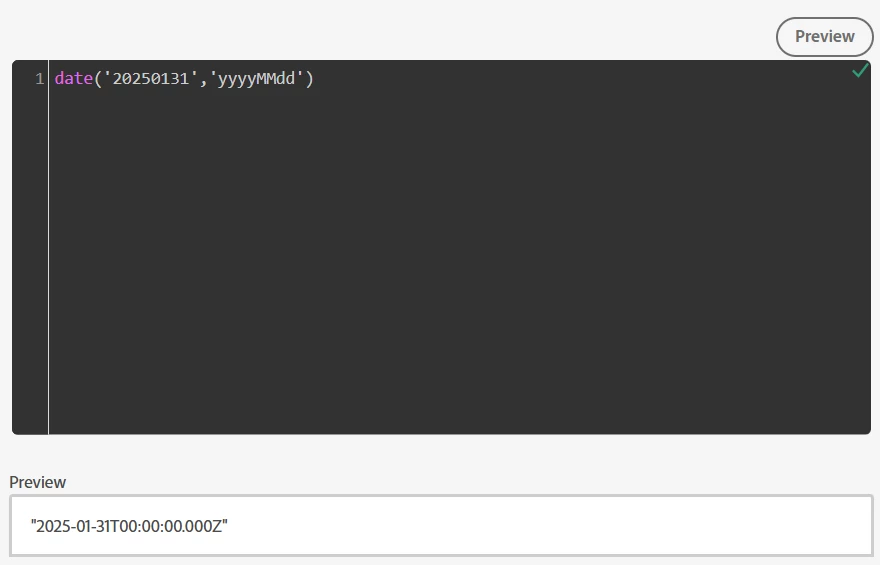
Also, what is the format of values in source field that you are using "lastUpdatedTimestamp"? Your data prep logic is expecting a format like "20250131" for 31-Jan-2025 in this field, if this is the correct format then the transformation should work as you can see I am able to verify the transformation using preview options,

If the format of the source values is not as above, then you need to adjust your second argument of the date() function to match what format you are receiving.

Can you take one or two example values for "lastUpdatedTimestamp" field from your event payloads and test using preview option and see if it is working as expected?

Cheers!


3 replies

Harveer_SinghGi1
Community Advisor and Adobe Champion
Harveer_SinghGi1Community Advisor and Adobe ChampionAccepted solution
Community Advisor and Adobe Champion
January 31, 2025

Hi @chanutejo ,

I see you are using the "lastUpdatedTimestamp" as the first argument of the date() function, is this the correct path/column name?

Also, what is the format of values in source field that you are using "lastUpdatedTimestamp"? Your data prep logic is expecting a format like "20250131" for 31-Jan-2025 in this field, if this is the correct format then the transformation should work as you can see I am able to verify the transformation using preview options,

If the format of the source values is not as above, then you need to adjust your second argument of the date() function to match what format you are receiving.

Can you take one or two example values for "lastUpdatedTimestamp" field from your event payloads and test using preview option and see if it is working as expected?

Cheers!


PratheepArunRaj
Community Advisor and Adobe Champion
February 8, 2025

Dear @chanutejo ,

Did you look into @harveer_singhgi1 's reply?

If you identify the source field string, then you can modify your FORMAT accordingly.

Example: If your string is '20250131', your format has to be 'YYYYMMDD'; if your string is '2025 01 31 00:00:00', your format has to be 'YYYY MM DD HH:MM:SS' and so on.

I did see that you replied to the other thread and selected your answer as correct. If that was the case, can you close this thread? Otherwise, let us know so that we can help.

Thank You, Pratheep Arun Raj B (Arun) | NextRow Digital | Terryn Winter Analytics

Thank You, Pratheep Arun Raj B (Arun) | Xerago | Terryn Winter Analytics
brekrut
Adobe Employee
Adobe Employee
February 10, 2025

When inserting dates into Adobe Experience Platform the data format for dateTime should be ISO 8601 format. 


https://experienceleague.adobe.com/en/docs/experience-platform/data-prep/functions#date-and-time