
Implement third party script ASAP | Community
Skip to main content
Michael_Soprano
Level 10
March 12, 2024
Solved

Implement third party script ASAP

  • March 12, 2024
  • 1 reply
  • 497 views

Hi, 


I would like to implement GA4 script using Adobe Tag. It's need to fired as soon as possible. 

Which event from these would fire as soon as Adobe Tag is loaded & the first?
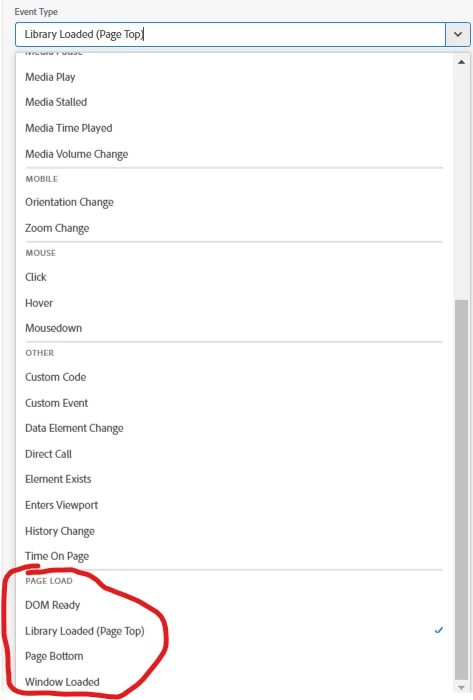
 

What rule would you use in order to achieve this recommendation? My Tag is implemented in the head of the page async. 



Thanks 

Mike 

This post is no longer active and is closed to new replies. Need help? Start a new post to ask your question.
Best answer by abhinavbalooni

Hey @michael_soprano 


Library Loaded is the one which loads first out of the four you've highlighted above. 


If you want to still test out the order, try creating four rules, one for each execution. Don't put any action as you just want to see the order of execution. Enable debug mode on your browser console using _satellite.setDebug(true) and check the order of the rules.


Hope the above helps.


Cheers,

Abhinav

1 reply

abhinavbalooni
Community Advisor
abhinavbalooniCommunity AdvisorAccepted solution
Community Advisor
March 12, 2024

Hey @michael_soprano 


Library Loaded is the one which loads first out of the four you've highlighted above. 


If you want to still test out the order, try creating four rules, one for each execution. Don't put any action as you just want to see the order of execution. Enable debug mode on your browser console using _satellite.setDebug(true) and check the order of the rules.


Hope the above helps.


Cheers,

Abhinav

Michael_Soprano
Level 10
March 18, 2024

Actually I found answer what was wrong. Both custom datalayer and that Google's datalayer was using the same name of the function (datalayer). I changed the name of the function and it worked 🙂