How to grant a user access to the option "Datasets" in Data Management | Community
Skip to main content
Level 2
January 25, 2023
Solved

How to grant a user access to the option "Datasets" in Data Management

  • January 25, 2023
  • 2 replies
  • 4149 views

Hi everyone.


My team is testing XDM as a way of retrieving data in one of our applications, and it is the first time we try this. We have already set the schema, datastream, configured the Adobe SDK extension and are just missing to create a Dataset. I found out that I do not have this option in my profile, but together with the PM we cannot find the option to grant access to this feature. Could you please guide us through the process?

We are trying to follow these steps now https://experienceleague.adobe.com/docs/platform-learn/implement-mobile-sdk/experience-cloud/platform.html?lang=en
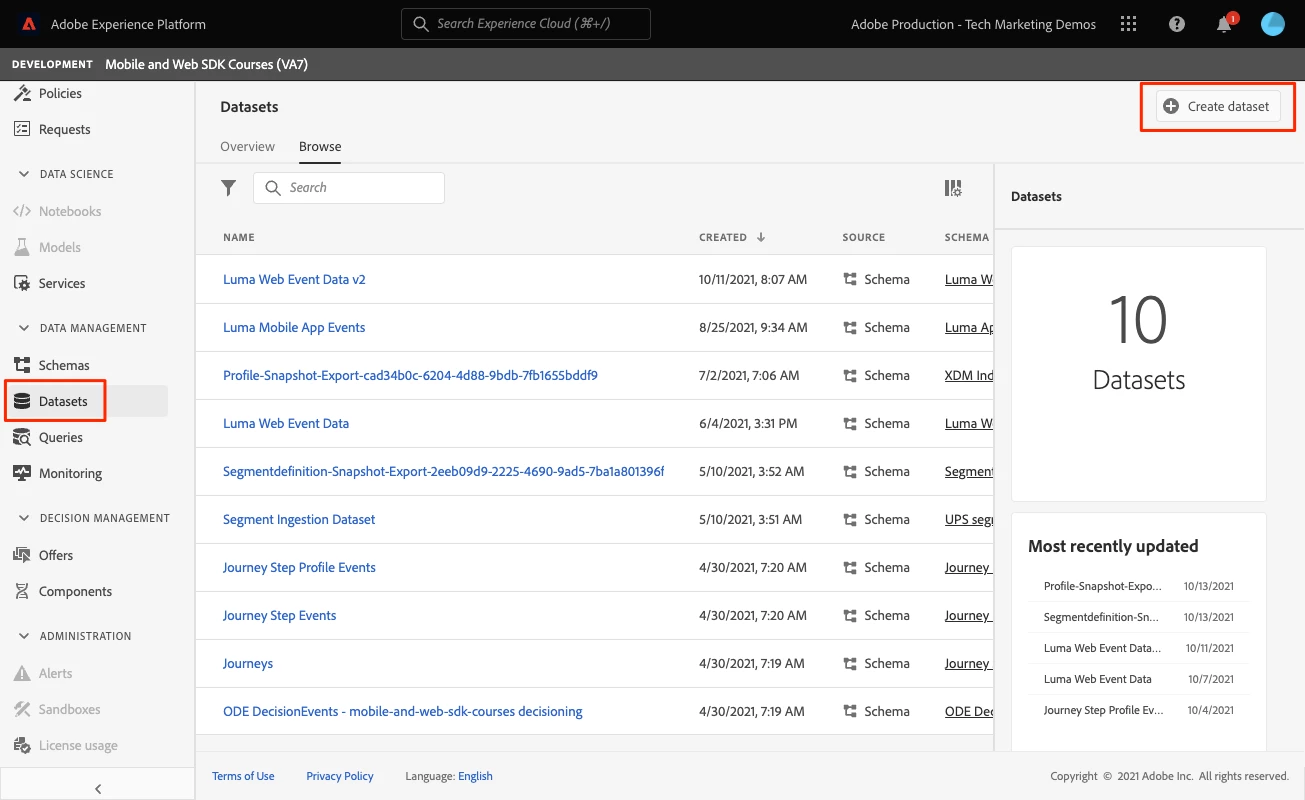
The imagen shows what is the missing option that we require.

Thank you!
 

This post is no longer active and is closed to new replies. Need help? Start a new post to ask your question.
Best answer by dwright-adobe

@germanroncelli ,

Have you licensed an application natively-built on Platform like Real-time CDP, Journey Optimizer, or Customer Journey Analytics? Features like schemas and identities are available to all Experience Cloud customers because they are required to implement non-Platform applications like Adobe Analytics, Target, and Audience Manager using our new Web and Mobile SDKs. But you won't have access to datasets unless you have licensed a Platform-based application.


@germanroncelli , 

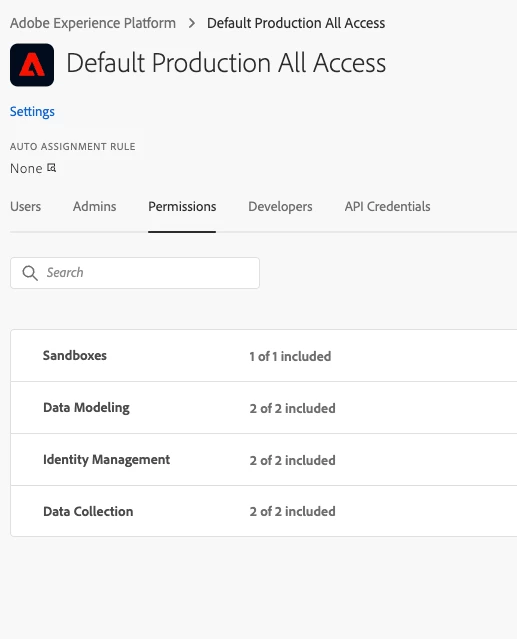
When you look at the permission items available in your Adobe Experience Platform Product Profile in the admin console, do you only see these four items? This is what you would have in an account that did not license a native-Platform application like Real-time CDP, Journey Optimizer, or Customer Journey Analytics. Without one of those, the dataset feature is not relevant.


2 replies

Level 4
January 25, 2023

In admin console, under your "product profile" you should see "permissions"

Check this value:

Level 2
January 25, 2023

Hi, thanks a lot for your fast reply.


It is weird, but that option just is not there. Could it be a bug or error for not displaying it? Perhaps another permission needs to be configured first?


Thanks

Adobe Employee
January 25, 2023

@germanroncelli ,

Have you licensed an application natively-built on Platform like Real-time CDP, Journey Optimizer, or Customer Journey Analytics? Features like schemas and identities are available to all Experience Cloud customers because they are required to implement non-Platform applications like Adobe Analytics, Target, and Audience Manager using our new Web and Mobile SDKs. But you won't have access to datasets unless you have licensed a Platform-based application.

Level 2
January 25, 2023

Use ACL to manage user, groups and access.

Makrand