how to count top of the sequential segment in AEP | Community
Skip to main content
Level 2
October 1, 2024
Question

how to count top of the sequential segment in AEP

  • October 1, 2024
  • 2 replies
  • 963 views

if a person views the product and after that adds that product to the cart but does not purchase the same person repeats this process 4 times in the year i want those profiles
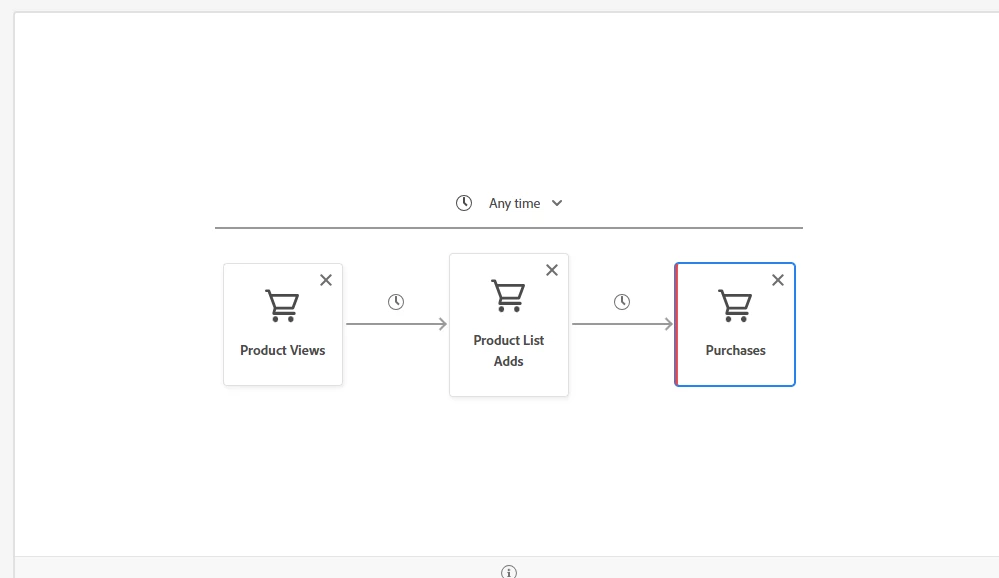
but I am unable to count on top of the sequential segment

This post is no longer active and is closed to new replies. Need help? Start a new post to ask your question.

2 replies

Parvesh_Parmar
Community Advisor
Community Advisor
October 1, 2024

Hello @venkataak , 


You can design your segment as follows to achieve the intended outcome:

Create a sequence where a Product View and Product Add to Cart event count is more that four, and no Purchase occurs afterward.


Kr,
Parvesh

Parvesh Parmar – Adobe Community Advisor https://www.linkedin.com/in/parvesh-parmar/
venkataakAuthor
Level 2
October 9, 2024

I'm working on a project that requires writing a sequential segment in PQL (Profile Query Language), and I'm looking for guidance or a sample code snippet if anyone has done this before.

Specifically, I need to segment users who:

  1. Perform Action A (e.g., clicked an email)
  2. Then, within a specified timeframe, perform Action B (e.g., make a purchase).

If someone could share a basic structure or sample code for how to approach this in PQL, that would be extremely helpful.

kautuk_sahni
Community Manager
Community Manager
October 16, 2024

@venkataak Did you find the suggestion helpful? Please let us know if you require more information. Otherwise, please mark the answer as correct for posterity. If you've discovered a solution yourself, we would appreciate it if you could share it with the community. Thank you!

Kautuk Sahni
venkataakAuthor
Level 2
October 16, 2024

I didn't get any solution till now

brekrut
Adobe Employee
Adobe Employee
October 16, 2024

@venkataak  


When building a segment you can select the Segment definition in the UI there is an option named '</> Code View' which allows you to see the PQL logic.  You can swap back and forth from a code view to a UI view using this toggle.


Here is a sample PQL which was generated using the Code view option.

CHAIN(xEvent, timestamp, [C0: WHAT(eventType.equals("directMarketing.emailClicked", false)) WHEN(<= 1 month before now), GAP(<= 1 week), C1: WHAT(eventType.equals("commerce.purchases", false)) WHEN(<= 1 month before now)])


Please note when a segment is created with PQL it may not be editable using the UI.