How do/should data layer capture instances of an item and also instances of user actions of that item in XDM to be reported in CJA Workspace? | Community
Skip to main content
Level 4
February 14, 2025
Solved

How do/should data layer capture instances of an item and also instances of user actions of that item in XDM to be reported in CJA Workspace?

  • February 14, 2025
  • 2 replies
  • 611 views

I'm trying to figure out how to capture instances of a photo that has been clicked on. That's simple. Where I'm getting lost is the user can also "favorite", "unfavorite", "share" or "more info" the photo. Ideally, I'd like to be able to have one table in CJA workspace present the data in one table, for example:

 

If I can only do it in multiple tables that is fine too.
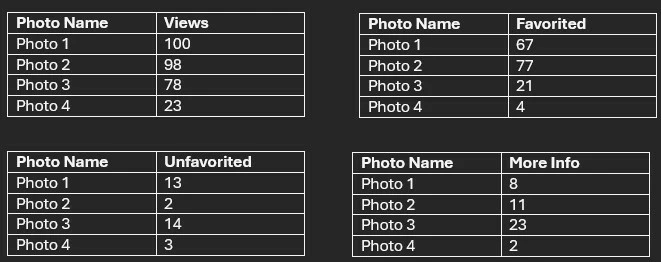
 

I'm just struggling with how my data layer and XDM schema should capture the data so I can associate the actions to the photos!?!? Any advice greatly appreciated is appreciated. 


Thanks!

This post is no longer active and is closed to new replies. Need help? Start a new post to ask your question.
Best answer by Harveer_SinghGi1

No you don't need five different objects, just one object with a string field for photo name and five integer fields for five user actions like below,


object photoDetails

           field: photoName (string)

           field: photoViewed (integer)

           field: photoFavorited (integer)

           field: photoUnfavorited (integer)

           field: photoShared (integer)

           field: photoMoreInfo (integer)


Creating different objects for each user action will create five different fields for photo name (photoViewed.photoName, photoFavorited.photoName etc.) and you won't be able to see a combined view for all the events. So, making sure that you have same field populated on every user action is the key to aggregate these metrics using the same dimension.

Cheers!

2 replies

Level 4
February 14, 2025

I know how to do it with multiple tables so I'm only asking about advice for the first table which has all data in one table.


Thanks!

Harveer_SinghGi1
Community Advisor and Adobe Champion
February 14, 2025

Hi @michaeljo13 ,

It should be as simple as tracking photo views only, so you'll have to create a schema like below (just an example format, you can choose your own hierarchies, idea is to have those fields created),


{ "_tenantID": { "photo": { "photoName": "", //string, set as photo name "photoView": , //integer, set as 1 for photo view action "photoFavorited": , //integer, set as 1 for photo favorited action "photoUnfavorited": , //integer, set as 1 for photo unfavorited action "photoShares": , //integer, set as 1 for photo share action "photoMoreInfo": //integer, set as 1 for photo more info action } } }


And then send the user actions as below,

1. On photo views send this payload,


{ "_tenantID": { "photo": { "photoName": "photo 1", "photoView": 1 } } }


2. On photo favorited send this payload,


{ "_tenantID": { "photo": { "photoName": "photo 1", "photoFavorited": 1 } } }


3. On photo unfavorited send this payload,


{ "_tenantID": { "photo": { "photoName": "photo 1", "photoUnfavorited": 1 } } }


4. On photo shares send this payload,


{ "_tenantID": { "photo": { "photoName": "photo 1", "photoShares": 1 } } }


5. On photo more info clicks send this payload,


{ "_tenantID": { "photo": { "photoName": "photo 1", "photoMoreInfo": 1 } } }


Once all these hits are collected you can run the CJA report for _tenantID.photo.photoName field as dimension and all other fields as metrics and you should get data as expected in single table,

Cheers!

Level 4
February 14, 2025

Thanks for the response! So in my XDM schema should I have a field for the photo name clicked on and then fields for the counts and photo names as below? 


object photoViewed

           field: photoName (string)

           field: cnt (integer)


object photoFavorited

           field: photoName (string)

           field: cnt (integer)


object photoUnfavorited

           field: photoName (string)

           field: cnt (integer)


object photoShared

           field: photoName (string)

           field: cnt (integer)


object photoMoreInfo

           field: photoName (string)

           field: cnt (integer)


Thanks!

Harveer_SinghGi1
Community Advisor and Adobe Champion
Harveer_SinghGi1Community Advisor and Adobe ChampionAccepted solution
Community Advisor and Adobe Champion
February 14, 2025

No you don't need five different objects, just one object with a string field for photo name and five integer fields for five user actions like below,


object photoDetails

           field: photoName (string)

           field: photoViewed (integer)

           field: photoFavorited (integer)

           field: photoUnfavorited (integer)

           field: photoShared (integer)

           field: photoMoreInfo (integer)


Creating different objects for each user action will create five different fields for photo name (photoViewed.photoName, photoFavorited.photoName etc.) and you won't be able to see a combined view for all the events. So, making sure that you have same field populated on every user action is the key to aggregate these metrics using the same dimension.

Cheers!