Help with Adobe Experience Platform API Connection Using Sandbox Credentials | Community
Skip to main content
YaswanthReddyD
Level 2
October 14, 2024
Solved

Help with Adobe Experience Platform API Connection Using Sandbox Credentials

  • October 14, 2024
  • 2 replies
  • 1168 views

I'm currently using the sandbox environment credentials provided by Adobe for learning Adobe Experience Platform (AEP). While trying to explore and set up API connections with these sandbox credentials, I encountered an issue where the APIs seem to be disabled for my account.

Is there any way to connect to AEP APIs using the sandbox credentials, or is there another method I can follow to explore and learn the APIs? Any guidance or solutions to help me set up the API connection would be greatly appreciated.

Thanks in advance for your help!

This post is no longer active and is closed to new replies. Need help? Start a new post to ask your question.
Best answer by Parvesh_Parmar

Hello @yaswanthreddyd , 


Could you please ensure that you've followed all the steps provided in the video tutorials below?

Authenticate and access Experience Platform APIs | Adobe Experience Platform


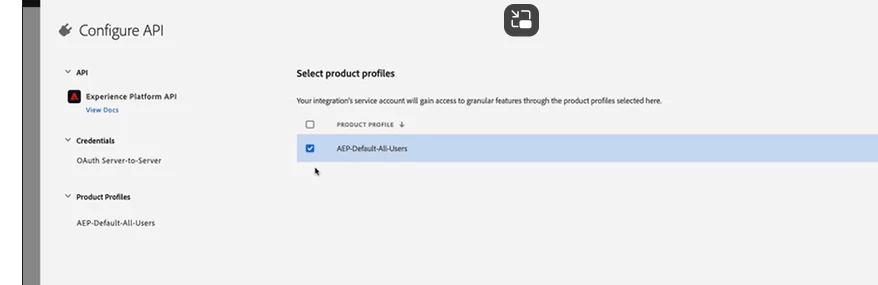
Additionally, when setting up your project, make sure you select the correct product profiles, as explained in the tutorial.


If your AEP tenant is enabled for Attribute-Based Access Control, you will need additional API permissions. The AEP system administrator or product administrator can provide these permissions.

For more details, you can refer to this guide:

Attribute-based Access Control Manage Users | Adobe Experience Platform


Without the proper access, you won’t be able to get the API up and running, and unfortunately, there is no workaround for this.


I hope this helps!


Kr,

Parvesh


2 replies

riballor
Level 3
October 14, 2024

Do you have access to the developer console?

YaswanthReddyD
Level 2
October 14, 2024

Yes @riballor, I have access to the developer console and I'm able to generate the access keys, but when i try to use them in postman, i'm not able to establish a connection with api.

riballor
Level 3
October 14, 2024

Did you add other environment requirements - like sandbox name etc? Which error are you getting? 

Are you able to generate the token to execute the API calls?

Parvesh_Parmar
Community Advisor
Parvesh_ParmarCommunity AdvisorAccepted solution
Community Advisor
October 14, 2024

Hello @yaswanthreddyd , 


Could you please ensure that you've followed all the steps provided in the video tutorials below?

Authenticate and access Experience Platform APIs | Adobe Experience Platform


Additionally, when setting up your project, make sure you select the correct product profiles, as explained in the tutorial.


If your AEP tenant is enabled for Attribute-Based Access Control, you will need additional API permissions. The AEP system administrator or product administrator can provide these permissions.

For more details, you can refer to this guide:

Attribute-based Access Control Manage Users | Adobe Experience Platform


Without the proper access, you won’t be able to get the API up and running, and unfortunately, there is no workaround for this.


I hope this helps!


Kr,

Parvesh


Parvesh Parmar – Adobe Community Advisor https://www.linkedin.com/in/parvesh-parmar/
YaswanthReddyD
Level 2
October 14, 2024

Thanks for your response @parvesh_parmar, it was actually not enabled by the admin. Will connect with the admin team.