Facebook tag via Launch - firing all events despite rules not being triggered | Community
Skip to main content
Level 3
May 19, 2020
Solved

Facebook tag via Launch - firing all events despite rules not being triggered

  • May 19, 2020
  • 3 replies
  • 4048 views

We're doing testing having migrated from DTM to Launch.  Most things look right but there's something odd going on with the Facebook pixel.


The tag is added via a rule, and then various events are triggered via additional rules based on either page load, or on button clicks.

In Launch, it looks like the page load events are getting triggered on every page load, even if the rules aren't firing.


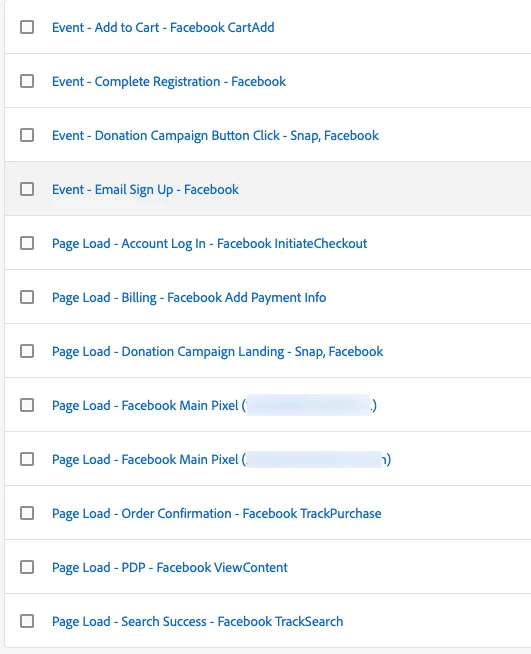
These are all the rules:
 

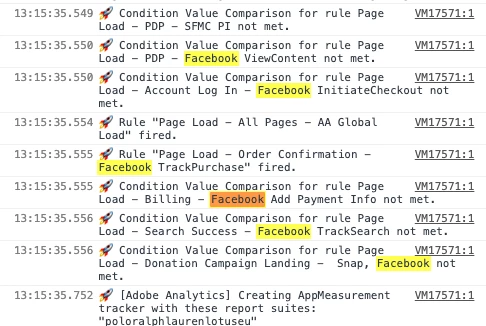
When the page loads, the debugging output says that the rules aren't firing (except in this instance, when order confirm fires):
 

But the FB helper chrome extension is showing all the events firing one every page load.  Admittedly most of them have the yellow error, and it looks like the right one is showing green on the right page:
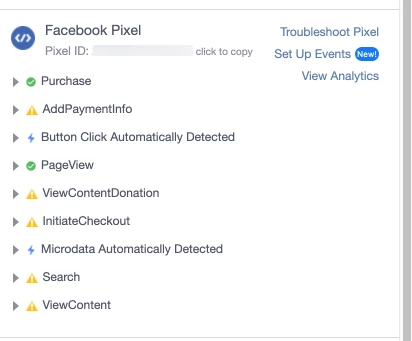
 

... but previously (in DTM) only the relevant page event was showing in this window.


If I disable the rule in Launch then the event disappears from this list.  So it does look like the code is getting fired, even though the rule conditions are not being met.


Anyone got any suggestions of what's going on?


Thanks

Ben

This post is no longer active and is closed to new replies. Need help? Start a new post to ask your question.
Best answer by Ben_Step

It looks like this isn't a problem with the tag, but with the Chrome Extension.  The events are actually being fired each time. So I think it's not really a problem.

3 replies

franzli
Level 4
June 11, 2020

Is the site a single page app?

Ben_StepAuthor
Level 3
June 11, 2020
No, just a standard site.
jantzen_b
Adobe Employee
Adobe Employee
September 24, 2020
Do any of the answers below answer your initial question? If so, can you select one of them as the correct answer? If none of the answers already provided answer your question, can you provide additional information to better help the community solve your question?
Ben_StepAuthorAccepted solution
Level 3
September 25, 2020

It looks like this isn't a problem with the tag, but with the Chrome Extension.  The events are actually being fired each time. So I think it's not really a problem.