Events are being passed for multiple times in adobeDataLayer | Community
Skip to main content
Level 2
February 16, 2023
Solved

Events are being passed for multiple times in adobeDataLayer

  • February 16, 2023
  • 2 replies
  • 2220 views

Hi, I am using adobeDataLayer and pushing events to it. However, I noticed that as I move across the pages, events are being passed multiple times along with other page details when pushing data into adobeDataLayer. This becomes a problem that it's hard to locate the events, is this normal behavior? If not, what should I do to solve this issue?
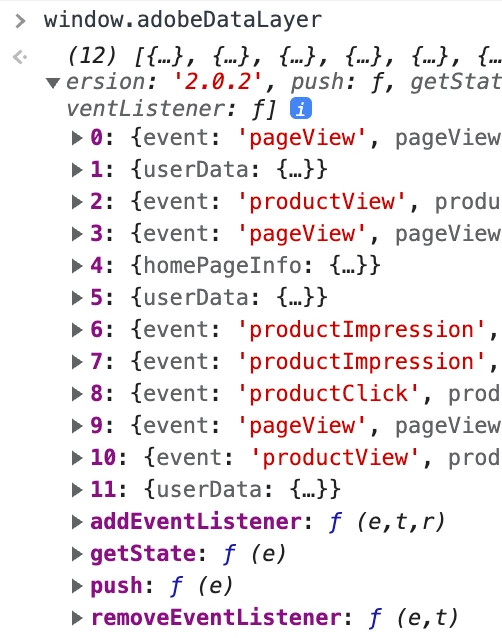


Any insights would be greatly appreciated! 

 

This post is no longer active and is closed to new replies. Need help? Start a new post to ask your question.
Best answer by leocwlau

So I guessed your site is a SPA such that the same window.adobeDataLayer being used for multiple "pages", as the Adobe extension does not carry adobeDataLayer forward from page to page by itself.

For SPA and when the adobeDataLayer is growing too long, you can use the reset data layer action to compute and merge all items in the data layer into one.

2 replies

leocwlau
Community Advisor and Adobe Champion
leocwlauCommunity Advisor and Adobe ChampionAccepted solution
Community Advisor and Adobe Champion
February 16, 2023

So I guessed your site is a SPA such that the same window.adobeDataLayer being used for multiple "pages", as the Adobe extension does not carry adobeDataLayer forward from page to page by itself.

For SPA and when the adobeDataLayer is growing too long, you can use the reset data layer action to compute and merge all items in the data layer into one.

YZ_JAuthor
Level 2
February 16, 2023

Hi Leo, thanks for helping! I have tried to use the reset data layer action, but after that I cannot get any data from adobeDataLayer.


leocwlau
Community Advisor and Adobe Champion
February 16, 2023

I just performed a test on the reset action and it works as expected. In your case the disappearing of the adobeDataLayer, you need to check if there are any other codes in Launch, or if your website manipulated the adobeDataLayer and accidentally deleted it.

yuhuisg
Community Advisor
Community Advisor
February 16, 2023

Don't inspect the adobeDataLayer array directly. Instead, log adobeDataLayer.getState() to see the latest, computed state of the data layer when each event occurs.

YZ_JAuthor
Level 2
February 20, 2023

Thanks Yuhui!

February 6, 2024

Hi @yz_j , I am also having the same issue, can you help to share the solution that worked for you.